18.3.3 Application Searching (Global Search) Security
To activate Application Searching for catalog items, in addition to deploying and indexing all the regular eProcurement Search Definitions and Categories, an additional category EP_CATALOG_ITEMS must be deployed and specified as a Search Group. This category, like the category EP_PV_MASTERITEMVENDOR_CAT, has all the required three search definitions mentioned in the previous section.
To perform Global Search, EP_CATALOG_ITEMS has to be assigned to a Permission List :
-
Select PeopleTools, Security, Permissions and Roles, Permission Lists.
-
Search for and select the Permission List EPPV1000.
-
Select the Search Groups tab.
-
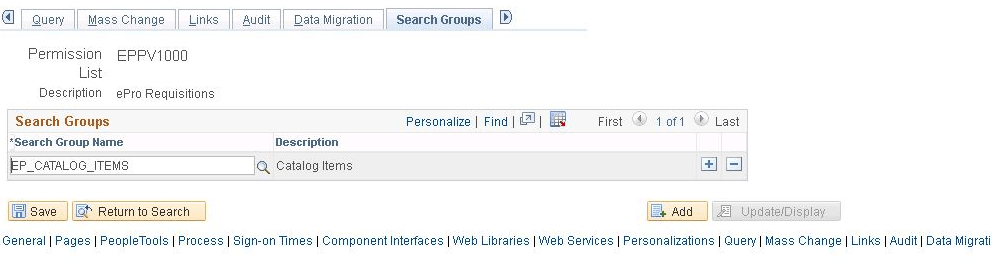
Select the catalog item EP_CATALOG_ITEMS from the lookup prompt, which is the Search Category specified as Search Group, as shown in the in the following example:
Figure 18-15 Permission Lists page: Search Groups tab for EPPV1000
Note:
Search categories flagged as search groups will only appear in the lookup prompt.
Alternatively, you can also assign the delivered role Search Catalog.
-
Click Save. Global Search bar appears after adding the search group.
Note:
The user may need to log out and log in back to see the global search bar. Additionally, this type of searching must be activated as part of the Portal configuration.
The user associated with a role connected with the permission list and any search groups assigned as searchable targets should be able to see the global search bar.