15.2 Configuring the Inbound Nodes
Before configuring the nodes, you need to set up the Integration Gateway.
See “Appendix: Applying Common Installation Instructions,” Setting Up Integration Gateways for instructions.
To configure the inbound nodes:
-
Select PeopleTools, Integration Broker, Integration Setup, Node Definitions.
-
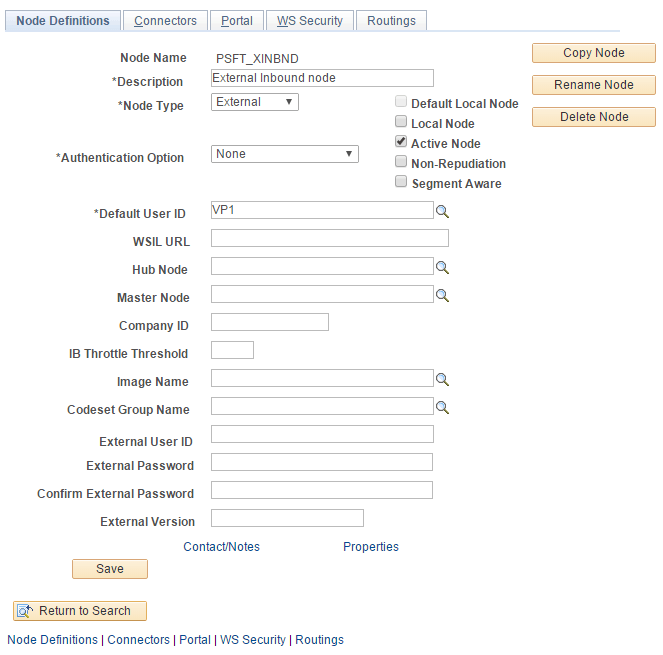
On the Nodes search page, search for and select the node name PSFT_XINBND.
The Node Definitions page for the PSFT_XINBND node appears, as shown in the following example:
Figure 15-1 Node Definitions - PSFT_XINBND page
-
On the Node Definitions page, enter the ID of the Asset Management Inventory user in the Default User ID field.
-
Click Save.
-
Click Return to Search.
-
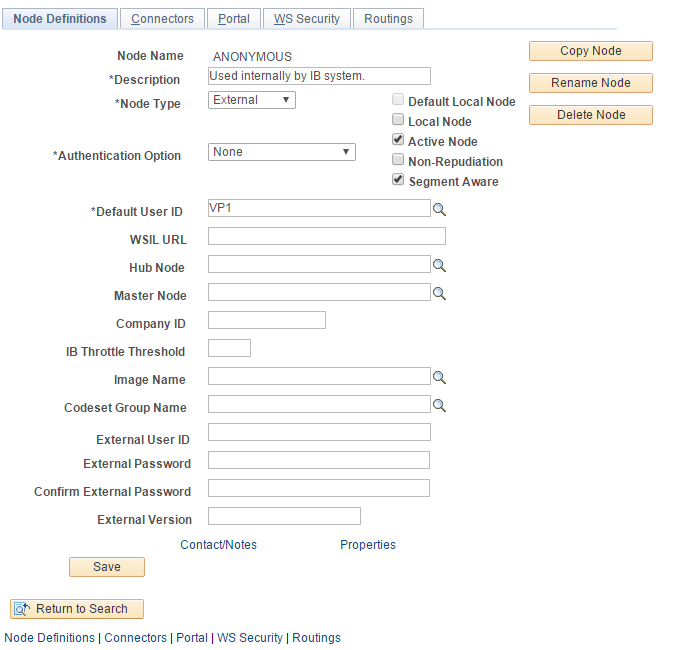
On the Nodes search page, search for and select the node name ANONYMOUS.
-
On the Node Definitions page, in the Default User ID field, enter the value for Asset Management Inventory user. A Node Definition page is shown in the following example:
Figure 15-2 Node Definitions - Anonymous page
-
Click Save.