14.3.1 Modifying the Attachment Print Command URL
After you install the additional component application, you must update the URL that is used by the PeopleSoft Work Order Attachment Print feature to call the additional component application to print attachments.
The URL WM_ATT_PRINT_CMD must point to the appropriate installation location of the primary additional component application’s executable file. This file is typically in the subdirectory that contains the majority of the additional component application’s binary executables.
To modify the URL for the additional component application’s primary executable installation location:
-
Select PeopleTools, Utilities, Administration, Maintain URLs.
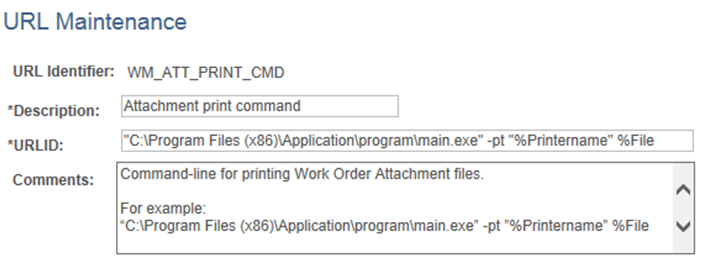
The URL Maintenance page appears, as shown in the following example:
Figure 14-1 URL Maintenance page - Attachment print command
-
On the URL Maintenance page, in the URL field, modify the example URL to point to your installation location of the additional component application’s primary startup executable and appropriate command-line arguments.
For example: C:\Program Files (x86)\Application\program\main.exe” -pt ”%Printername” %File
In the preceding example, -pt is the command-line switch that commands the additional component application to print the list of files to a specified network printer.
-
At runtime the place holder %Printername will be replaced with the network printer name specified in the Output Destination field on the Work Order Task - Details Report Options page. The place holder %File will be replaced with a list of the attachment file(s) to be printed.
For reference, the original example URL is provided in the Comments field of the URL Maintenance page.