Administer Time and Attendance Dashboard
Use the Administer Time and Attendance dashboard (HC_TL_ADM_TIME_ABS_DBRD_LP) to access tiles to manage time, absence, schedules, reporting, configurations, and insight analytics.
Navigation:
Select the Administer Time and Attendance tile from the My Work - Time and Attendance section of the PeopleSoft (My Home) Landing Page.
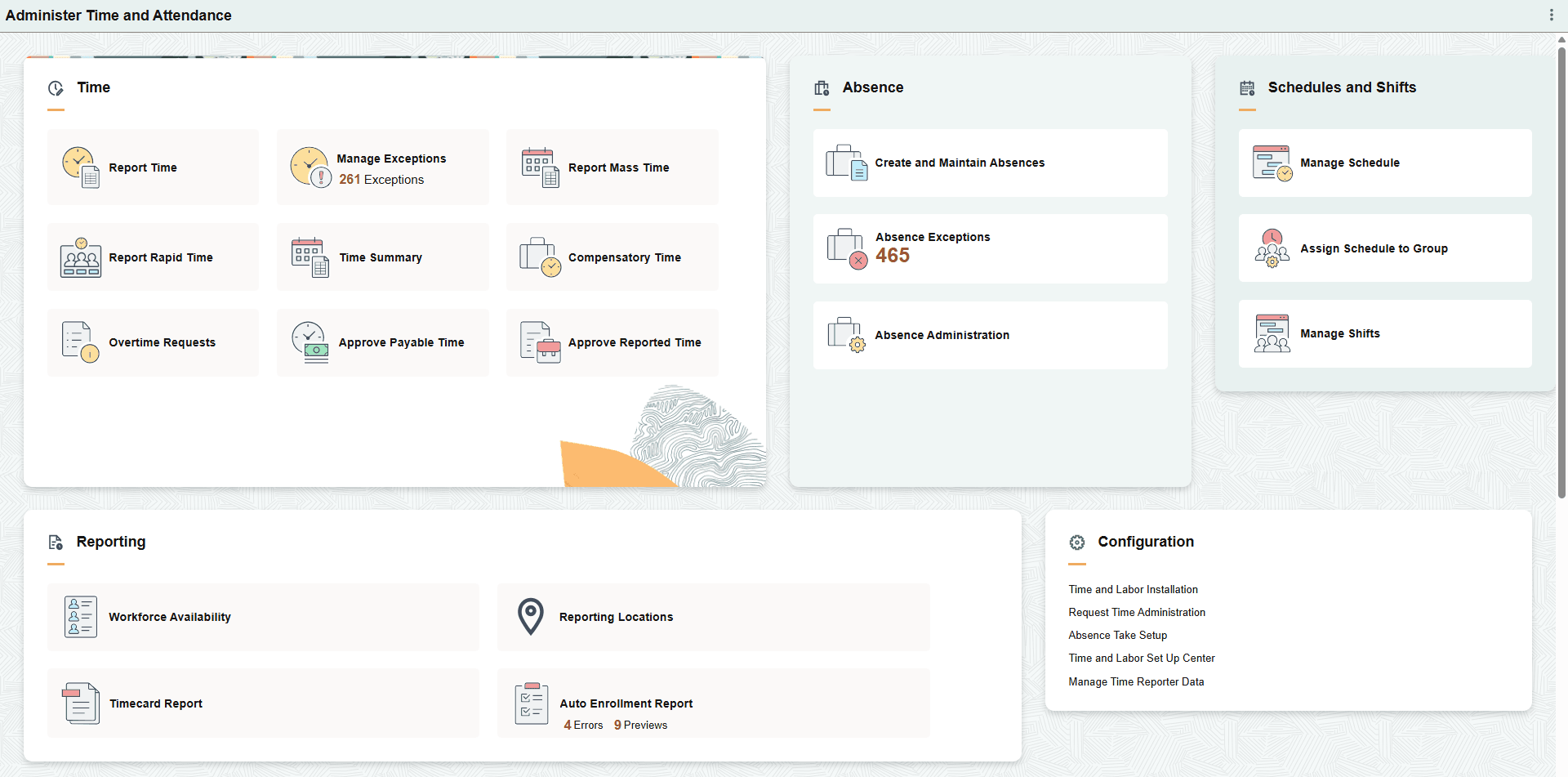
This example illustrates the fields and controls on the Administer Time and Attendance dashboard (1 of 2).
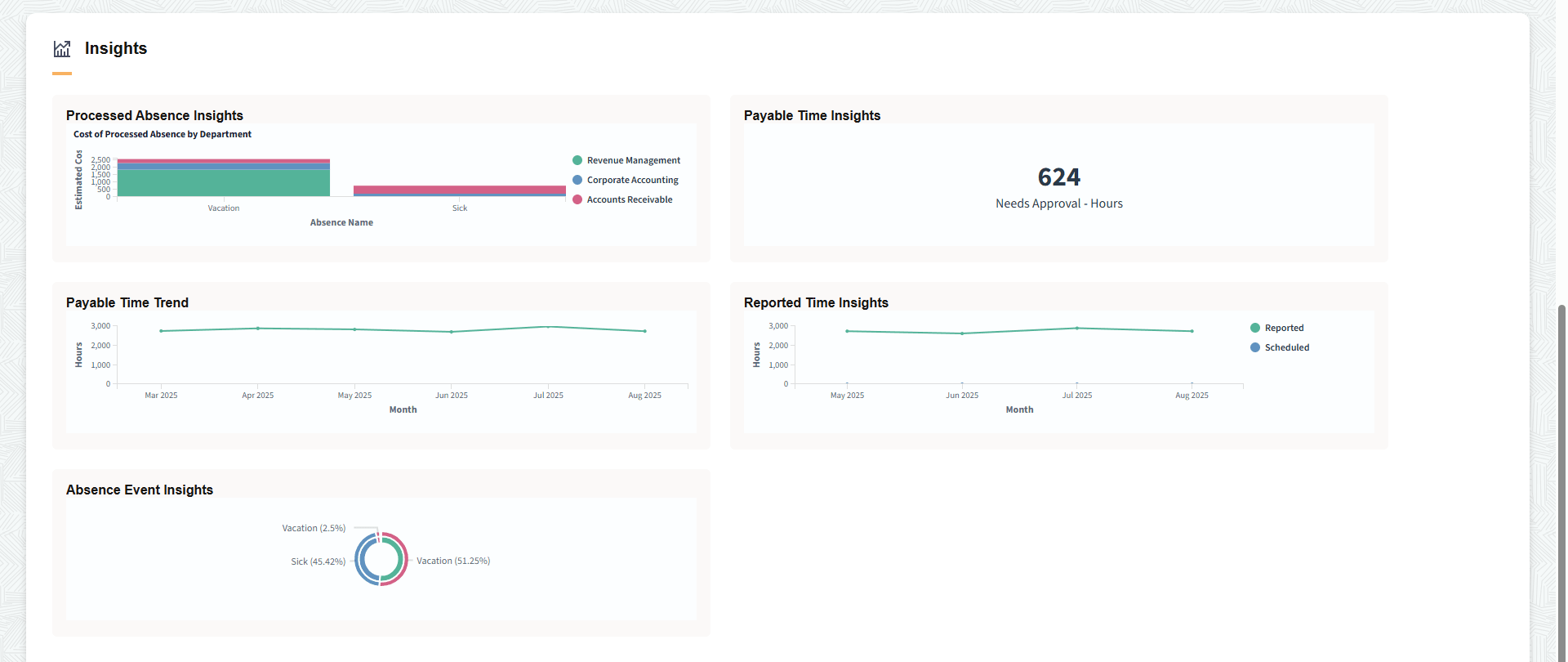
This example illustrates the fields and controls on the Administer Time and Attendance dashboard (2 of 2).
The Administer Time and Attendance dashboard includes the following sections and tiles, which appear based on user roles and security permissions.
-
Time section
-
Report Time Tile (see PeopleSoft Time and Labor: Select Employee Page and PeopleSoft Time and Labor: Report Time Select Employee Filters page)
-
Manage Exceptions Tile (see PeopleSoft Time and Labor: Manage Exceptions Page)
-
Report Mass Time tile (see PeopleSoft Time and Labor: Mass Time - Select Time Reporters Page)
-
Report Rapid Time Tile (see PeopleSoft Time and Labor: Rapid Time Page)
-
Time Summary Tile (see PeopleSoft Time and Labor: Time Summary Page)
-
Compensatory Time Tile (see PeopleSoft Time and Labor: Compensatory Time Page)
-
Overtime Requests Tile (see PeopleSoft Time and Labor: Approve Overtime Requests - Select an Employee Request Page)
-
Approve Payable Time Tile (see PeopleSoft Time and Labor: Approve Payable Time - Approve Time for Time Reporters Page)
-
Approve Reported Time Tile (see PeopleSoft Time and Labor: Approve Reported Time - Timesheet Summary Page)
-
-
Absence section
-
Create and Maintain Absences Tile (see PeopleSoft Absence Management: Create and Maintain Absence Requests Page)
-
Absence Exceptions Tile (see PeopleSoft Absence Management: Absence Exceptions Page)
-
-
Schedule and Shifts section
-
Assign Schedule to Group Tile (see PeopleSoft Time and Labor: Assign Schedule to a Group Page)
-
Manage Shifts Tile (see PeopleSoft Absence Management: Shift Page)
-
Reporting section
-
Workforce Availability Tile (see PeopleSoft Time and Labor: Workforce Availability Page)
-
Reporting Locations Tile (see PeopleSoft Time and Labor: Reporting Locations Page)
-
Timecard Report Tile (see PeopleSoft Time and Labor: TimeCard Page)
-
Auto Enrollment Report Tile (see PeopleSoft Time and Labor: Understanding the Time and Labor Auto Enrollment Analytics)
-
-
Configuration section
-
Time and Labor Installation link (see PeopleSoft Time and Labor: Time and Labor Installation Page)
-
Request Time Administration link (see PeopleSoft Time and Labor: Request Time Administration Page)
-
Absence Take Setup link (see PeopleSoft Absence Management: Configure Country Take Setup - Absences Page)
-
Time and Labor Set Up Center link (see PeopleSoft Time and Labor: Pages Used to Navigate in Time and Labor)
-
Manage Time Reporter Data link (see PeopleSoft Time and Labor: Manage Time Reporter Data Tile)
-
-
Insights section