Biographical Details Page
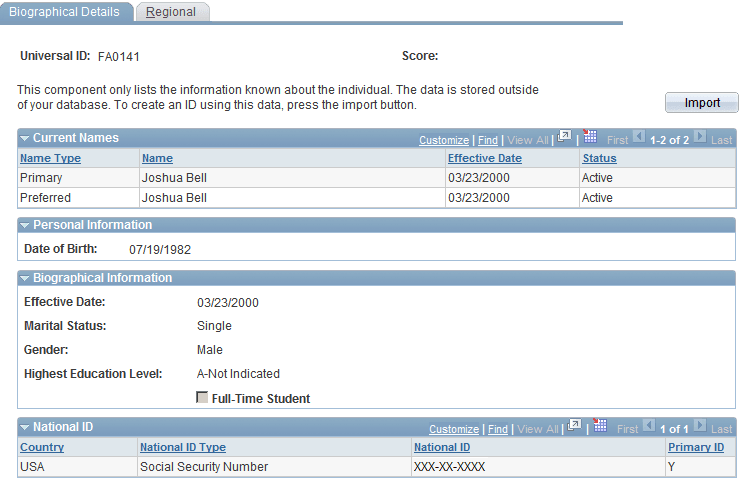
Use the Biographical Details page (SCC_SM_RESP_DTL) to view personal data stored inside the external system.
Navigation:
Click the Detail link on the Search Results page for a matching candidate that does not have an emplID.
Note:
The sample component shown is Biographical Details (SCC_SM_RESP_DTL), which is accessed by clicking the Detail link for an individual with no HCM employee ID.
This example illustrates the fields and controls on the Biographical Details page (1 of 2). You can find definitions for the fields and controls later on this page.
This example illustrates the fields and controls on the Biographical Details page (2 of 2). You can find definitions for the fields and controls later on this page.
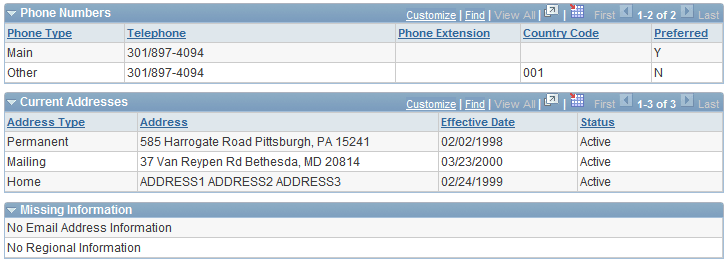
This page displays sections of data that are not stored in the HCM database until you click the Import button.
The system displays messages on this page based on the following conditions:
Note:
Where no data exists, the system hides the fields and displays a message in the Missing Information group box.
| Data Region | Condition | Message |
|---|---|---|
|
Current Names |
No name information exists |
No Current Name Information |
|
Personal Information |
No personal information exists |
No Personal Information |
|
Biographical Information |
No biographical information exists |
No Biographical Information |
|
National ID |
No national ID information exists |
No National ID Information |
|
Email Addresses |
No email address information exists |
No Email Addresses Information |
|
Phone Numbers |
No phone information exists |
No Phone Number Information |
|
Current Addresses |
No address information exists |
No Address Information |
|
Regional |
No regional data exists |
No Regional Information |
| Field or Control | Description |
|---|---|
|
Import |
Click this button to import the external system ID and all the information displayed, into the HCM system and create an emplID. |
Current Names
| Field or Control | Description |
|---|---|
|
History |
This link appears only if the external system ID contains a past or future date in addition to the current row. Click the link to access the Name Type History page. |
Current Addresses
| Field or Control | Description |
|---|---|
|
History |
This link appears only if the external system ID contains a past or future date in addition to the current row. Click the link to access the Address Type History page. |