Common Header for Employee Self-Service Pages
Many of the employee-related self-service fluid pages display a header with the employee’s photo, name, job title, and an icon for accessing related actions. Although pages that use the delivered Employee Photo Header sub-page (HR_EMPL_HDR_SBF), display the employee name and job title in two rows, the Employee Header Configuration feature (see (Fluid) Managing Employee Headers) enables you to determine other field data that appears in fluid header.
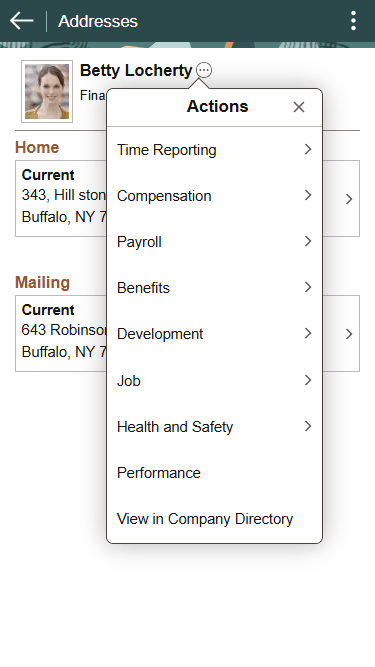
This example illustrates the common header for employee self-service fluid pages. In this example, the user has tapped the Related Actions icon to display the Actions menu.
| Term | Definition |
|---|---|
|
<employee photo> |
The photo in the common header is visible if the Display on Self Service option is enabled on the Installation Table - HCM Options Page. |
|
Update Photo |
This link is visible if the Allow Employee to Update Photo option is enabled on the Installation Table. It is visible only on the Personal Details fluid pages. For more information about uploading an employee photo, refer to the documentation for the PeopleSoft eProfile: Select Photo Page. |
|
|
Tap the related actions icon next to the employee’s name to display a menu of additional self-service transactions. The menu provides access to both fluid and classic pages. |

Related Actions
On all pages that include a related actions menu, the menu choices are the same except that the menu never includes a link to the current page. The following table provides details about the related actions menu:
| Top-Level Menu Item | Transactions |
|---|---|
|
Time Reporting |
|
|
Compensation |
|
|
Payroll |
|
|
Benefits |
|
|
Development |
|
|
Compare My Profile (appears only from the Talent Profile pages) |
This menu item goes directly to the Select Profile page where users can begin the process of comparing their person profile to their job profile. |
|
Search and Compare Profiles (appears only from the Talent Profile pages) |
This menu item goes directly to the Search for Profiles page where users can begin the process of comparing various profiles. |
|
Personal Details |
This menu item goes directly to the Personal Details page. |
|
Performance |
This menu item goes directly to the Performance page. |
|
View in Company Directory |
This menu item goes directly to the Company Directory page. |
|
View Team Snapshot (appears only from the Company Directory pages for one of your direct or indirect reports) |
This menu item goes directly to the Team Snapshot - Summary dashboard. |