Controlling Data Sets
The system filters the field options available to the user in the transaction components based on the tableset controls you set up. For example, when a user is creating a job data record for a new worker and selects the drop down list for the Job Code field, the system filters the available options by determining the following:
-
What business unit is this person's job data record in?
USA
-
What table controls data for this field (Job Code)?
JOBCODE_TBL
-
What record group is that table in?
HR_02
-
What set ID is assigned to that record group for this business unit?
SHARE
-
What rows in the control table (Job Code Table) are keyed by that set ID?
-
The system looks only for the job code with the SHARE set ID values.
-
The system makes available to the user only the rows keyed by the SHARE set ID.
-
This diagram shows the tableset controls for the USA business unit and illustrates how the system determines which job code values to display for that business unit, as described above:
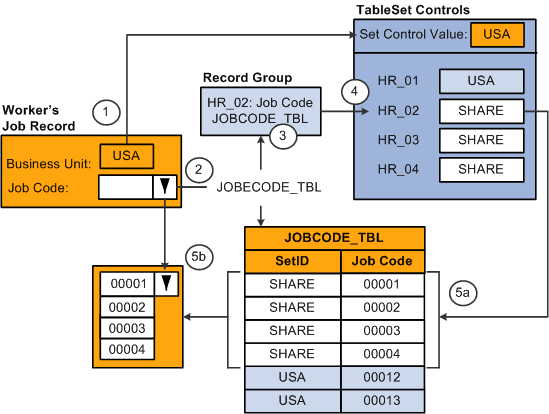
If the user were accessing a field whose control table was in record group HR_01, the system would display the values keyed by the set ID USA from the corresponding control table. The data the system makes available to the user depends on the set ID specified in the TableSet Control component for the record group that contains the control table the user is accessing.