Referencing Multiple Set IDs
Occasionally, some pages have references to more than one set ID. It's important to understand how the Page Processor works through such a situation when you're working with set ID functionality. This will help you to understand how the system is making decisions about default values in the data record.
Two scenarios exist in PeopleSoft HCM where a table that is keyed by one set ID also has fields that prompt onto another set ID table:
Scenario 1: A Control Table with Multiple Set IDs, but No Defaults Based on Those Set IDs
An example of a control table that is associated with multiple set IDs is the Departments component (DEPARTMENT_TBL). The record for the component, DEPT_TBL, has two set IDs: the set ID for the department and the set ID for the department's location. The set ID for the location prompt comes from the LOCATION_TBL record.
This example illustrates the Department Profile page.
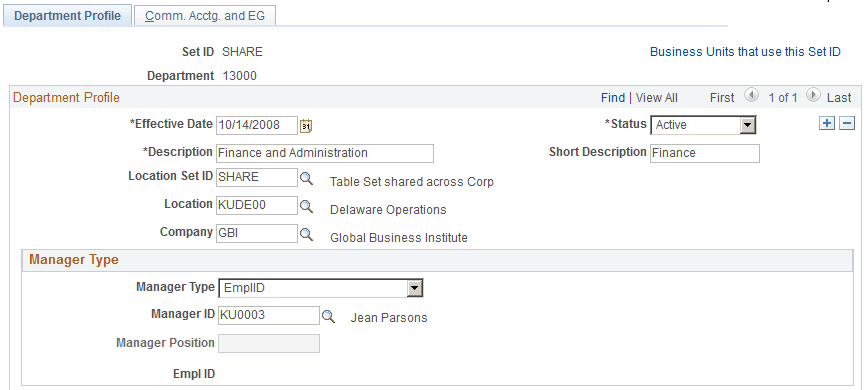
In this situation where this is a department set ID and a location set ID, you can set up the component so that the system makes available in the Location field:
-
All locations from all set IDs.
-
Locations that share the same set ID and the department's set ID.
Making all locations available may cause problems if a user creates a department with a location in a set ID that is not used by any business unit with access to the department's set ID. Making only one location set ID available could cause problems if business units with access to the department's set ID use different location set IDs.
For example, an organization has the following tableset controls set up for its four business units for the DEPT and LOCATION record groups:
| Business Units | PDEV | EURO | ASIA | RUSS |
|---|---|---|---|---|
|
Record Group: DEPT |
USA |
EURO |
USA |
EURO |
|
Record Group: LOCATION |
USA |
EURO |
ASIA |
RUSS |
Note:
Set up tableset controls on the Tableset Controls component.
If you limited the location set ID to the set ID of the department, you would not be able to set up departments with a valid location for the ASIA and RUSS business units. If you made all locations in all set IDs available, you run the risk of users creating a department in set ID USA with a location in set ID EURO.
To limit the locations available to a department, while still accommodating the different tablesharing arrangements, you could limit the location set IDs to USA and ASIA when the department set ID is USA and to RUSS and EURO when the department set ID is EURO.
Scenario 2: A Transaction Table with Multiple Set IDs Controlling Defaults Across the Transaction Record
An example of a transaction table that has multiple set IDs controlling defaults across the record is the Job Data component (JOB_DATA).
When you create a job data record for someone, you select a business unit on the Work Location page (JOB_DATA1). The system uses the business unit's tableset controls to determine which values to make available in other fields on the component and when to use established defaults.
The system only displays departments that are in the set ID selected for the business unit and defaults in the department's location only if the location is in a valid set ID for the business unit. Locations have associated salary plans, and the system defaults in the location's salary plan only if the salary plan is in a valid set ID for the business unit. If a default value is not in a valid set ID for the selected business unit, the system leaves the field blank and the user selects a value from the options in the valid set ID.
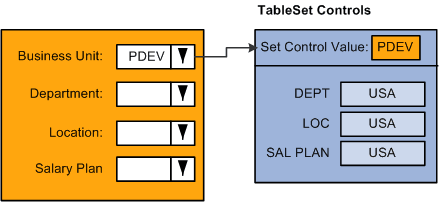
For example, in the Job Data component, select the business unit, such as PDEV as shown in this diagram. The system references the tableset controls for that business unit to determine the valid set IDs for many of the other fields on the component, such as Department, Location, and Salary Plan:
When you select the Department lookup button in the Job Data component, the system references the TableSet Control table for the record group row that determines which department set ID is available for this business unit. Since USA is the designated set ID for the department record, the system only displays in the search list those departments with the USA set ID. In the diagram below this would be departments USA-00001 and USA-00002:
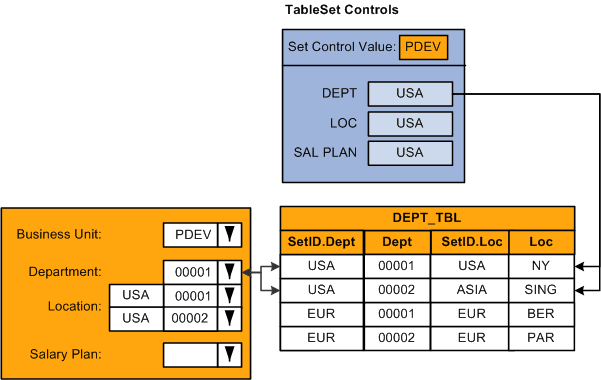
The system also checks to see if the set ID of the location associated with the department is valid for this business unit.
In this example, only locations with the set ID USA should be valid for the PDEV business unit. When the location associated with the department uses the set ID USA, such as department USA-00001, which is associated with location USA-NY, the system enters the default location in the Location field. If you were to select department USA-00002, the location associated with this department, with the set ID ASIA, will not default into the Location field. The system leaves the Location field blank:
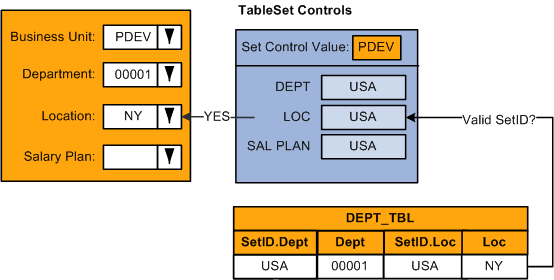
If the salary plan is associated with the location, the system checks the TableSet Control record for the business unit, in this example PDEV, to see if the set ID of the salary plan associated with this location is valid for this business unit. Since valid values for this business unit should be associated with the USA set ID, and the salary plan associated with the USA-NY location uses a salary plan set ID of SHARE, the salary plan will not be provided by default into the worker's record:
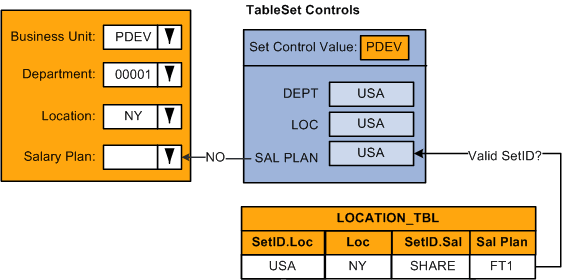
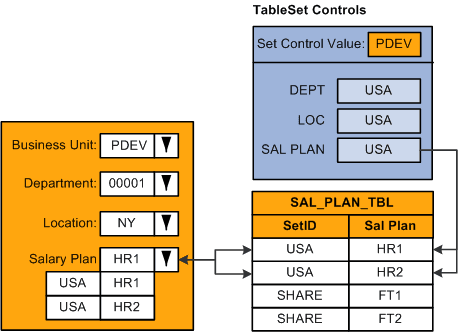
When you select a salary plan, the system will only retrieve those rows from the Salary Plan table that begin with set ID USA, as defined on the tableset controls for business unit PDEV:
Note:
Many of the set ID driven control tables enable you to review which business units have access to the selected set ID so that, as you set up your control values, you can confirm that they will be available to the appropriate business units.