Data Security and Data Retrieval
The system enforces data permission security with security search views. To understand how this is done it helps to understand how the system retrieves data when you access a component.
When you open a component in PeopleSoft HCM the system displays a search page. The search page represents the search record and the fields that appear are the search keys and alternate key fields that uniquely identify each row of data. The system uses the information that you enter in the key or alternate key fields to select the rows of data that you want to view or manipulate (except for the Add action, where you enter a key and the system creates a new data row). For example, a search page may have EmplID as a key field and Name as an alternate key. If you enter Smith in the Name field, the system retrieves all data rows with Name field data that matches Smith.
The system also uses search records to enforce data permission security. Search views for components that contain sensitive data also contain a security view to control data access.
The system adds the user's security profile, including their user ID and the values of the permission lists attached to their user profile, to the SQL (Structured Query Language) select statement along with the values that the user entered on the search page. The system retrieves the data that matches the criteria from the search page and the user's data permission lists. The system doesn't retrieve data for people to whom you haven't granted the user's permission lists data access.
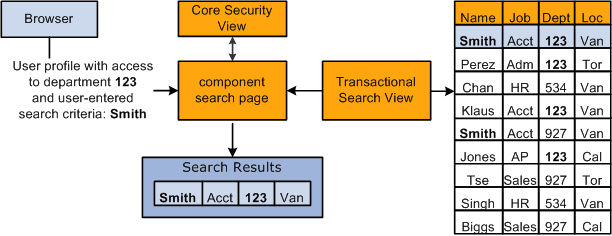
Using the above example, if you enter Smith in the Name alternate key field, the system retrieves data only for the people with the name Smith to whom you have access, which are workers in department 123. Workers with the name of Smith outside of your security permission, department 123, are not retrieved or accessible to you as the user. This diagram illustrates the data retrieval process:
Note:
Security for process and queries is enforced in much the same way.
Not all PeopleSoft HCM components require data permission security. Their security requirements can be met using application security (restricting access to the entire page, component, or menu). Only components containing sensitive information, such as salary information, use the security search views. If necessary, you can add data permission security to any component that accesses person data, as long as the search records are defined as SQL views (some search records are defined as SQL tables).
A component can have only one search record. To associate more than one search record with a component (for example, data level security for some users and not for others), you reinstall the component on different menus, one for each search record, and grant access to the appropriate component using application security.
Core Security Views
PeopleSoft delivers the following core security views for components tracking people:
Security Views for Components Storing All Person Types
| Type | Includes Future-Dated Security | Security View | Rows Returned |
|---|---|---|---|
|
Component search view |
Yes |
PERALL_SEC_SRCH |
One row per EMPLID and distinct search items. Includes future-dated rows. |
|
SQR view |
No |
PERALL_SEC_SQR |
One row per EMPLID. |
|
Query view |
No |
PERALL_SEC_QRY |
One row per EMPLID. |
Security Views for Components Storing People With Jobs
| Type | Includes Future-Dated Security | Security View | Rows Returned |
|---|---|---|---|
|
Component search view |
Yes |
PERS_SRCH_GBL |
One row per EMPLID and EMPL_RCD combination, effective date, and distinct search items. Includes future-dated rows. |
|
Component search view |
Yes |
PERS_SRCH_EMP |
One row per EMPLID for employees only. Includes future-dated rows. |
|
Component search view |
No |
PERS_SRCH_CURR |
One row per EMPLID. |
|
SQR view |
No |
FAST_SQR_SEC_VW |
One row per EMPLID. |
|
Query view |
No |
PERS_SRCH_QRY |
One row per EMPLID. |
|
Prompt view |
No |
EMPL_ACTV_SRCH |
One row per EMPLID for people with current, active (as of the system date) job records. |
|
Prompt view |
No |
WORKER_PROMPT |
One row per EMPLID for employees and contingent workers with current, active (as of the effective date of the component) job records. |
Security Views for Components Storing People With Potentially More Than One Job Data Record
| Type | Includes Future-Dated Security | Security View | Rows Returned |
|---|---|---|---|
|
Component search view |
Yes |
EMPLMT_SRCH_GBL |
One row per EMPLID and EMPL_RCD combination, effective date, and distinct search items. Includes future-dated rows. |
|
Component search view |
Yes |
EMPLMT_SRCH_EMPbe |
One row per EMPLID and EMPL_RCD combination for employees only. Includes future-dated rows. |
|
SQR View |
Yes |
FAST_SQRFUT_SEC |
One row per EMPLID. Includes future-dated rows. |
|
SQR view |
No |
FAST_SQR_SEC_VW |
One row per EMPLID and EMPL_RCD combination. |
|
Query view |
No |
EMPLMT_SRCH_QRY |
One row per EMPLID and EMPL_RCD combination. |
|
Prompt view |
No |
PERJOB_PROMPT |
One row per EMPLID for people with current, active (as of the effective date of the component) job records. |
Security Views for Components Storing People Without Jobs
| Type | Includes Future-Dated Security | Security View | Rows Returned |
|---|---|---|---|
|
Component search view |
N/A |
POI_SEC_SRCH |
One row per EMPLID, POI_TYPE and distinct search items. |
|
SQR view |
N/A |
POI_SEC_SQR |
One row per EMPLID and POI_TYPE. |
|
Query view |
N/A |
POI_SEC_QRY |
One row per EMPLID and POI_TYPE. |
See PeopleTools: PeopleSoft Application Designer