Security Data
Data permission is controlled on two sides: transaction and user.
Transaction Security Data
Transaction data is the data that is being secured. Certain transaction fields on a transaction data row are used to secure access to that row. The data in these fields is called transaction security data. When the value of the transaction security data matches the value that a user can access (user security data), the system makes the entire row of data available to the user.
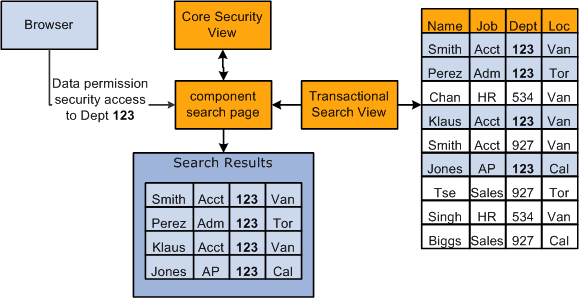
When the user accesses the component search page the security search view filters the data rows, displaying only the rows of data with the same transaction security values that the user has access to.
This diagram shows the Department field being used as transaction security data to secure the data of people in the organization in which the user only has security access to the workers in department 123:
This table lists where you enter and maintain transaction data, to which record the transaction data is saved, and which fields can be used as transaction security data:
| Data Type | Transaction Component in which Data is Entered or Maintained | Record Storing Transaction Data | Fields Available for Transaction Security Data |
|---|---|---|---|
|
Departments |
Departments component (DEPARTMENT_TBL) |
DEPT_TBL |
|
|
Job openings |
Job Opening page (HRS_JO_360) |
HRS_JOB_OPENING |
|
|
|
JOB |
|
|
POIs without jobs |
|
PER_POI_SCRTY |
|
Note:
All people, regardless of type, are first entered in the Add a Person component (PERSONAL_DATA), where you enter their personal information and assign them an ID. These pages do not capture any transaction security data. Transaction security data is captured on the components that you use to enter details about the person's relationship to the organization.
Note:
If you create a person but do not create a job data record or POI type record for them the system will save the person as a POI without job with a POI Type of Unknown. Somebody in your organization must have data permission access to unknown POIs in order to access their data and create either a job data or POI type record for them, otherwise the data is inaccessible.
Make sure that users who enter people into the system understand the consequences of not creating and saving a Job Data or POI type record for new people at the time the person is entered in the system.
When a transaction record is successfully completed and saved for the person on the Add an Employment Instance component, Add a Contingent Worker component, Add a POI Instance component, or Add a POI Reltn. component, the system deletes the Unknown POI instance for that person.
See PeopleSoft Human Resources Administer Workforce: (Classic) Adding a Person.
See PeopleSoft Human Resources Administer Workforce: Controlling Data Access for POIs Without Jobs.
See PeopleSoft Human Resources Administer Workforce: (Classic) Adding Organizational Instances.
User Security Data
User security data is the data about a user's security access. It enables the system to ensure that users have access only to that which you have granted them access. User security data for HCM data permission is the data permission that you assign to permission lists and the roles and users to whom you assign the permission lists.
Data permission is granted to row security (tree-based) permission lists (ROWSECCLASS) and regular (role-based) permission lists (CLASSID). Both permission lists are created using the Permission Lists component and Copy Permission Lists component.
When you create a permission list on the Permission Lists component you can assign security to a number of different aspects of the application. Data permission is assigned separately on the Security by Dept Tree page and Security by Permission List page.
Note:
When you add a permission list to the Security by Dept. Tree component, the system saves it as ROWSECCLASS.
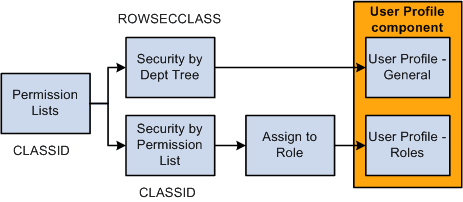
This diagram shows that permission lists are created, assigned data permission (using either security by department tree or security by permission list), and then assigned to a user directly on the User Profile - General page as the Row Security permission list or assigned to a user on the User Profile - Roles page by assigning roles to the user, which are associated with permission lists:
This table lists the key differences between role-based permission lists with data permission and row security permission lists:
| Row Security Permission Lists | Role-Based Permission Lists |
|---|---|
|
Are assigned to users on the Row Security field on the User Profile – General page. |
Are assigned to users by way of roles. |
|
Are limited to one per user. |
Users can have multiple role-based permission lists and the combined data permission access of each list. |
|
Bring with them only the data permission assigned to the user on the Row Security field on the User Profile - General page. |
Bring with them data permission access assigned to them on the Security by Permission List page and any application security access granted to the permission list on the Permission Lists component. The user will not have access to any data permission assigned to them on the Security by Dept Tree page. |
|
Should have only department security tree-based security. |
Can have only non-department tree-based security. |
Note:
You can use the same permission list as a row security permission list and a role-based permission list by adding it to both the Security by Dept Tree component and Security by Permission List component and then adding them to the user on the User Profile - General page and by way of roles.
Note:
The system recognizes non-tree based security associated with row security permission lists. Customers who modified the system to use non-tree based security in previous releases only have to import the customized table capturing the row security permission lists and security definitions into SJT_CLASS. You can continue to assign the permission lists to users in the Row Security field on the User Profile - General page.
New customers, or customers using non-tree based security for the first time, should use role-based permission lists. This will provide you much greater flexibility.
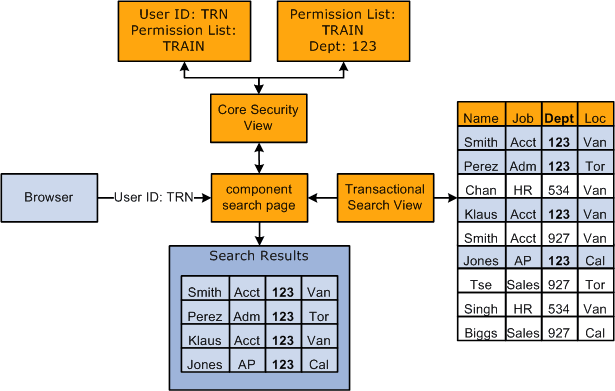
This diagram shows the search page determining which permission lists a user has and what data permission the list gives the user. The user, TRN, is associated with the permission list TRAIN for both row security and permission lists through roles. Since permission list TRAIN is granted access to worker's records in department 123 only, the search results will display only those workers from this department:
This table lists where you enter and maintain user security data and to which record the user security data is saved:
| Data Type | Security Page in which Data is Entered or Maintained | Record Storing User Security Data |
|---|---|---|
|
Row security permission lists |
Security by Dept Tree page |
SCRTY_TBL_DEPT This data is loaded into SJT_CLASS_ALL |
|
Role-based permission lists |
Security by Permission List page |
SJT_CLASS This data is loaded into SJT_CLASS_ALL |
|
Permission lists assigned to roles |
Roles - Permission Lists page |
PSROLECLASS This data is loaded into SJT_OPR_CLS. |
|
Roles assigned to users |
User Profile - Roles page |
PSROLEUSER This data is loaded into SJT_OPR_CLS |
|
Row security permission lists assigned to users |
User Profile - General page |
PSOPRDEFN This data is loaded into SJT_OPR_CLS |
Note:
The data from PSROLECLASS, PSROLEUSER, and PSOPRDEFN is loaded into SJT_OPR_CLS either automatically by the system, when you enable the USER_PROFILE and ROLE_MAINT messages, or when you run the Refresh SJT_OPR_CLS process.
See Understanding PeopleSoft Security.
See Setting Up and Assigning Tree-Based Data Permission.
See Assigning Role-Based Data Permission Security to Permission Lists.