Security Join Tables
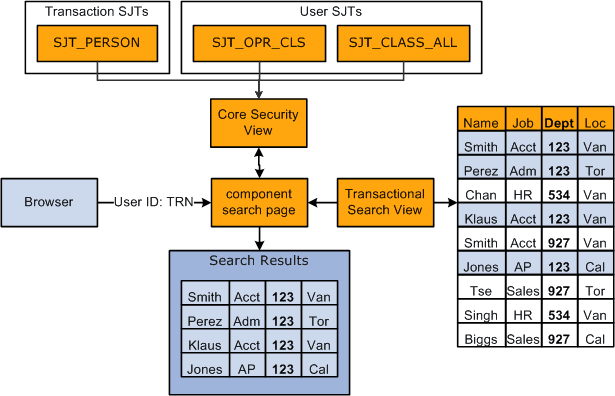
The system stores security data in transaction and user security join tables (SJTs). When you access a transaction component with a security search view, the security view references the security join tables to determine how the data is secured and what access the user has.
This graphic shows the search page determining which permission lists a user has and what data permission the list gives the user using either the transaction or user security join tables. The transaction security join table is determined by the type of data stored in the component:
Transaction Security Join Tables
Each transaction security join table stores the transaction data required to secure each row of data. The security join tables store one row of data for each unique combination of key fields.
There are four transaction security join tables:
| Transaction Security Join Table | Description | Stores Data From: | Key Fields |
|---|---|---|---|
|
SJT_PERSON SJT_PERSON_USF Note: SJT_PERSON is used by customers using the core job data components and SJT_PERSON_USF is used by customers using the USF job data components. |
Contains transaction data for the people (employees, contingent workers, POIs with jobs, and POIs without jobs) in your HCM system. |
|
SCRTY_TYPE_CD SCRTY_KEY1 SCRTY_KEY2 SCRTY_KEY3 EMPLID |
|
SJT_DEPT |
Contains the transaction data for the HCM departments. |
DEPT_TBL |
SCRTY_TYPE_CD SCRTY_KEY1 SCRTY_KEY2 SCRTY_KEY3 SETID DEPTID |
|
HRS_SJT_JO |
Contains the transaction data for the job openings in your system. |
|
SCRTY_TYPE_CD SCRTY_KEY1 SCRTY_KEY2 SCRTY_KEY3 HRS_JOB_OPENING_ID |
The key fields are:
-
SCRTY_TYPE_CD (security access type code)
Security access types indicate which field is used for transaction security data. For example the security type 002 enables you to secure person data by location.
Security access types are unique to a security access set.
-
SCRTY_KEY1, SCRTY_KEY2, and SCRTY_KEY3 (security keys)
The key security fields uniquely identify the security transaction data securing a row of data. The system determines the key fields by the security access type. For example, if person data is secured by location, then the key security fields are BUSINESS_UNIT (the prompt value for location) and LOCATION (the third key field isn't required for this example).
-
EMPLID
A person's unique identifying number that is assigned to them on the Personal Data pages.
-
SETID and DEPTID
A department's set ID and department ID.
-
HRS_JOB_OPENING_ID
A job opening's unique identifying number, which is assigned to it on the Job Opening page.
Each table stores additional fields depending on the type of security you are using.
For example, if you are securing the data of people with jobs using the security access type Job Department Tree (001), the key fields of the security join table SJT_PERSON looks like this:
| SCRTY_TYPE_CD | SCRTY_KEY1 | SCRTY_KEY2 | SCRTY_KEY3 | EMPLID |
|---|---|---|---|---|
|
001 |
Department set ID: SHARE |
Department ID: 123 |
N/A |
IN3321 |
|
001 |
Department set ID: SHARE |
Department ID: 534 |
N/A |
IN7894 |
|
001 |
Department set ID: USA |
Department ID: OKL |
N/A |
US8390 |
If you used two security access types, for example Job Location (002) and Job Department Tree, SJT_PERSON looks like this:
| SCRTY_TYPE_CD | SCRTY_KEY1 | SCRTY_KEY2 | SCRTY_KEY3 | EMPLID |
|---|---|---|---|---|
|
001 |
Department set ID: SHARE |
Department ID: 123 |
N/A |
IN3321 |
|
002 |
Location business unit: FRA01 |
Location code: PAR |
N/A |
IN3321 |
|
001 |
Department set ID: SHARE |
Department ID: 534 |
N/A |
IN7894 |
|
002 |
Location business unit: AUS01 |
Location code: SYD |
N/A |
IN7894 |
|
001 |
Department set ID: USA |
Department ID: OKL |
N/A |
US8390 |
|
002 |
Location business unit: USA |
Location code: KSC |
N/A |
US8390 |
Note:
Locations and departments do not need three key fields to uniquely identify them so the third security key field isn't necessary for this example.
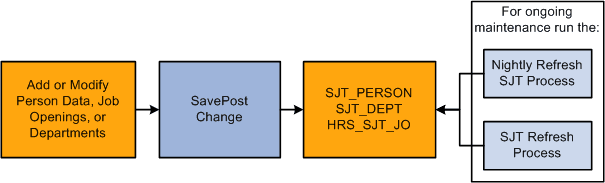
When you first enable a security access type, load the transaction data into security join tables using the SJT Refresh process. After the initial load, the system updates the tables using SavePostChange PeopleCode when you make a change to the transaction security data in the transaction components. You can also capture any changes the PeopleCode misses by running the SJT Refresh process as needed or the Nightly Refresh process.
Note:
The SavePostChange PeopleCode on the transaction component subpage SCRTY_SJT_SBP updates the security join tables.
This graphic illustrates how the transaction security join tables are kept up to date, as described above:
User Security Join Tables
The user security join tables store the user security data required to determine users' data permission. The security join tables store one row of data for each unique combination of key fields.
There are two user security join tables:
| User Security Join Table | Description | Stores Data From: | Key Fields |
|---|---|---|---|
|
SJT_CLASS_ALL |
Contains the data permission information for all the permission lists that are given data access on the Security by Dept Tree page or Security by Permission List page. |
|
CLASSID SCRTY_SET_CD SCRTY_TYPE_CD SCRTY_KEY1 SCRTY_KEY2 SCRTY_KEY3 |
|
SJT_OPR_CLS |
Contains the user IDs of people with data permission and the permission lists with data permission that are assigned to them. |
|
OPRID CLASSID |
In addition to the security access type field and security key fields, the user security join tables store the following fields:
-
SCRTY_SET_CD (security set code)
A security set is a set of data secured in HCM. For example, PPLJOB is the security set for the data of people with jobs and DEPT is the security set for the department data. Each security set has security access types.
-
OPRID
The user's user ID.
-
CLASSID
The ID of the role-based or row security permission list.
Note:
The security join tables store row security permission lists (ROWSECCLASS) as CLASSID permission lists but identify them using a row security flag.
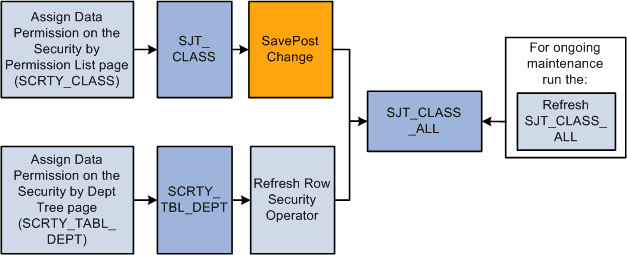
The permission list data in SJT_CLASS_ALL comes from two sources:
-
SCRTY_TBL_DEPT
When you add tree-based data permission to a permission list, you use the Security by Dept Tree page and the system saves the permission list information to the SCRTY_TBL_DEPT record.
-
SJT_CLASS
When you add non-tree based data permission to a permission list, you use the Security by Permission List page and the system saves the permission list information to the SJT_CLASS record.
For example, if you are securing the data of people with jobs using the security access type Job Department Tree (001), the key fields of the SCRTY_TBL_DEPT table look like this:
| ROWSECCLASS | SET ID | DEPTID |
|---|---|---|
|
TRAIN |
Department set ID: SHARE |
Department ID: 123 |
|
PAY1 |
Department set ID: SHARE |
Department ID: 534 |
|
PAY2 |
Department set ID: USA |
Department ID: OKL |
To load the data from the SCRTY_TBL_DEPT table, you need to run the Refresh SJT_CLASS_ALL process. In SJT_CLASS_ALL, the Refresh SJT_CLASS_ALL process:
-
Creates a row of data for each enabled, tree-based security access type (and it's security set) with the data permission you set up on the Security by Dept Tree page.
For example, if you enable security access type 012 (RS Dept Id) and security access type 001 (Job Department Tree) and grant the row security permission list TRAIN data permission to department 123, the process will create a row for each security access type and the permission will have access to people with jobs in department 123 and job openings in department 123.
-
Saves the row security permission list as a CLASSID permission list.
-
Saves the department set ID as SCRTY_KEY1 and the department ID as SCRTY_KEY2.
If you are securing the data of people with jobs using the security access type Job Location (002), the key fields of the security join table SJT_CLASS look like this:
| CLASSID | SCRTY_SET_CD | SCRTY_TYPE_CD | SCRTY_KEY1 | SCRTY_KEY2 | SCRTY_KEY3 |
|---|---|---|---|---|---|
|
TRAIN |
PPLJOB |
002 |
Location business unit: FRA01 |
Location code: PAR |
N/A |
|
PAY1 |
PPLJOB |
002 |
Location business unit: AUS01 |
Location code: SYD |
N/A |
|
PAY2 |
PPLJOB |
002 |
Location business unit: USA |
Location code: KSC |
N/A |
When you save your changes on the Security by Permission List page, SavePostChange PeopleCode automatically updates the data to the security join table SJT_CLASS_ALL.
If you are using both security access types, SJT_CLASS_ALL looks like this after you have run the Refresh SJT_CLASS_ALL process and the PeopleCode has updated it:
| CLASSID | SCRTY_SET_CD | SCRTY_TYPE_CD | SCRTY_KEY1 | SCRTY_KEY2 | SCRTY_KEY3 |
|---|---|---|---|---|---|
|
TRAIN |
PPLJOB |
001 |
Department set ID: SHARE |
Department ID: 123 |
N/A |
|
TRAIN |
PPLJOB |
002 |
Location business unit: FRA01 |
Location code: PAR |
N/A |
|
PAY1 |
PPLJOB |
001 |
Department set ID: SHARE |
Department ID: 534 |
N/A |
|
PAY1 |
PPLJOB |
002 |
Location business unit: AUS01 |
Location code: SYD |
N/A |
|
PAY2 |
PPLJOB |
001 |
Department set ID: USA |
Department ID: OKL |
N/A |
|
PAY2 |
PPLJOB |
002 |
Location business unit: USA |
Location code: KSC |
N/A |
This graphic illustrates how the permission list user security join tables are kept up to date, as previously described:
See Refresh SJT_CLASS_ALL Page.
The security join table SJT_OPR_CLS stores the relationship between User IDs and permission lists with data permission. The data in SJT_OPR_CLS comes from three sources:
-
PSOPRDEFN
This record contains the relationship between the User ID and row security permission list from the User Profile - General page.
-
PSROLEUSER
This record contains the relationship between the User IDs and roles from the User Profile - Roles page.
-
PSROLECLASS
This record contains the relationship between roles and permission lists from the Roles - Permission Lists page.
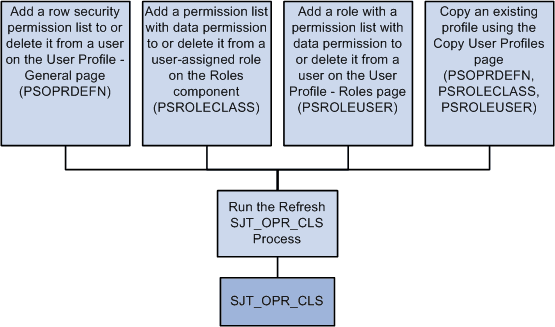
To update SJT_OPR_CLS with the data from PSOPRDEFN, PSROLECLASS, and PSROLEUSER, run the Refresh SJT_OPR_CLS process whenever you add a permission list with data security to a user profile (either by adding a row security permission list on the User Profile - General page, by adding a role-based permission list with data permission to a user-assigned role on the Roles - Permission Lists page, adding a role with data permission on the User Profile - Roles page, or by creating a new user profile by copying an existing one) or delete one from a user profile.
This graphic illustrates this process of when to update the user profile security join table:
Note:
You can enable the USER_PROFILE message and the local subscription HCM_Refresh_SJT_OPR_CLS and the ROLE_MAINT message and the local subscription HCM_Role_Refresh_SJT_OPR_CLS to automatically update SJT_OPR_CLS. PeopleSoft does not deliver the system with these messages enabled.
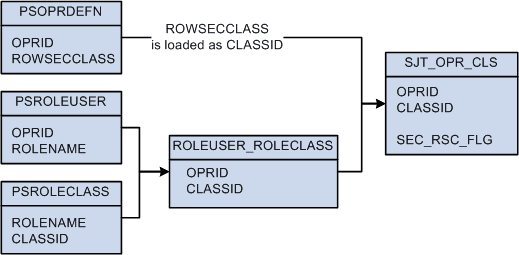
The Refresh SJT_OPR_CLS process loads the OPRID and ROWSECCLASS values from PSOPRDEFN directly into SJT_OPR_CLS, saving the row security permission list as CLASSID.
To establish the relationship between user profiles and role-based permission lists, the process first loads the OPRID and ROLENAME from PSROLEUSER and the ROLENAME and CLASSID from PSROLECLASS into a temporary table (ROLEUSER_ROLECLASS) and then loads the OPRID and CLASSID, and the relationship between them, into SJT_OPR_CLS.
This diagram illustrates the data stored in SJT_OPR_CLS and their source as described above:
Note:
The SEC_RSC_FLG field indicates if the CLASSID was originally a ROWSECCLASS permission list by flagging it with a value of Y.