Establishing Regulatory Transaction Types
To establish regulatory transaction types, use the Regional Transactions component (REG_TRX_REGION).
These topics provide an overview of regulatory transactions and discuss how to add regulatory regions to a transaction.
Pages Used to Update or Add Regulatory Transactions
| Page Name | Definition Name | Usage |
|---|---|---|
|
Regional Transactions - Transaction Page |
REG_TRX |
Update the regulatory transaction description or add a new regulatory transaction. |
|
Regional Transactions - Regions in Transaction Page |
REG_TRX_REGION |
Define the regulatory regions that make up a regulatory transaction type. |
Understanding Regulatory Transactions
Two sets of regulatory transactions are already defined in the system as shown in the following table:
| Regulatory Transaction | Countries or Regions Included | Reason |
|---|---|---|
|
STANDARD |
All countries that are supported in the system. |
Most applications apply regulatory and legislative edits at the country level. |
|
HANDS (Health and Safety) |
All countries that are included in the system, plus the Canadian provinces. |
Most applications apply regulatory and legislative edits at the country level, but Canada has specific provincial laws governing their Health and Safety reporting. |
Use the two pages in the Regional Transactions component (REG_TRX_REGION) to assign new regulatory regions to these transaction types (if you have added countries or regulatory regions to the system) and to establish new regulatory transactions.
Regions in Transaction Page
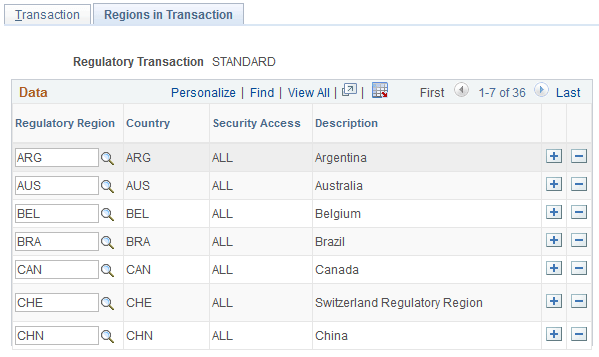
Use the Regional Transactions - Regions in Transaction page (REG_TRX_REGION) to define the regulatory regions that make up a regulatory transaction type.
Navigation:
This example illustrates the fields and controls on the Regions in Transaction page. You can find definitions for the fields and controls later on this page.
| Field or Control | Description |
|---|---|
|
Regulatory Region |
Select the regulatory regions that belong to this transaction. |