Generating Form Letters
This diagram and the steps below illustrate how PeopleSoft Process Scheduler generates form letters for PeopleSoft Human Resources:
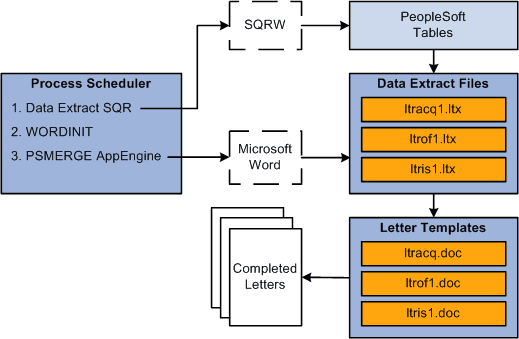
Step 1: SQR Data Extract Process
The SQR data extract process:
-
Identifies records in the database with the appropriate letter codes (and no print date).
-
Extracts data from these tagged records.
-
Updates the Print Date field in the tagged records.
-
Creates a data extract file (with an .ltr extension) that contains the data for each letter.
For example, the file containing data for offer letters is ltrof1.ltr, where of1 represents offer letter, and .ltr represents letter.
The SQR process sends its output to the log/output directory defined for SQR reports. Define the log/output directory in the Process Scheduler configuration file.
Step 2: WORDINIT WinWord Process
The WORDINIT WinWord process is an initialization process. Its purpose is to ensure that the PSMERGE application engine process can retrieve the location of:
-
The executable file for Microsoft Word, winword.exe.
-
The PS_HOME directory that contains the letter templates.
The WORDINIT process runs winword.exe and a dummy macro called PSINIT which opens and closes the psmerge.doc file without creating any output. By including the WORDINIT WinWord process in the job definition, the Process Scheduler ensures that it has loaded the location of the winword.exe file into PSPRCSPARMS.
The PSMERGE application engine process uses this information to call Microsoft Word.
Step 3: PSMERGE Application Engine Process
The PSMERGE Application Engine process completes the merge of the data extract files and the Word templates. It:
-
Retrieves the locations of the data extract files, winword.exe and the PS_HOME Winword directory.
-
Creates a file called param.txt in the log/output directory.
This file contains the locations of the files and a list of files to be merged.
-
Calls Microsoft Word to carry out the merge.
Microsoft Word:
-
Opens the form letter templates that correspond to the data extract files.
-
Merges the appropriate extract file data into the field codes for each template.
For example, the offer letters template is ltrof1.doc and it includes field codes for names, addresses, and offer amounts.
-
Inserts the data from the appropriate .ltr file into the template field codes.
For example, it inserts the data from the ltrof1.ltr extract file into the ltrof1.doc template.
-
Places the resulting letters in the log/output directory.
-