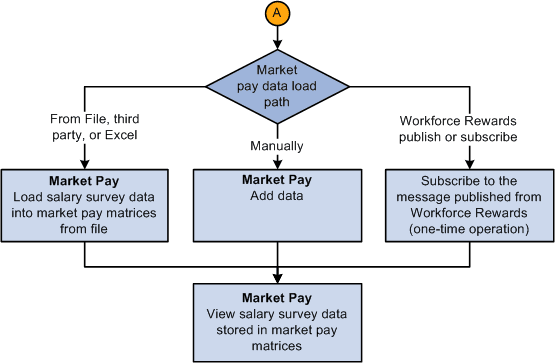
The Market Pay Process Flow
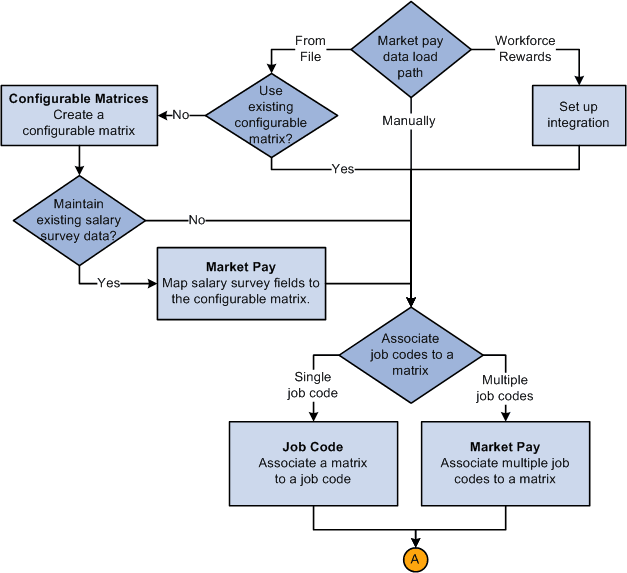
Follow these steps to set up the market pay functionality:
-
Define geographical areas.
-
Select an existing configurable market pay matrix, or create a new one.
-
(Optional) Map existing salary survey data fields to a configurable matrix definition.
-
Associate a market pay matrix with one job code on the Job Code - Market Pay Match page or to several job codes on the Associate Mkt Pay to Job Codes page.
-
Load market pay data by one of three methods:
-
Load data from file using an automated process.
-
Manually enter data.
-
(Workforce Rewards users only): Subscribe to message published from Workforce Rewards.
Set up Integration Broker messaging to subscribe to the message published by Workforce Rewards.
-
-
View market pay data online by job code.
This diagram illustrates creating a configurable matrix and associating job codes:
This diagram illustrates loading data into the market pay matrix: