Setting Up Direct Reports for PeopleSoft HelpDesk for HR
To set up Direct Reports for PeopleSoft HelpDesk for HR, use the Direct Reports Setup component (SS_LINK_TBL).
PeopleSoft HelpDesk for HR can only retrieve the appropriate reporting structure for a person if you have set up the access type on the Direct Reports Setup page.
Page Used to Set Up Direct Reports for PeopleSoft HelpDesk for HR
| Page Name | Definition Name | Usage |
|---|---|---|
|
SS_LINK_TBL |
Set up the access type for the HD_360_COMPONENT. |
Target Information Page
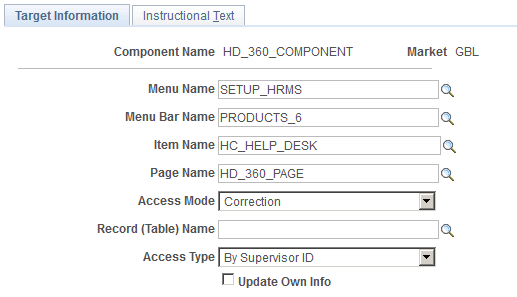
Use the Target Information page (SS_LINK_TBL) to set up the access type for the HD_360_COMPONENT.
Navigation:
This example illustrates the fields and controls on the Target Information page.
To set up the access type:
-
Access the Direct Reports Setup component and select the component HD_360_COMPONENT.
-
On the Target Information page choose the Access Type By Supervisor Id.
-
Save the page.