Cancel Absence Page
Use the Cancel Absence page (GP_ABS_SS_REQUEST) to submit a request for an absence cancelation.
Navigation:
Click the Cancel button for an absence on the Absence Request History page.
This example illustrates the fields and controls on the Cancel Absence page.
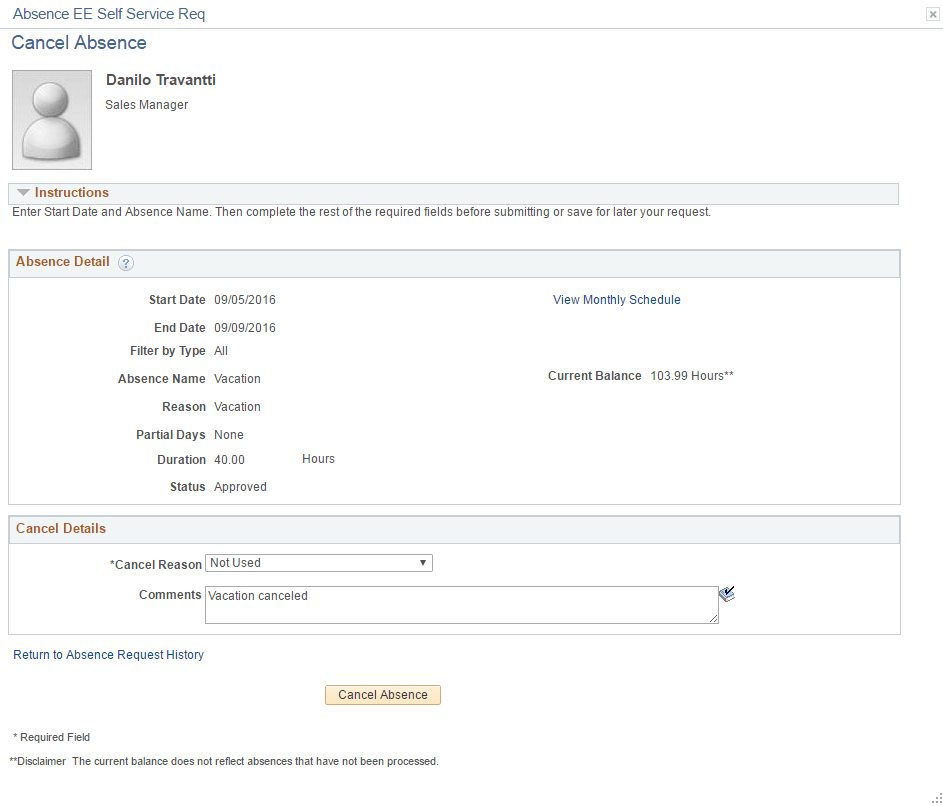
| Field or Control | Description |
|---|---|
|
Cancel Reason |
Select a reason for canceling the absence request. |
|
Comments |
Enter any additional comments regarding the absence cancellation. |
|
Cancel Absence |
Click this button to submit the request to cancel the absence. You will receive a message confirming that you want to submit the request to cancel the absence. Click Yes to confirm the request submittal. The system changes the status of the absence request to Cancel in Progress and routes it to your manager for approval. |