Forecast Balance Page
Use the Forecast Balance page (GP_ABS_SS_FCST_BAL) to run the online forecasting process for future absence entitlement balances based on date, absence type and absence name.
Navigation:
Click the Forecast Balance link on the View Absence Balances page.
This example illustrates the fields and controls on the Forecast Balance page.
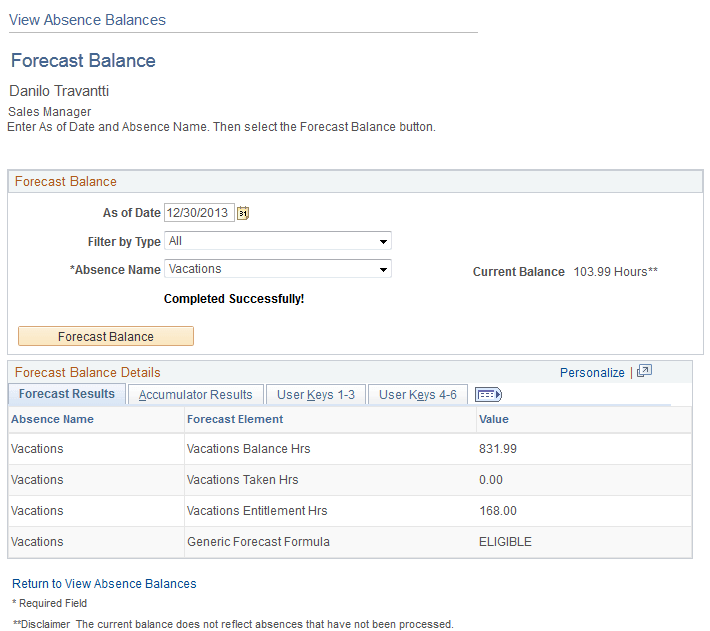
This page enables the employee to run the online absence entitlement balance forecast process, and to view entitlement balances as of a future date, by absence type, and absence name.
| Field or Control | Description |
|---|---|
|
As of Date |
Enter a future date that the system will use to calculate the balance. |
|
Filter by Type |
Select the absence type. The selection you make in this field will limit or filter the selections available in the Absence Name field. |
|
Absence Name |
Select the absence name from the available options in the field. Note: The user must make an entry in this field in order for the system to display the Forecast Balance button. |
|
Forecast Balance |
Click to run the online absence balance forecasting process. When the process is completed, the forecasted absence entitlement balances appear in the Forecast Balance Details group box. Note: The system does not automatically save your absence request before initiating the Forecasting process. Although the system prompts you to save before leaving the page, it is not necessary to save your forecast information before or after the Forecasting process. |