Multiple Absence Requests Page
Use the Multiple Absence Requests page (HGA_MANAGE) to approve, deny, or push back multiple absence requests.
Navigation:
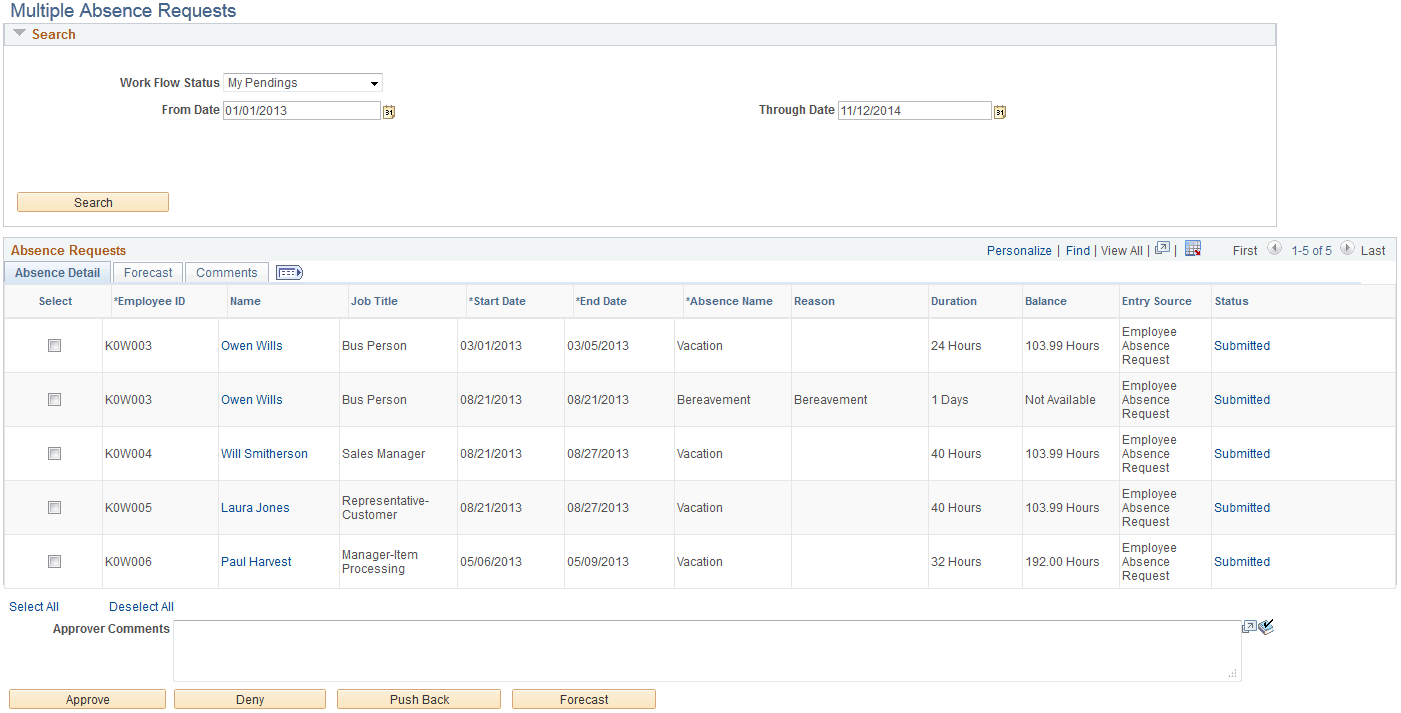
This example illustrates the fields and controls on the Multiple Absence Requests page.
Search
| Field or Control | Description |
|---|---|
|
Work Flow Status |
Enter a value to search for absence requests based on work flow status. Values are:
|
Absence Requests
This section of the page enables you to the review the absence details, forecasting information, and any comments associated with the absence requests that meet your search criteria.
| Field or Control | Description |
|---|---|
|
Name |
Click to access the Absence Details page where you can view additional details for the absence request. |
|
Approver Comments |
Any comments you enter in this field are added to the selected absence requests when you click the Approve, Deny, or Push Back buttons. |
|
Approve |
Click to approve the selected absence requests. |
|
Deny |
Click to deny the selected absence requests. |
|
Push Back |
Click to push back the selected absence requests. |
|
Forecast |
Click to initiate the forecasting process for the selected absence requests. |