Viewing Payee Data
Page Used to View Job Information
| Page Name | Definition Name | Usage |
|---|---|---|
|
GP_PYE_DATA |
View Absence Management-specific information that is stored for a payee on the Job record in HR, as well as the pay entity that is associated with the pay group on the Job record. |
Understanding Payee Data Pages in Absence Management
Absence Management contains two payee data-related pages: Job Information and Retro Limits Assignment. This topic discusses how to view job data for a payee on the Job Information page. The Retro Limits Assignment page is discussed elsewhere in this documentation.
Related Topics
Review Job Information Page
Use the Review Job Information page (GP_PYE_DATA) to view Absence Management-specific information that is stored for a payee on the Job record in HR, as well as the pay entity that is associated with the pay group on the Job record.
Navigation:
This example illustrates the fields and controls on the Review Job Information page.
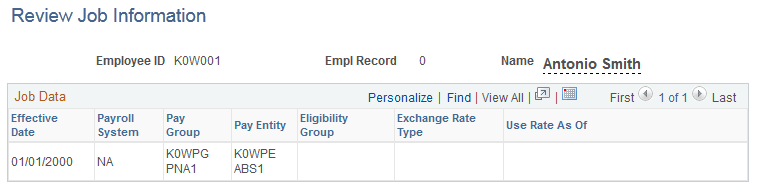
To change data that appears on this page, you must update the Job record in HR using the Job Data - Payroll page or one of the other Job Data components.
| Field or Control | Description |
|---|---|
|
Payroll System |
Displays the payroll system for the payee. Values are: GP (Global Payroll) NA (Payroll for North America) OT (Other) This pay system flag is not supported in Absence Management. PI (Payroll Interface) |
|
Pay Group |
Displays the pay group for the payee. |
|
Pay Entity |
Displays the pay entity for the payee. |
|
Eligibility Group |
Displays the eligibility group for the payee. |
Note:
The Eligibility Group field appears only if it is overridden at the payee level. The field is blank if the default value from the pay group is used.