Managing Open Enrollment
To manage the Open Enrollment process, use the Open Enrollment Definition (BAS_OE_DEFINITION) and Fluid Activity Guide (BAS_OE_DEFN_FLUID) components.
Pages Used to Manage Open Enrollment
| Page Name | Definition Name | Usage |
|---|---|---|
|
BAS_OE_DEFINITION |
Set up the parameters of the open enrollment. |
|
|
BAS_OE_DEFN_FLUID |
Set up the tile and activity guide configurations for the open enrollment event. |
Note:
You will need to assign the delivered Open Enrollment Administrator role to users to grant them access to these pages.
Open Enrollment Definition Page
Use the Open Enrollment Definition page (BAS_OE_DEFINITION) to set up the parameters of the open enrollment.
Navigation:
This example illustrates the fields and controls on the Open Enrollment Definition page. You can find definitions for the fields and controls later on this page.
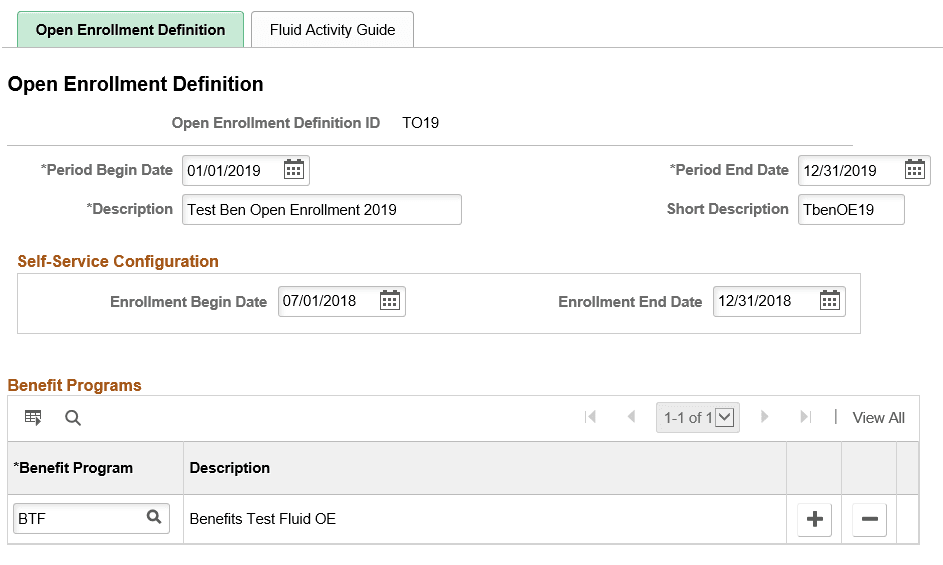
| Field or Control | Description |
|---|---|
|
Period Begin Date |
Equals the first day that coverage becomes effective for this Open Enrollment process. |
|
Period End Date |
Defines the end of the plan year for information purposes only. |
|
Benefit Programs |
Select benefit programs that will participate in this open enrollment event. |
Open Enrollment Definition - Fluid Activity Guide Tab
Use the Fluid Activity Guide page (BAS_OE_DEFN_FLUID) to set up the tile and activity guide configurations for the open enrollment event.
Navigation:
This example illustrates the fields and controls on the Fluid Activity Guide page. You can find definitions for the fields and controls later on this page.
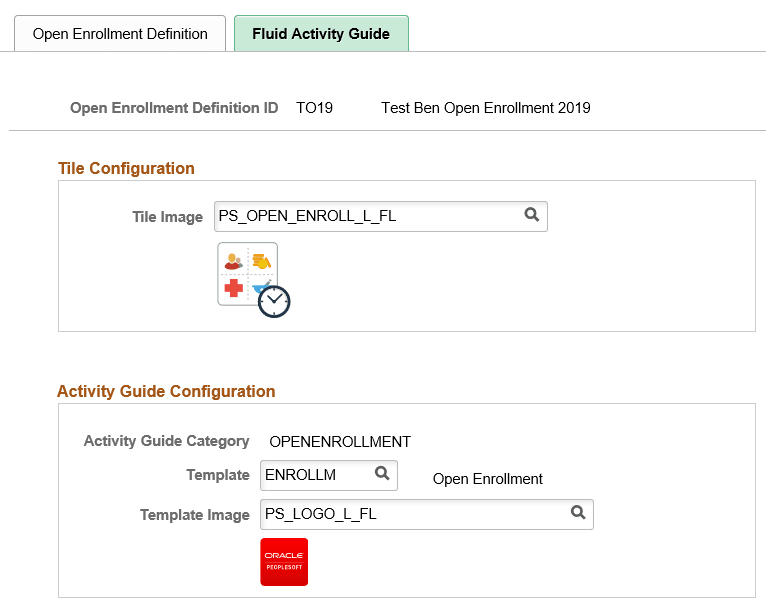
| Field or Control | Description |
|---|---|
|
Tile Image |
Select the image to be displayed in the Open Enrollment tile in the Employee Self Service homepage. |
|
Template |
Select the desired open enrollment template. |
|
Template Image |
Select the image to be displayed on the upper-left corner of the Open Enrollment activity guide. |