Setting Up Excess Credit Calculations
To set up excess credit calculations, use the Excess Credit Calculation (EXCESS_CRDT_CALC) component.
This section provides an overview of excess credit calculation setup and discusses how to enter excess credit calculations.
Page Used to Set Up Excess Credit Calculations
| Page Name | Definition Name | Usage |
|---|---|---|
|
EXCESS_CRDT_CALC |
Enter excess credit calculations. |
Understanding Excess Credit Calculation Setup
During the calculation of benefits costs and credits, PeopleSoft Benefits Administration computes a value called excess credits. This is an important value, because an organization can choose to treat excess credits in a variety of ways. Excess credits can appear on the paycheck as net additional pay, they can simply be forfeited, or they can be rolled over to automatically increase certain voluntary contributions such as savings plans and flexible spending accounts. Normally, excess credits are calculated by:
Total of All Flexible Credits - Total of All Before Tax CostsYou can override the Total of All Before Tax Costs portion of the calculation with plan types and deduction codes of your choice. For U.S.-based companies, normally you will not override this calculation. However, Canadian-based companies may need to implement a more complex set of deductions.
Excess Credit Calculation Page
Use the Excess Credit Calculation page (EXCESS_CRDT_CALC) to enter excess credit calculations.
Navigation:
This image shows the Excess Credit Calculation page.
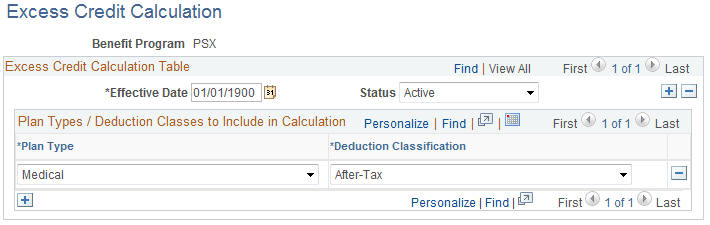
Enter the plan types and deduction classifications that you want the system to include when calculating the excess credit amount.