Integration With Resume Extractors
This topic provides a general overview of the use of resume extractors to populate the online application form. For information about setting up resume extractors, see PeopleSoft Talent Acquisition Manager: Setting Up Recruiting Vendors and PeopleSoft Talent Acquisition Manager: Setting Up Data Mapping.
The Resume Extraction Process
If you integrate with a third-party resume extractor, the extraction process parses data from the applicant's resume attachment and populates application fields automatically. Resume parsing does not apply to resumes that are entered using the Copy & Paste resume option.
See PeopleSoft Talent Acquisition Manager: Understanding Resume Management.
Here is how resume extraction works:
-
An applicant uploads a resume.
-
The resume extractor parses the resume and enters data in the appropriate application fields.
Parsing occurs immediately; the applicant does not need to continue to the next step
Data from the resume extraction process overwrites any existing application data, including the default data that the system imports from a previous application or from an employee profile.
-
Applicants continue to step through the online application process, reviewing data and supplying any missing information.
Sometimes the resume extraction process will create a row of data that is missing required information. In this situation, the system prevents the applicant from moving past the step with the missing information until all required data is supplied. A red warning icon identifies the incomplete data, and the applicant must resolve the issue before continuing to the next step.
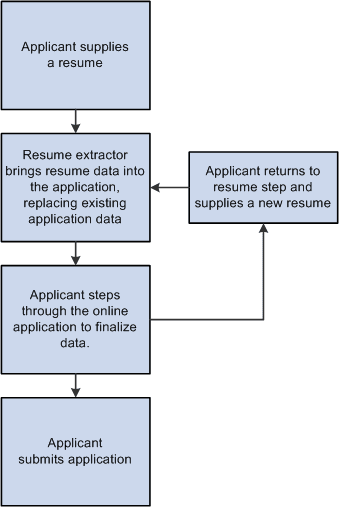
If an applicant returns to the resume step and supplies a new resume, the newly extracted data replaces the previous data, and the applicant must go through each application step again to verify the newly extracted information.
The following diagram shows how a resume extractor is used during the online application process. The extractor uses resume information to enter default values into the application form. While proceeding through the remaining steps, the applicant can review and modify the data provided by the resume extractor.
Extracting Name and Contact Data
The resume extraction process handles contact information as follows:
-
The resume extractor does not overwrite any existing name or physical address in the system.
If no physical address exists in the system, then the resume extractor inserts any physical address found in the resume. Because Candidate Gateway stores only one address for the applicant, only the first address is used if more than one is found in the resume.
-
If no email address or phone number exists in the system, then the resume extractor will insert any found in the resume.
-
If email addresses and phone numbers already exist in the system, then the resume extractor will add new ones found in the resume.
If an email or phone type is already in use (for example, the extractor finds a home phone number, but one already exists in the system), then the new email or phone number is added using the type Other. If the Other type already exists, it is overwritten, and any additional email or phone numbers in the resume are ignored.