Using the PeopleSoft Fluid User Interface to Manage Compensation Tasks as Administrators
This topic discusses a list of pages that administrators can access from a single place in the PeopleSoft Fluid User Interface to configure, manage and view compensation information.
For general information about fluid pages in PeopleSoft HCM, see Application Fundamentals: Understanding PeopleSoft Fluid User Interface Homepages.
Pages Used to Manage Compensation Tasks as Administrators Using the PeopleSoft Fluid User Interface
| Page/Tile Name | Definition Name | Usage |
|---|---|---|
|
HC_COMP_ADMIN_TILE_FL (cref for the tile) |
Access administrator-specific pages to configure, manage, and view compensations. |
|
|
Employee Compensation History |
COMP_SUMMARY |
View the history of all pay rate changes the worker has received to date. |
|
Manage Cycle Transactions |
WCS_ECM_MSS_SUM |
Enter compensation proposal changes for individuals. |
|
Adhoc Comp for Organization (adhoc compensation for organization) |
TC_ADHOC_ORG |
Add adhoc compensation for a group of workers. |
|
Calculate Group Budget |
RUNCTL_CALCBUDGET |
Run the Budget Calculation application engine process. |
|
Define Compensation Cycles |
WCS_ECM_CYC_DEF |
Define compensation cycles. |
|
Salary Plan PeopleSoft Human Resources Administer Compensation: Salary Plan Page |
SALARY_PLAN_TABLE |
Define salary plan basics. |
|
Salary Grades |
SALARY_GRADE_TBL1 |
Specify the minimum, maximum, and midpoint rates for salary grades. |
|
Define Salary Increase Matrix |
SALARY_MATRIX_TBL |
Establish the minimum and maximum percentage increases permitted for each review rating by quartile. |
|
Automated Step Increment PeopleSoft Human Resources Manage Base Compensation and Budgeting: Automated Step Increment Page |
RUNCTL_CMP007 |
Move workers automatically to the next salary step when they complete the required time in the current step. |
|
Administer Total Rewards PeopleSoft Human Resources Administer Compensation: Viewing and Printing the Total Rewards Statement The Total Rewards page is displayed if the selected employee views his or her statement in fluid mode. The Administer My Total Rewards page is displayed if the selected employee views his or her statement in classic mode. |
TRW_SS_STMT_NONE |
Review compensation and benefit summary information of selected employees and reward periods. |
|
Administer Statement PeopleSoft Human Resources Administer Compensation: Administer Statement Page |
TRW_ADM_STMT |
Define and process a total rewards statement. |
|
Define Compensation History |
HR_EC_CONFIG_FL |
Specify the setup options for displaying employees’ compensation history. |
Compensation Administration Tile
Use the Compensation Administration tile (HC_COMP_ADMIN_TILE_FL) to access groups of Fluid pages to configure, manage and view compensations.
Navigation:
Click the title of the default home page and select Workforce Administrator from the list that appears. The Compensation Administration tile is displayed on the Workforce Administrator page.
As an administrator, you can add the tile, through personalization, to a system-delivered home page or a home page that you create.
This example illustrates the (tablet) Compensation Administration tile.
This example illustrates the (smartphone) Compensation Administration tile.
Click the Compensation Administration tile to access the Compensation Administration application start page, which contains a list of administrator-specific pages for configuring, managing, and viewing compensations.
This example illustrates the pages that are displayed on the Compensation Administration application start page.
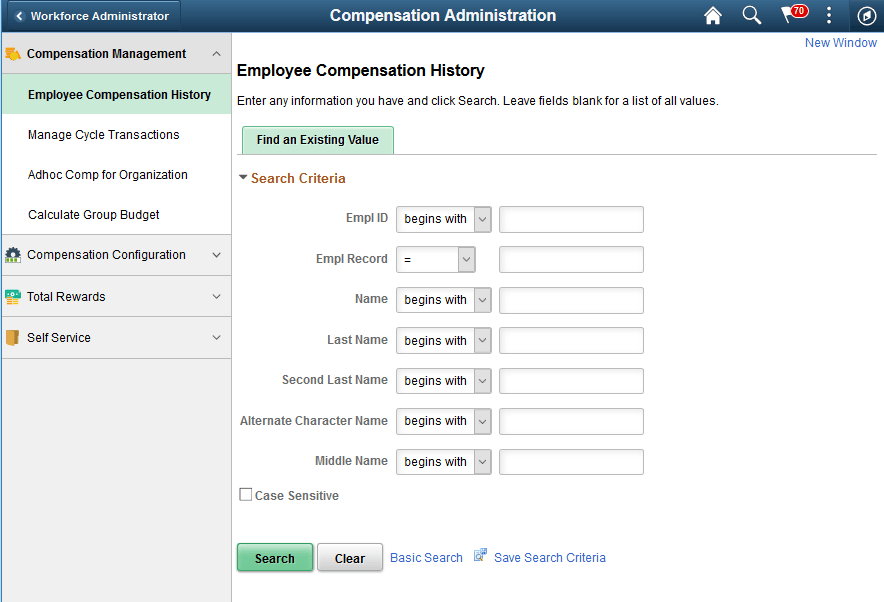
Pages are grouped into these tabs:
-
Compensation Management
-
Compensation Configuration
-
Total Rewards
-
Self Service