(JPN) Setting Up the YEA Data Self-Service Transaction
To set up the YEA data self-service transaction, use the YEA Self Service Setup JPN (GPJP_YEA_SETUP_GBL) component.
Page Used to Set Up the YEA Data Self-Service Transaction
| Page Name | Definition Name | Usage |
|---|---|---|
|
GPJP_YEA_SETUP |
Specify the period during which the YEA data self-service transaction is available to employees and specify the effective date of tax and deduction data entered through the transaction. |
Year End Adjustment Self Service Setup Page
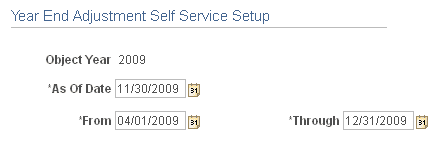
Use the Year End Adjustment Self Service Setup page (GPJP_YEA_SETUP) to specify the period during which the YEA data self-service transaction is available to employees and specify the effective date of tax and deduction data entered through the transaction.
Navigation:
This example illustrates the fields and controls on the Year End Adjustment Self Service Setup page.
| Field or Control | Description |
|---|---|
|
Object Year |
The year that is being adjusted. |
|
As Of Date |
The system uses this date when retrieving current information from effective-dated tables. The system also uses this date as the effective date when loading YEA self-service data into tables. |
|
From and Through |
Enter the begin and end dates of the period that employees can access the YEA data self-service transaction. |