Payment Distribution Page
Use the Banking page (GPSC_NET_DIST_FL) to edit or add a payment distribution.
Navigation:
Click a payment distribution on the Banking page.
Click the Add button on the Banking page to add a new payment distribution.
This example illustrates the fields and controls on the Payment Distribution page.
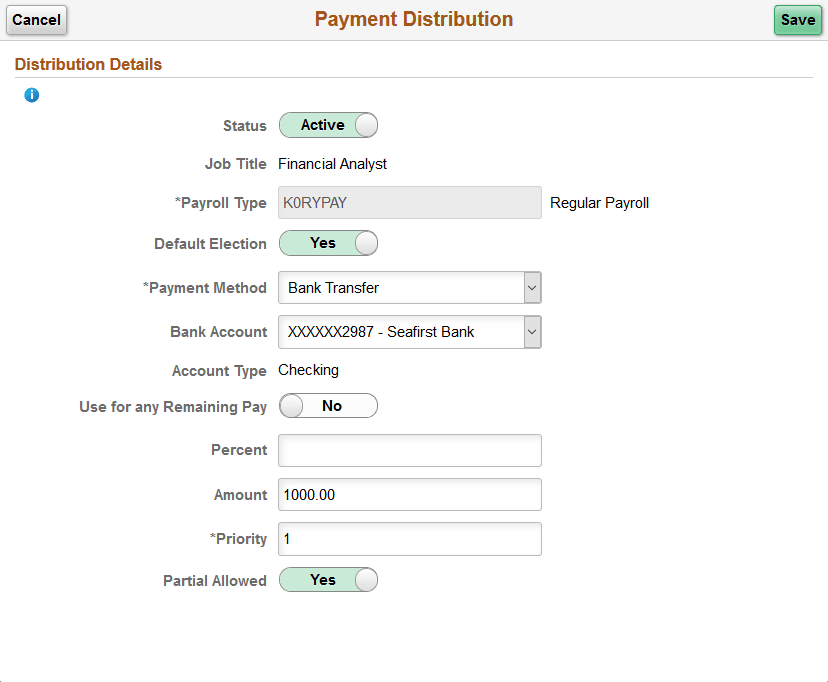
| Field or Control | Description |
|---|---|
|
Status |
Select whether the distribution is Active or Inactive. |
|
Job Title |
Select the job title to which this payment distribution applies. |
|
Payroll Type |
Select the run type for the payment distribution. |
|
Default Election |
Switch to Yes to indicate the default run type. When the banking process runs, the system checks the run type defined on the pay calendar and seeks a match on the net distribution for the payee. If it finds none, it uses the distribution designated as the default election. |
|
Payment Method |
Select the payment method for your distribution. The methods available for you to select are defined on the Self Service Banking Options Page. |
|
Bank Account |
For Bank Transfer and Wire Transfer payment methods, select the account you want to use. |
|
Use for any Remaining Pay |
Switch to Yes to make this the primary account. If you set up distribution amounts for allocation to several accounts and an amount remains after allocation, the extra amount goes to the primary account. |
|
Percent |
If the distribution is calculated by a percentage of the net payment, enter that percentage. |
|
Amount |
If the distribution to an account is calculated by an amount, specify that amount. Note: You can define a distribution in percentages, amounts, or both. The total cannot exceed 100 percent. Any amount remaining after percentage allocation is allocated to the primary account, unless otherwise specified. |
|
Priority |
Enter a number to prioritize a distribution. For example, if you want 100 distributed to a savings account every month and everything else distributed to a checking account, you would give the savings account higher priority. |
|
Partial Allowed |
Select to allow partial amounts to be distributed. For example, let’s say you distribute 1200 monthly as follows:
One month, your pay is only 1050. The system still distributes 500 to the checking account and 400 to the savings account, but it cannot distribute the full 300 to the retirement account. If Partial Allowed is selected, the system distributes the partial amount, which is 150 in this case. If Partial Allowed isn't selected, the system allocates 150 your primary account and nothing is deposited in the retirement account. |
Related Topics