Document Generation Processes
Document generation initiates the evaluation process. The process for generating a document varies, depending on the role of the person that is generating the document. The process culminates in the creation of a document based upon template definition rules used to create the document.
This diagram shows the document generation process for HR administrators, managers, and employees:
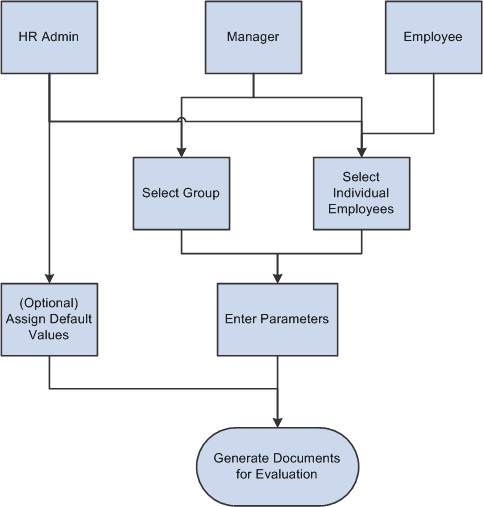
Each of the three roles that can generate documents does so in slightly different ways:
-
HR Administrators schedule a background process and select one or more employees or employee groups. They can also define default values (document type and the evaluation period) that get populated when users are about to create documents.
-
Managers can select one employee group that reports to them and select one or more employees from the group, or just select one or more employees that report to them.
-
Employees can only generate documents for themselves.
After the individuals are identified, the process initiator must select the parameters for the document. These include the document type, document template, and evaluation period that is covered. The language code might be required, depending on the installation settings. For employee-initiated documents, if the employee has more than one job, the job title is required. The employee might also need to select a manager or mentor for the evaluation, if specified for the document type.
Once a user enters the parameters, the system checks the rules associated with the document type and the document template, such as:
-
Is Define Criteria enabled?
-
Is Track Progress enabled?
-
Is Nominate Participants enabled?
Based on the rules established by the document type and document template, the system generates a document for use in the evaluation process. This document is presented using the WorkCenter framework, which reduces the number of user clicks, offers better insight into the performance process and provides users with easy access to other performance information without having to leave the current performance document they are working on.
See Understanding ePerformance WorkCenter.
Fluid ePerformance
Fluid ePerformance redesigns the components and pages for accessing and updating evaluation documents to better support the performance review process for managers, employees, and review participants. For more information, refer to the Understanding Fluid ePerformance topic.