Understanding Due Date Notifications
The Due Date Notifications feature sends email messages to managers, employees, and peer reviewers automatically and reminds them about the due dates of their evaluation documents. It leverages the Publish Notification framework to identify recipients, configure email templates, and generate email notifications for delivery.
Note:
Email notifications for employees are created in the same language as their associated documents. For managers and participants, these notifications are created in their preferred language that is selected on the User Profiles - General page (USER_GENERAL), or the base language if the preferred language is not specified.
As an administrator, you can select the type of notifications that users receive. Each process step in the evaluation cycle is a type of due date notification, which includes:
-
Define Criteria
-
Checkpoint
-
Finalize Criteria
-
Nominate Participants
-
Evaluation
For each step that you want to enable for due date notifications, you can specify when they are sent. ePerformance delivers three alert types, which define the number of days before the due date that these reminders need to be generated and sent. You can select up to three levels of due date reminders to send to users for each step.
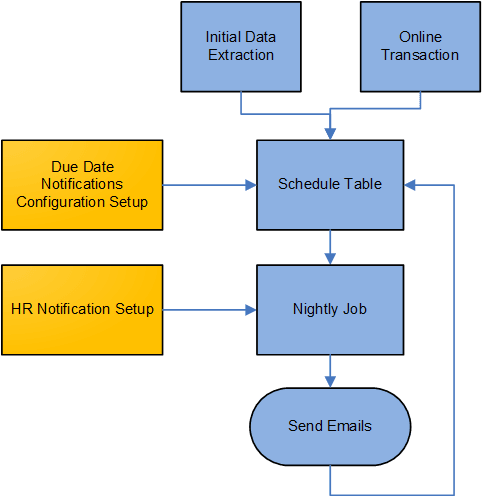
After the configuration for due date and alert types is complete, you run an application engine (AE) program (EP_INIT_NOTIF) that first extracts the due date information from all documents that are not completed or canceled and are currently in progress at any step in the evaluation cycle, and then loads it into the schedule table (EP_NOTIFY_TBL). Going forward, any evaluation creation or update that occurs after this initial load is validated online, and added or updated in the schedule table when applicable. This table provides the most current scheduling information for processing due date notifications.
As mentioned previously, ePerformance leverages the Publish Notification framework to configure recipients and email templates for use in due date notifications, and deliver them. As scheduled, the framework runs to look up from the schedule table a list of evaluations for which due date notifications need to be sent based on the configuration settings. Then, it generates due date notifications for these evaluations and sends them to the corresponding recipients. A recipient of a due date notification is a user whose role is given permission to update a document in a process step, as specified in the document template setup. For managers who may receive multiple reminders from their teams’ evaluations on a single day, their reminders are consolidated in one email notification for delivery.
This diagram illustrates the high-level process flow for due date notifications, which includes preparing data, setting up the feature, and running a nightly job that composes and sends due date reminders to corresponding recipients.
Refer to the Setting Up Due Date Notifications topic for a complete list of setup steps for the Due Date Notifications feature.
Video: Image Highlights, PeopleSoft HCM Update Image 27: ePerformance Due Date Notifications