Understanding HTML Email Approvals
The PeopleSoft Approval Workflow Engine (AWE) enables you to take action on approval requests directly from an email using the HTML Email Approval functionality.
Video: PeopleSoft 9.2 HTML Email Approvals
When enabled and a requestor submits a transaction for approval, an email is generated and sent to the approver(s), which contains detailed information about the transaction request. Based on the transaction’s configured actions, an approver can take action directly from the email by clicking a link, such as Approve, Deny, or Pushback, to generate a reply to the request. The email may display requestor comments and, if applicable, view approval history from other approvers.
The HTML Email Approval feature delivers HTML email templates for some of the key PeopleSoft HCM Talent Management transactions. This table lists these transactions, with their corresponding process IDs:
| Transaction | Transaction Process ID | Additional Information About the Transaction |
|---|---|---|
|
Job Opening Job Offer |
JobOpening JobOffer |
|
|
Absence Request Extended Absence Request |
AbsenceManagement AM_Extended_Abs |
PeopleSoft Absence Management: Self Service Pages Used by Managers to Manage Absence Requests |
|
Promote Employee Transfer Employee Reporting Change |
PromoteEmployee TransferEmployee ReportingChgEmployee |
|
|
Performance Document |
PerformanceManagement |
Note:
This feature is dependent on the Approvals Framework delivered by Enterprise Components. Any transactions that do not use the Approvals Framework for approvals will not be generated as HTML emails.
For more information on configuring HTML email approvals, see Approval Framework: Triggering Email Collaboration.
Responding to a Request
The approver can act upon an email request by selecting the appropriate action link that appears at the bottom of the email request.
Upon selecting an action, a response email will open. The email includes instructional text to let the user know where to enter comments, if any.
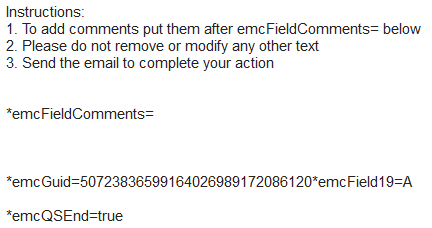
The approver can enter comments after the emcFieldComments text, but this is not a requirement. Note that any other identifiers should not be removed or modified.
Note:
If an approver takes an action from an email for a request that is no longer pending his or her approval, the system will open a similar reply email as previously mentioned. However, upon processing the response email, the system will send an email back to the approver indicating that the action was not applied as the approval request was no longer pending his or her action.