Viewing Direct Reports' Personal Information
These topics provide an overview of viewing personal information for direct report and list the pages used to view employees' personal information for those direct reports.
Understanding Viewing Personal Information
The View Employee Personal Information transaction enables managers to view information about their direct reports. The Employee Information page displays basic job information and provides links to other information such as:
-
Home, mailing, and email addresses.
-
Phone numbers.
-
Emergency contacts.
-
Instant message IDs.
-
Profile information.
-
Training information.
-
Compensation information and history.
Pages Used to View Personal Information
| Page Name | Definition Name | Usage |
|---|---|---|
|
View Employee Personal Information Page |
HR_DR_DIRECTREPORT |
Select the direct employee whose information you want to review as of a reporting date. |
|
Employee Information Page |
HR_EE_INF_HOME |
View job information for a specific direct report. To view another employee's information, click the Return to Select Employees link at the bottom of the page. The system displays the View Employee Personal Information page, where you need to enter the as of date you wish to view the employee's information prior to selecting the employee. |
|
Home and Mailing Addresses Page |
HR_EE_ADDRESS_MGR |
View the employee's home and mailing address information. |
|
Email Addresses Page |
HR_EMAIL_ADDRESSES |
View the employee's home and mailing address information. |
|
Phone Numbers Page |
HR_PERSONAL_PHONE |
View the employee's phone numbers. |
|
Emergency Contacts Page |
HR_EMERGENCY_CNTCT |
View the employee's emergency contact information. |
|
Instant Message IDs Page |
HR_IM_CHAT_IDS |
View the employee's instant message IDs. |
|
Birthday Page |
HR_EE_BIRTHDATE |
View the employee's birth date information. |
|
Total Compensation Page |
HR_SS_TC_MG_REVIEW |
View the employee's total compensation information. |
|
Compensation History Page |
HR_SS_MG_COMP_HIST |
View the employee's salary, variable cash, and variable noncash information. |
|
Training Summary Page |
HR_TRN_SUMMARY |
View the employee's internal and professional training information. |
|
Current Person Profile Page |
JPM_JP_PROFL2_EMP |
View the employee's profile information, such as competencies, education, and so forth. |
Employee Information Page
Use the Employee Information or View Employee Personal Information page (HR_EE_INF_HOME) to view job information for a specific direct report.
Navigation:
- Select the My Team Tile then the Related Actions icon next to an employee's name. Select
This example illustrates the Employee Information page for the manager.
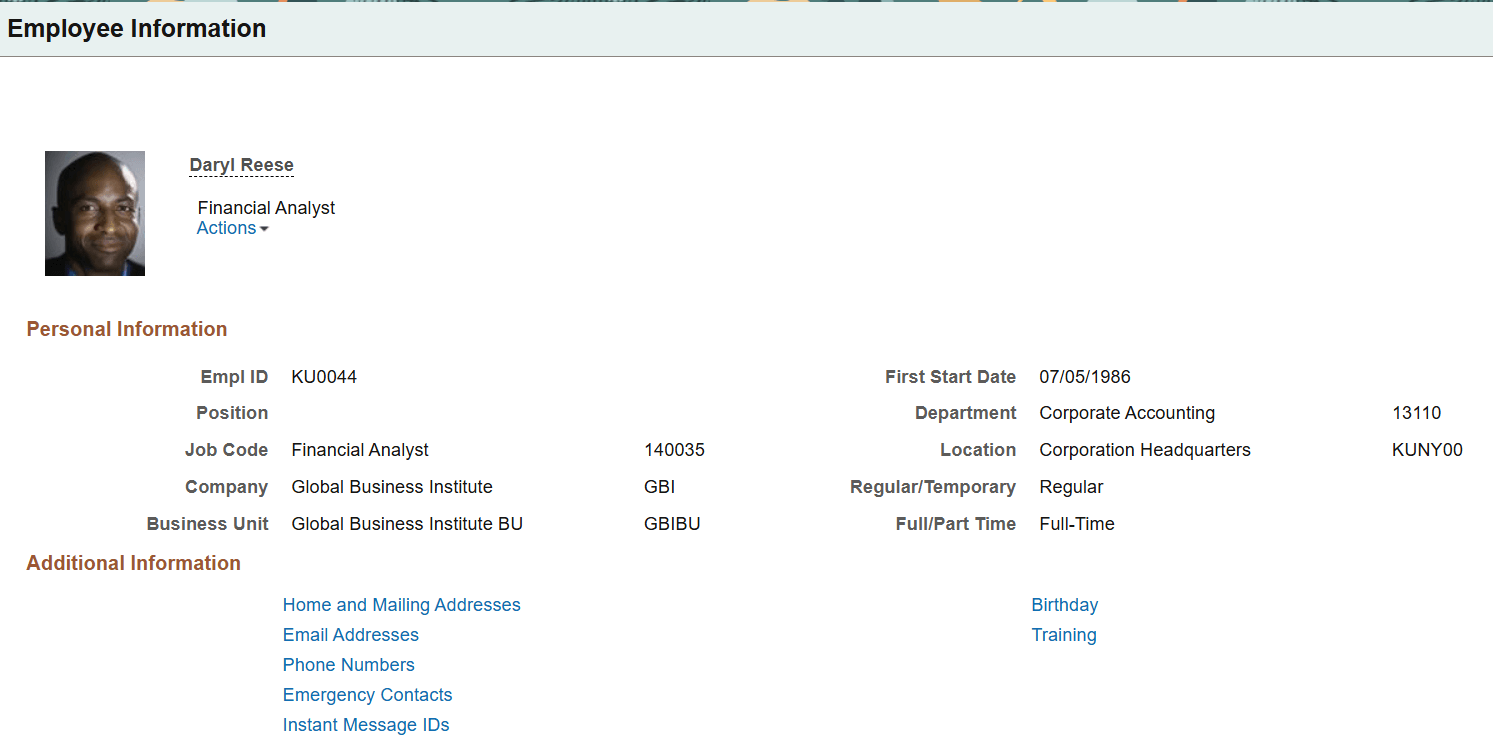
Select a link to view the corresponding information for the employee.
Emergency Contact Page (for Manager)
Use the Emergency Contact page (HR_EMERGENCY_CNTCT) to view the employee's emergency contact information.
Navigation:
Select the Emergency Contact link from the Employee Information Page.
This example illustrates the Emergency Contact page for the manager.
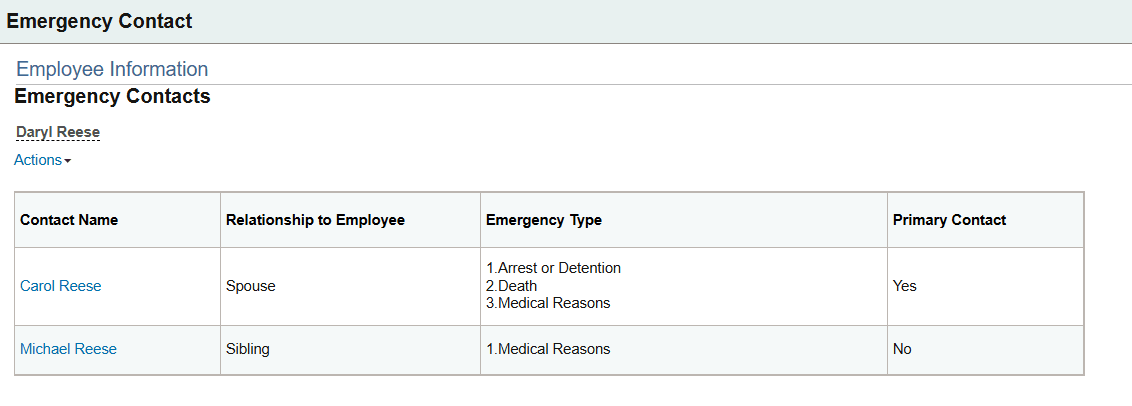
User the Actions drop down link under the person's name to display a drop-down menu of self-service transactions. These links provide the manager quick access to self service transactional pages. For more information about related actions, see Application Fundamentals: Related Actions for Manager Self Service Pages.
Select a contact's name link to access the Emergency Contact Detail Page (for Managers).
Emergency Contact Detail Page (for Managers)
Use the Emergency Contact Detail page (HR_EMERG_CNTCT_DET) to view a person's emergency contact details.
Navigation:
Select an emergency contact's name link on the Emergency Contact Page (for Manager).
This example illustrates the Emergency Contact Detail page for managers.
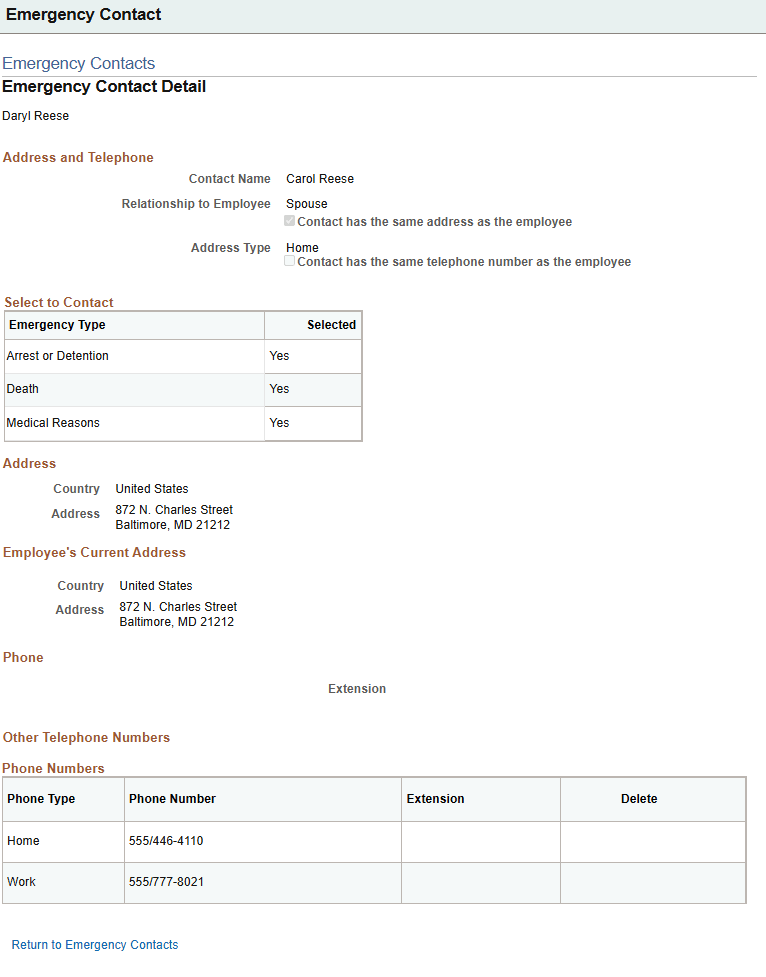
This page is display only.
| Field or Control | Description |
|---|---|
|
Contact Name |
Displays the name of the emergency contact. |
|
Relationship to Employee |
Displays this person's relationship to the employee. |
|
Contact has the same address as the employee and Address Type |
Displays as selected if the contact person shares the same address as the employee. When selected, it will also show the Address Type field for the employee's address type shown on the page. |
|
Contact has the same telephone number as the employee and Phone Type |
Displays as selected if the contact person shares the same phone number as the employee. When selected, it will also show the Phone Type for the phone number they share. |
Select to Contact
This section is available when Enable Emergency Type Selection is enabled on the Installation Table - HCM Options Page and a contact has been designated to be contacted for at least one of the emergency situations. If no emergency contacts have been designated, this section will not be available.
| Field or Control | Description |
|---|---|
|
Emergency Type |
This grid lists the critical situations for which you should contact this person. Values include:
|
|
Selected |
Displays Yes if this person should be contacted for the corresponding emergency type. |
Address, Phone, and Other Telephone Number Sections
The address and phone number information is read only.
Multiple phone numbers for an emergency contact may appear under the Other Telephone Number section.