Defining PAR Tracking Data
To define PAR tracking data, use the Approval Transactions (GVT_WIP_RECORD) component.
These topics provide an overview of default PAR data and describe how to enter the PAR tracking data for federal self-service transactions.
Page Used to Define PAR Tracking Data
| Page Name | Definition Name | Usage |
|---|---|---|
|
GVT_WIP_RECORD3 |
Define PAR tracking data. |
Understanding PAR Tracking Data
Self-service transactions are designed so that employees can easily enter requests to change their own personal data and managers can enter requests to change their direct reports' job data. The government requires that certain information be included with each personnel action request. However, this data would not ordinarily be known by the self-service user.
To ensure that this information is recorded accurately, the system enables you to define the appropriate action/reason codes, Notice of Action (NOA) codes, legal authorities, and PAR remarks for each transaction. This default information is automatically written to the government PAR records when the federal component interface is run at the completion of the final self-service step for the transaction.
Defaults / Admin Page
Use the Defaults / Admin page (GVT_WIP_RECORD3) to define PAR tracking data.
Navigation:
This example illustrates the fields and controls on the Defaults / Admin page. You can find definitions for the fields and controls later on this page.
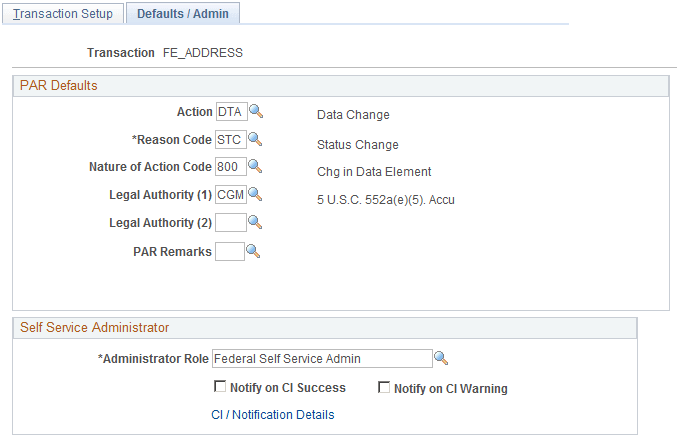
PAR Defaults
| Field or Control | Description |
|---|---|
|
Action |
Select the action that you want written to the government PAR tables for the transaction. These codes are defined on the Action Reasons page. |
|
Reason Code |
Select the reason code that you want written to the government PAR tables for the transaction. These codes are defined on the Action Reasons page. |
|
Nature of Action Code |
Select the nature of action code that you want written to the government PAR tables for the transaction. These codes are defined on the Nature of Action Table page. |
|
Legal Authority (1) |
Select the legal authority (1) that you want written to the government PAR tables for the transaction. These codes are defined on the Legal Authority page. |
|
Legal Authority (2) |
Select the legal authority (2) that you want written to the government PAR tables for the transaction. These codes are defined on the Legal Authority page. |
|
PAR Remarks |
Select the PAR remarks that you want written to the government PAR tables for the transaction. These codes are defined on the Personnel Action Rqst Rmks page. |