Viewing the Career Snapshot - Summary Tiles and Pages
When employees access the Career Snapshot, the system displays the Summary dashboard by default. The Summary dashboard displays tiles with a variety of high level information you can quickly review in regards to your professional career and skills.
This topic discusses and lists the Career Snapshot - Summary tiles and pages for the employee.
Pages Used to View the Career Snapshot - Summary Tiles and Pages
| Page Name | Definition Name | Usage |
|---|---|---|
|
PT_LANDINGPAGE |
Access a variety of high level summary tiles about your employment and career. |
|
|
PeopleSoft eProfile Manager Desktop: Performance (Summary) Tile |
HCTS_PERF_SUM1_FL |
View your overall rating from the last performance period. |
|
PeopleSoft eProfile Manager Desktop: Performance History Page |
HCTS_PERFHIST_FL HCTS_PERFHIST_SCF |
Review the overall ratings for your past performance periods using either a chart or table grid. |
|
PeopleSoft eProfile Manager Desktop: Compensation (Summary) Tile |
HCTS_CMP_SAL1_FL |
View your current base salary and when it was last changed. |
|
PeopleSoft eProfile Manager Desktop: Compensation: Current Salary Page |
HCTS_COMP_SALRY_FL |
View your salary range for your job and where you fall within that range. |
|
PeopleSoft eProfile Manager Desktop: Compensation: Salary History Page |
HCTS_COMP_SALRY_FL |
View a quick summary of your compensation history. |
|
PeopleSoft eProfile Manager Desktop: Compensation History Page |
HCTS_COMP_HIST_SCF |
Review or verify your compensation history. |
|
PeopleSoft eProfile Manager Desktop: Salary Change Details Page |
HCTS_COMP_VC_SCF |
View details of a specific salary change. |
|
PeopleSoft eProfile Manager Desktop: Compensation: Total Rewards Page |
HCTS_COMP_SALRY_FL HCTS_CMP_TRW_SBF |
Review your total rewards data. |
|
PeopleSoft Human Resources Administer Compensation: Total Rewards Page |
TRW_SS_STMT_FL |
Review your earnings, benefits, and other compensation information for a select review period. |
|
PeopleSoft eProfile Manager Desktop: Job Details (Summary) Tile |
HCTS_JOBDTL_SUM_FL |
View your years of service and time in the current job. |
|
PeopleSoft eProfile Manager Desktop: Job Details: Job Information Page |
HCTS_JOBDTL_SUM_FL |
Review detailed information about your current job. |
|
PeopleSoft eProfile Manager Desktop: Job Details: Job History Page |
HCTS_JOB_DTLS_FL |
View a summary of your job history. |
|
PeopleSoft eProfile Manager Desktop: Job Competencies (Summary) Tile |
HCTS_JOBCOMP1_FL |
Note the number of competencies where your profile rating is above or below the target for the your job |
|
HCTS_JOBCOMPDT_FL HCTS_JOBCOMPDTL_FL |
Review a list of competencies associated with your job (non-person) profile compared to the your (person) profile. |
|
|
PeopleSoft eProfile Manager Desktop: Job Competency Details Page |
JPM_ITM_DTL_FL |
View the details of your rating for a job competency. |
|
PeopleSoft eProfile Manager Desktop: Personal Competencies (Summary) Tile |
HC_HCTS_PERS_COMP1_FL |
View the total number of competencies associated with your (person) profile, but not your job (non-person) profile. |
|
PeopleSoft eProfile Manager Desktop: Personal Competencies Page |
HCTS_PERS_COMP_FL |
View a complete list of competencies associated with your profile, but not your job (non-person) profile. |
|
PeopleSoft eProfile Manager Desktop: Personal Competency Details Page |
JPM_ITM_DTL_FL |
View additional details about your competency ratings. |
|
Talent Profile Page (see PeopleSoft eDevelopment: Talent Profile Page (for Employees) or Team Talent Profile Page (for Managers)) |
JPM_PERS_PROFL_FLU |
View and update your talent profile data in fluid. |
|
PeopleSoft eProfile Manager Desktop: Licenses and Certifications (Summary) Tile |
HCTS_LICENSE_FL |
View the number of current, expiring, or missing licenses and certifications you hold. |
|
PeopleSoft eProfile Manager Desktop: Licenses and Certifications Page |
HCTS_LICENSE1_FL HCTS_LICENSE_SCF |
View your licenses and certifications. |
|
PeopleSoft eProfile Manager Desktop: Licenses and Certifications Details Page |
JPM_ITM_DTL_FL |
View additional details about a license or certification your hold. |
|
PeopleSoft eProfile Manager Desktop: Responsibilities (Summary) Tile |
HC_HCTS_RESP_SUM1_FL |
Note the number of responsibilities you have been assigned. |
|
HCTS_RESP1_FL HCTS_RESP_FL |
Review a list of responsibilities you have been assigned. |
|
|
PeopleSoft eProfile Manager Desktop: Responsibilities Details Page |
JPM_ITM_DTL_FL |
View additional details about your assigned responsibilities. |
|
PeopleSoft eProfile Manager Desktop: Honors and Awards (Summary) Tile |
HC_HCTS_HONAW_SUM1_FL |
View the total number of honors and awards you have recorded. |
|
HCTS_HONORS_FL |
Review a list of recorded honors and awards you have received. |
|
|
PeopleSoft eProfile Manager Desktop: Honors and Awards Details Page |
JPM_ITM_DTL_FL |
View additional details about one of your honors or awards. |
|
PeopleSoft eProfile Manager Desktop: Job Interests (Summary) Tile |
HCTS_JOBIN_SUM1_FL |
See a job, as well as a count of the number of jobs, in which you have expressed interest. |
|
HCTS_JOB_INT1_FL |
Review a list of jobs in which you have expressed interest. |
|
|
Job Profile Page [seePeopleSoft eDevelopment: My Job Profiles Page (for Employees), View Job Profiles Page (for Employees), and Maintain Job Profiles Page (for Managers)] |
JPM_NPERS_PROFL_FL |
Review or update a job profile using the Profile Management system. |
|
HCTS_EDUCATION1_FL_GBL |
See the most recent education level you have recorded and a number count of all your other degrees and school levels. |
|
|
HCTS_EDUCATION_FL |
See the school education levels attended and degrees you've completed. |
|
|
JPM_ITM_DTL_FL |
View details about your education level or degrees obtained. |
|
|
PeopleSoft eProfile Manager Desktop: Career Plans (Summary) Tile |
HCTS_CAREERPLN1_FL_GBL |
View the next step in your career path. The tile will also list the number of other specified career path options. |
|
HCTS_CAREERPLN_FL |
Review a list of all career path options defined for you. |
|
|
PeopleSoft eProfile Manager Desktop: Career Move Details Page |
HCTS_CP_ADMPTH_SCF |
View additional details about a career move. |
|
PeopleSoft Human Resources Plan Careers and Successions: Career Progression Chart Page |
HR_CP_PRO_CHART |
View a graphical representation of your career paths and perform a competency gap/fit analysis. |
|
PeopleSoft eProfile Manager Desktop: Digital Badges (Summary) Tile |
HC_HCTS_BDG_SUM_FL_GBL |
View the number of badges you have earned. |
|
PeopleSoft Application Fundamentals: View Digital Badges Page |
BDG_SS_VIEW_LST_FL |
View a list of your awarded badges. |
|
PeopleSoft eProfile Manager Desktop: Recognitions (Summary) Tile |
HCTS_RECOG_SUM_FL |
View the number of recognitions you have received over the last 12 months. |
|
HCTS_RECOG_LIST_FL |
Review details of recognitions you have received. |
Note:
These pages and tiles are similar to those on the (Manager) Team Snapshot and (Administrator) View Snapshot - Summary dashboard. For further information on these tiles and pages, see the PeopleSoft eProfile Manager Desktop: Viewing the Snapshot - Summary Tiles and Pages documentation.
Career Snapshot - Summary Dashboard
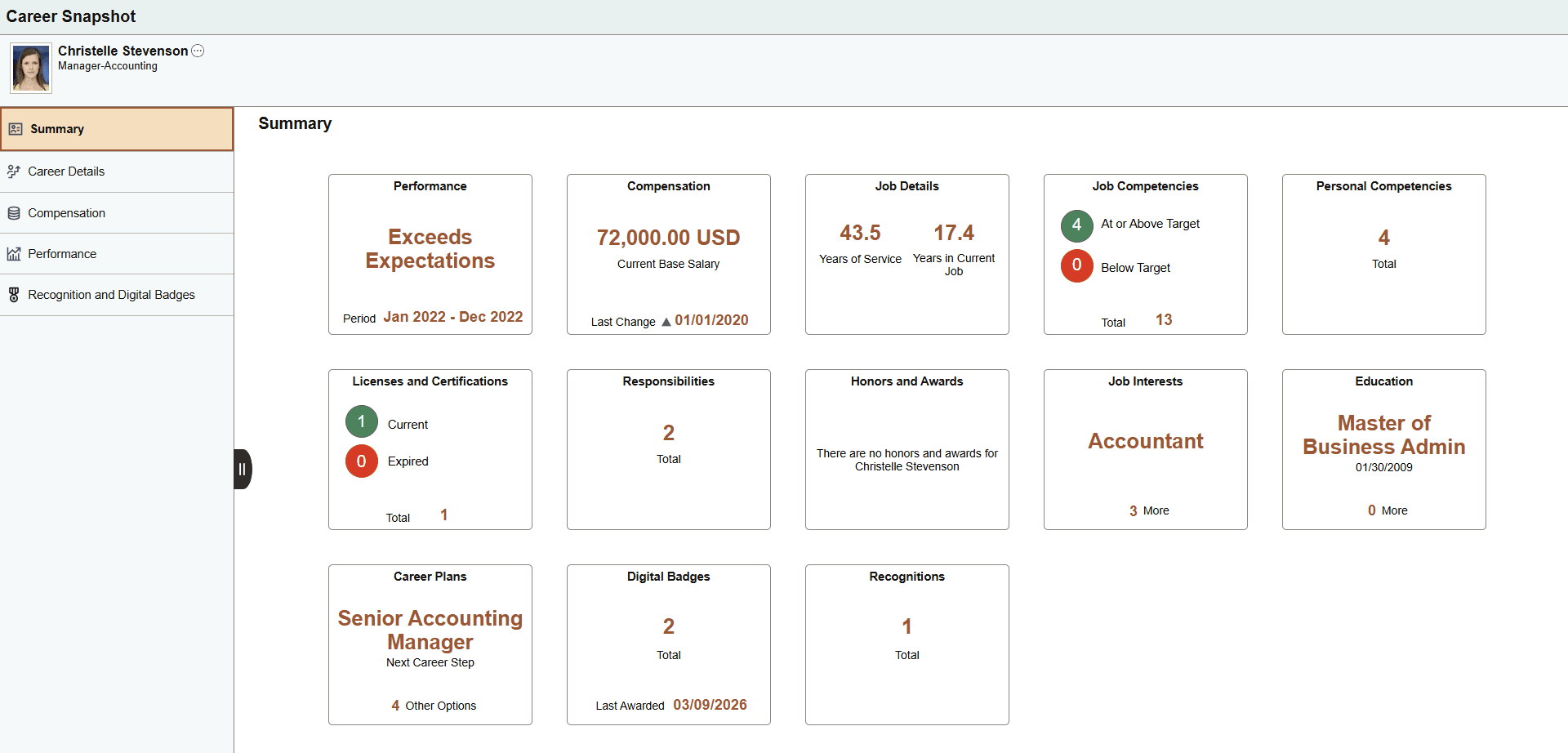
Employees use the Career Snapshot - Summary dashboard (PT_LANDINGPAGE) to access a variety of high level summary tiles about their employment and career.
Navigation:
Select the Career Snapshot Tile from the homepage you added the tile.
Note:
You must be assigned the Talent Summary Employee Fluid role to access the Career Snapshot dashboards.
This example illustrates the fields and controls on the Career Snapshot - Summary dashboard.
This example illustrates the fields and controls on the Career Snapshot - Summary dashboard for a person with multiple jobs.
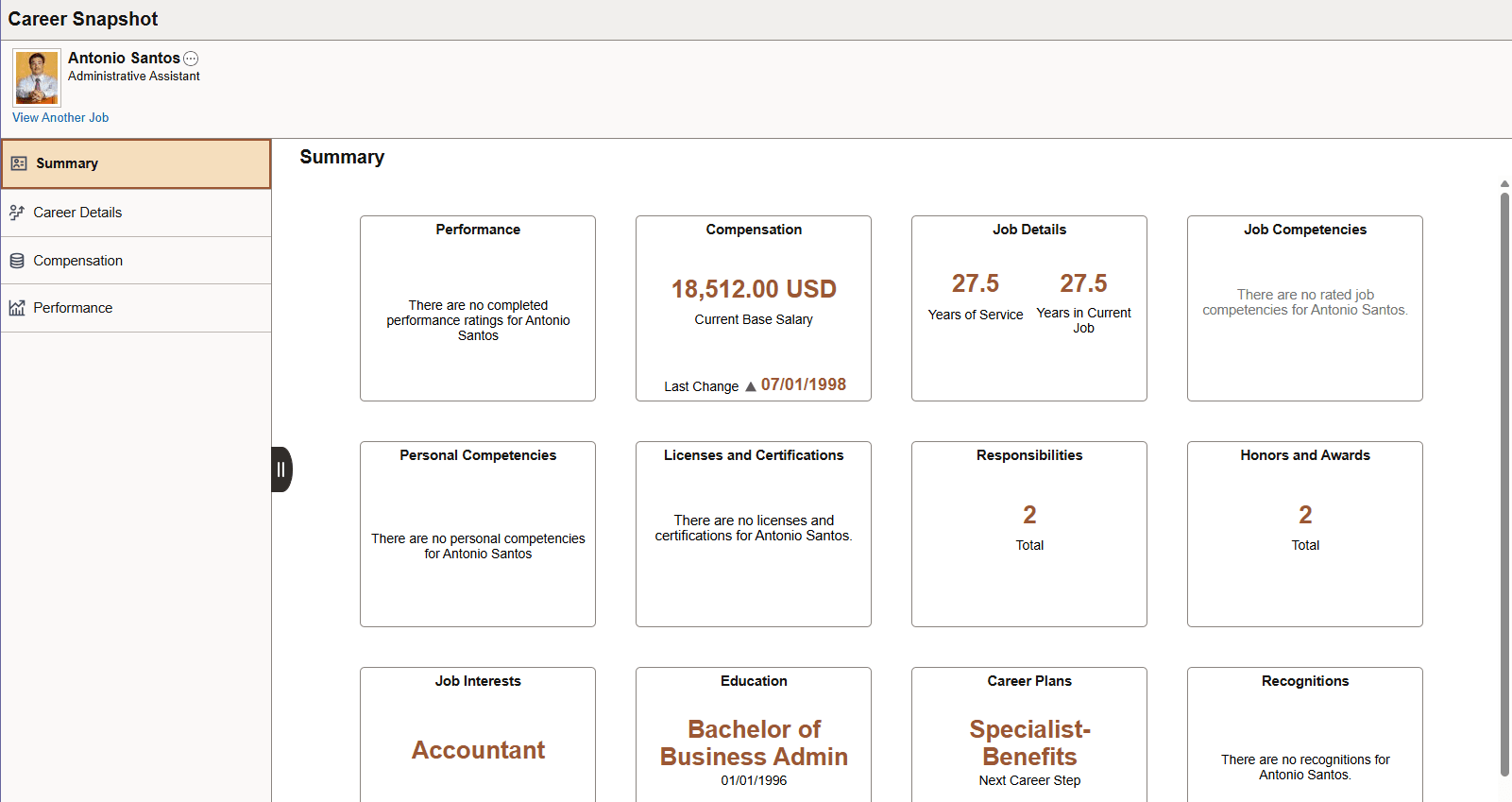
These tiles are delivered by default with the Summary dashboard.
-
PeopleSoft eProfile Manager Desktop: Performance (Summary) Tile
-
PeopleSoft eProfile Manager Desktop: Compensation (Summary) Tile
-
PeopleSoft eProfile Manager Desktop: Job Details (Summary) Tile
-
PeopleSoft eProfile Manager Desktop: Job Competencies (Summary) Tile
-
PeopleSoft eProfile Manager Desktop: Personal Competencies (Summary) Tile
-
PeopleSoft eProfile Manager Desktop: Licenses and Certifications (Summary) Tile
-
PeopleSoft eProfile Manager Desktop: Responsibilities (Summary) Tile
-
PeopleSoft eProfile Manager Desktop: Honors and Awards (Summary) Tile
-
PeopleSoft eProfile Manager Desktop: Job Interests (Summary) Tile
-
PeopleSoft eProfile Manager Desktop: Career Plans (Summary) Tile
-
PeopleSoft eProfile Manager Desktop: Digital Badges (Summary) Tile
-
PeopleSoft eProfile Manager Desktop: Recognitions (Summary) Tile
Note:
These tiles are delivered by default to appear on the Summary dashboard page of Career Snapshot; however, the administrator can move the tiles to appear on other Career Snapshot dashboard folders. The navigation in the corresponding topics references the delivered navigation.
| Field or Control | Description |
|---|---|
|
View Another Job link |
This link is available when you have multiple jobs. Select this link to access the View Another Job Page and change the Career Snapshot view to examine data related to another one of your jobs. |