Accruing and Taking Annual Leave
This section discusses each of the annual leave entitlements and their respective take elements.
Hours Per Year—Entitlement Only
This is absence entitlement ANN ENTHRS. It has to determine the accrual rate per frequency and is based on a standard annual accrual of 152 hours and 38 standard weekly work hours (38 × 4 weeks leave per year = 152).
The absence element's entitlement value on the calculation page is formula ANN FM ENTHPY. This formula prorates the annual hours accrual for each employee because their standard hours (on JOB) may not be your organization's standard weekly work hours set in variable LVE VR ENT STD HRS on the Supporting Elements Override page of the absence entitlement. The standard annual entitlement, 152, is set in variable ANN VR ENTHRS.
(Standard weekly hours for employee ÷ Entitlement standard weekly hours) × Annual entitlement = ANN FM ENTHPY
35 / 38 × 152 = 139.999999
Note:
The rounding rules handle the fractions. Standard weekly hours for the employee are calculated by formula LVE FM WK STD HRS, which annualizes and deannualizes the employee's standard hours because the work period (in the Job record) may not be weekly, and the proration of the annual accrual is based on weekly hours.
The annualized accrual is deannualized by the absence calendar frequency when the calendar is run. The deannualized accrual adds to the absence entitlement's _ENT and _BAL accumulators.
Accumulators are stored by EMPL ID/EMPL RCD and begin at hire date or rehire in the first instance. When a new accumulator instance is automatically created for a new year to date (YTD) period, the previous value of the _BAL accumulator is rounded and rolled over into the new YTD accumulator instance. The other accumulators are reset to 0.
The related absence take, ANN TKEHRS, decrements the absence units from the _BAL accumulator and stores them in the _TKE accumulator.
The units (hours) to decrement are resolved by the take's hours-based day formula, LVE FM HRS ABS PH which:
-
Determines if the day is a public holiday.
If it is, the system does nothing further because there are no entitlement hours used or annual leave paid for that day.
-
Checks for scheduled and partial hours and returns partial hours if there are any.
-
If there are no partial hours, it checks for a decimal value in the User Defined 1 field on the Absence Event Input Detail page.
If there is a value (any value) it halves the scheduled hours.
-
If it isn't a public holiday, there are no partial hours and no halving, and there are scheduled hours, the formula returns the scheduled hours.
-
The units returned become the paid units (DAY COUNT PD) and unpaid units (DAY COUNT UNP) depending on available absence entitlement.
These units are mapped to the appropriate earnings elements (ANN and LWOP, respectively), which the system processes as positive input when the payroll calendar is run. The value of DAY COUNT PD is also mapped to the LVLD (leave loading) earnings element if a leave loading is required.
Note:
Any value in the decimal field will halve the hours taken. You can use this to take twice as long a leave period at half hours per day, which is effectively half pay per day.
The day formula includes a check to see if a forecasted leave duration (in hours) is overridden in the User Defined 3 field on the take's Calculation page. If it is, that duration represents the whole leave period so the system stops using the day count formula to determine the leave duration in hours.
Days Per Year—Pro Rata and Entitlement
This scenario requires two absence entitlements, ANN PRODYS and ANN ENTDYS, which this discussion refers to as entitlement and pro rata, respectively. The pro rata day entitlement, ANN PRODYS, determines the accrual rate per frequency. Its entitlement value on the calculation page is numeric 20 and the specified frequency is A (annual).
The entitlement value, 20, is deannualized according to the calendar period frequency for each employee.
Note:
When an employee works less than five days per week and therefore accrues less than 20 days per year, you can enter an employee level override on the Entitlement/Take Assignment page to change the entitlement unit value; for example, from 20 to 16 for an employee working a four-day week.
When you run the absence calendar, the deannualized value is accrued to the pro rata year-to-date _ENT and _BAL accumulators. The year in the year-to-date is set when the accumulator's begin option is Specify Date, and the begin month and begin day are generic variables LVE VR HIRE MONTH and LVE VR HIRE DAY, which hold the employee's hire month and day, respectively. The accumulators are stored by EMPL ID/EMPL RCD.
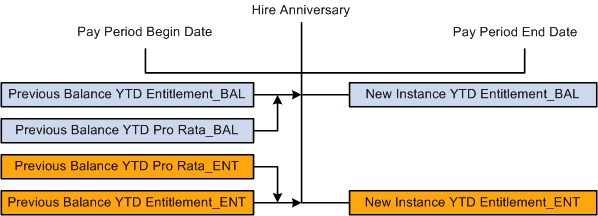
When the system automatically creates new instances of the accumulators at the hire date anniversary, the previous values of the entitlement _ENT and _BAL accumulators are rolled over into their new instances and the previous values of the pro rata _ENT and _BAL accumulators are rounded and rolled over into the new instances of the entitlement _ENT and _BAL accumulators.
This diagram shows pro rata balances transferring to new instances of entitlement balances
The current calendar period is then split into pre-hire anniversary and post-hire anniversary periods, using generic date element LVE DT HIRE ANN DT. The pre-hire anniversary days are then used in formula ANN FM P2EDYS EMBR to work out the proportion of the accrual that belongs to the pre-hire anniversary period. This value is then sent to variable ANN VR PP2EDYS MBR, which adds to the entitlement _BAL and _ENT accumulators.
This diagram shows accrual for the days before hire anniversary becoming entitlement.
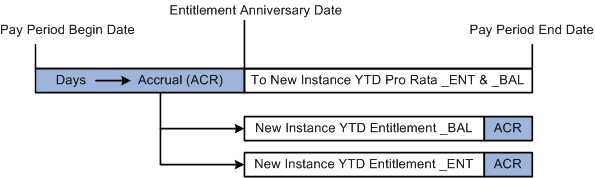
The pre-hire anniversary accrual variable, ANN VR PP2EDYS MBR, also subtracts from the pro rata _ENT and _BAL accumulators. This reduces the pro rata _ENT and _BAL balances by the amount of the accrual that was accrued in the previous accumulator period.
The absence take, ANN TKEDYS, related to both the pro rata and entitlement absence elements (indicating that pro rata days can be used despite not having become entitlement yet) firsts looks to the entitlement balance to decrement absence units before looking to the pro rata balance to further decrement absence units (where the entitlement units are depleted).
The units (days) to decrement is resolved by the take's Day Formula, LVE FM DYS ABS PH which:
-
Determines if the day is a public holiday.
If it is, it does nothing further because no entitlement hours are used and no annual leave is paid for that day.
-
Checks for scheduled and partial hours; if there are partial hours, the system returns the fraction of the day the hour represents and then rounds them.
Partial hours ÷ Scheduled hours = Fraction of day absent
2 ÷ 8 = 0.25
The formula includes variable LVE VR DYS ABSENT, which holds the cumulative value of the results of the day formula as it resolves for each day in the leave period. It starts as 0. In this example, its value after the resolution for day 1 would be 0 + 0.25 = 0.25.
-
If there are no partial hours, it checks for a decimal value in the User Defined 1 field on the Absence Event Input Detail page.
If there is any value, it adds 0.5 to LVE VR DYS ABSENT. Assuming this is the case, in this example Day 1 + Day 2 = 0.75.
-
If it isn't public holiday, there are no partial hours or halving, but there are scheduled hours, then the formula adds 1 to LVE VR DYS ABSENT.
The units returned become the paid units (DAY COUNT PD) and unpaid units (DAY COUNT UNP) depending on available absence entitlement days and pro rata days.
The positive input for this absence take is earnings ANN and LWOP. The units for these earnings are formulas LVE FM DY DCP HRS and LVE FM DY DCUP HRS, respectively. The formulas multiply the DAY COUNT PD and DAY COUNT UNP by the scheduled hours, so the system can pay the leave in hours.
Note:
Any value in the decimal field halves the hours taken. You can use this to take twice as long a leave period at half hours per day which is effectively half pay per day.
Anything but a partial day returns either 0.5 or 1, because a day can only be a partial hours fraction, a half day or a full day.
Hours Per Hour—Entitlement Only
This leave entitlement is ANN ENTHPH, and there is no pro rata leave. Leave accrues as a fraction of an hour per hour worked. The hourly accrual rate (the fraction) is derived from 4 × 38 hour weeks, or 152 hours per year.
The hour fraction, stored in variable ANN VR ENTHPH, is set to 0.076712. That figure comes from:
(152 ÷ 52.14308 (the weekly annualization factor)) ÷ 38 = 0.076712
Accumulator ANN AC ENTHPH REG stores the units of hourly pay for the calendar period, and ANN ENTHPH entitlement's formula ANN FM ENTHPH multiplies the accumulated hours by the variable when the absence calendar is run and populates its _ENT and _BAL accumulators.
Note:
The formula also checks to see if the employee hasn't been terminated. If he has, the formula returns ANN VR ENTHPH × TER VR FINAL HRS.
The absence take for this leave accrual is ANN TKEHPH, and its day formula is LVE FM HRS ABS PH—the same day formula that take ANN TKEHRS uses.
Note:
If you pay more than 38 hours per week, this entitlement accrues more than the annual maximum of 152 hours (unless there are balancing reductions in other weeks).