Viewing Dependents
This topic discusses how to view an employee's dependents.
Page Used to View Dependents
| Page Name | Definition Name | Usage |
|---|---|---|
|
GPBR_DEPEND_SUMM |
View information about an employee's dependents, including how many dependents are eligible for Income Tax deductions. You can also view the number of dependents for other purposes, such as family allowance and child care allowance. |
Review Dependent Data BRA Page
Use the Review Dependent Data BRA page (GPBR_DEPEND_SUMM) to view information about an employee's dependents, including how many dependents are eligible for Income Tax deductions.
You can also view the number of dependents for other purposes, such as family allowance and child care allowance.
Navigation:
This example illustrates the fields and controls on the Review Dependent Data BRA page.
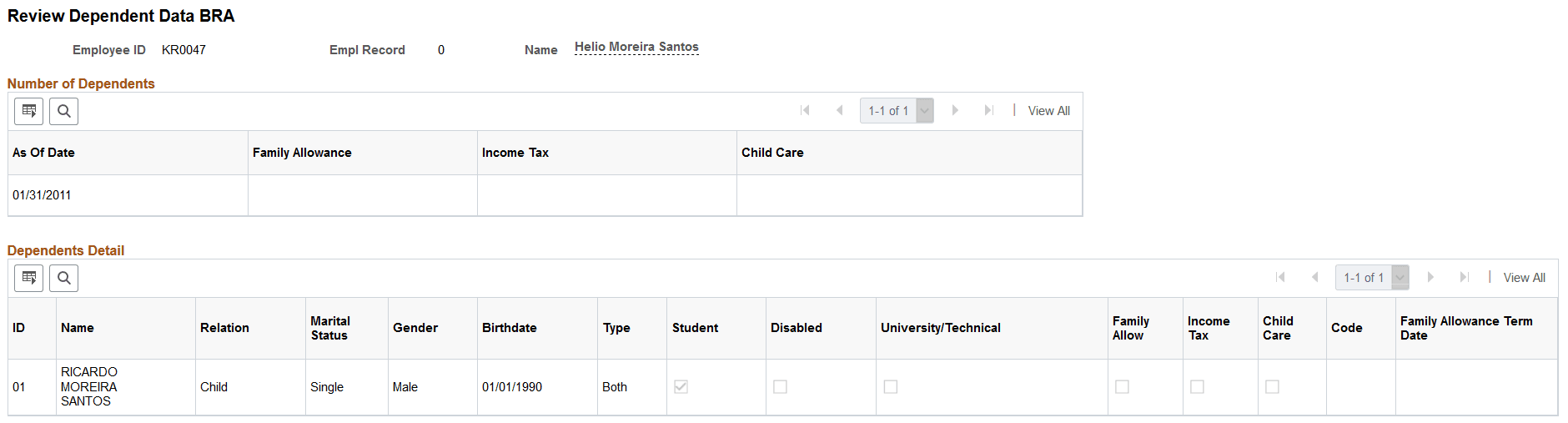
Number of Dependents
| Field or Control | Description |
|---|---|
|
As Of Date |
Displays the date of the most recent payroll calculation. |
|
Family Allowance, Income Tax, and Child Care |
Displays the number of qualifying dependents for family allowance, income tax, and child care purposes as calculated by the most recent payroll. |
Dependents Detail
This group box displays a summary of the information entered for each dependent on the Dependent Information - Personal Profile page. Use this data to validate the number of qualifying dependents for each purpose that appears in the Number of Dependents group box.