Configuring the Payroll Approval Process for CHN
Note:
Oracle PeopleSoft delivers Notification Composer Framework to manage the setup and administration of all notifications in one central location.
Once you have adopted the Notification Composer feature, you must use it to create new notifications and manage your existing notifications.
Notifications delivered with HCM Image 47 or later must use Notification Composer.
For more information about Notification Composer Framework, see Enterprise Components: Understanding Notification Composer.
Pages Used to Configure the Payroll Approval Process for CHN
| Page Name | Definition Name | Usage |
|---|---|---|
|
EOAW_TXN |
View or edit the notification options, default approval component, approval event handler class, and other settings for the Payroll Approval Process (GPCN_Payroll_Approval) process ID. See Application Fundamentals: Registering Approval Transactions and Approval Framework: Setting Up the Transaction Registry |
|
|
EOAW_TXN_NOTIFY |
View or edit the notification template to use for the GPCN_Payroll_Approval process ID. See Application Fundamentals: Configuring Approval Transactions and Approval Framework: Configuring Approval Transactions |
|
|
EOAW_PRCS_MAIN |
View or edit the delivered process definition for the GPCN_Payroll_Approval process ID. See Application Fundamentals: Defining Dynamic Approvals and Approval Framework: Defining the Setup Process Definitions Component. |
|
|
USER_EMAIL |
Enter or confirm the email address for an approver. |
Related Topics
Register Transactions Page
System Administrators use the Register Transactions page (EOAW_TXN) to view or edit the notification options, default approval component, approval event handler class, and other settings for the GPCN_Payroll_Approval process ID.
Navigation:
This example illustrates the fields and controls on the Register Transactions page, and shows the field values that are delivered for the GPCN_PAY_XREF process ID.
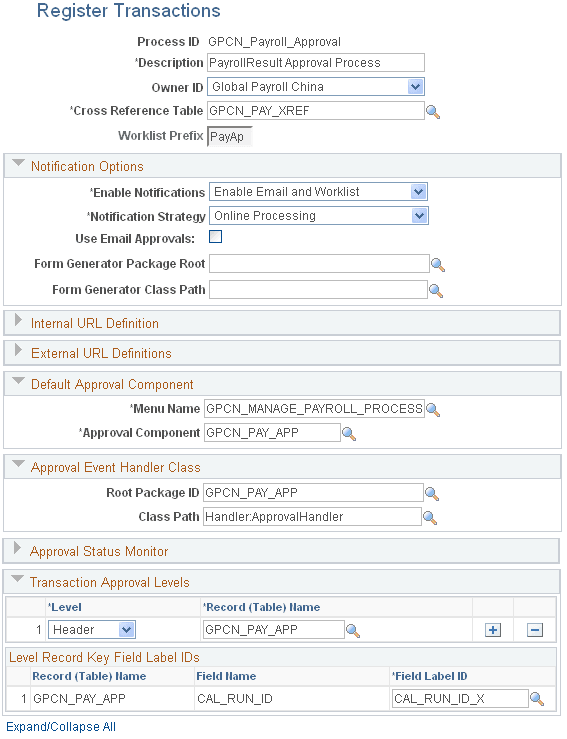
For more information about this page, seeApplication Fundamentals: Registering Approval Transactions and Approval Framework: Setting Up the Transaction Registry
Configure Transactions Page
System Administrators use the Configure Transactions page (EOAW_TXN_NOTIFY) to view or edit the notification template to use for the GPCN_Payroll_Approval process ID.
Navigation:
This example illustrates the fields and controls on the Configure Transactions page, and shows the field values that are delivered for the GPCN_PAY_XREF process ID.
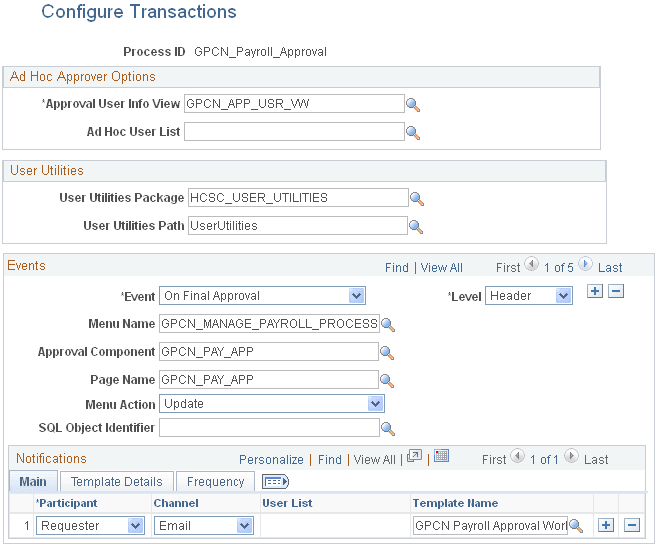
For more information about this page, seeApplication Fundamentals: Configuring Approval Transactionsand Approval Framework: Configuring Approval Transactions
Setup Process Definitions Page
System Administrators use the Setup Process Definitions page (EOAW_PRCS_MAIN) to view or edit the delivered process definition for the GPCN_Payroll_Approval process ID.
Navigation:
This example illustrates the fields and controls on the Setup Process Definitions page, and shows the field values that are delivered for the GPCN_PAY_XREF process ID.
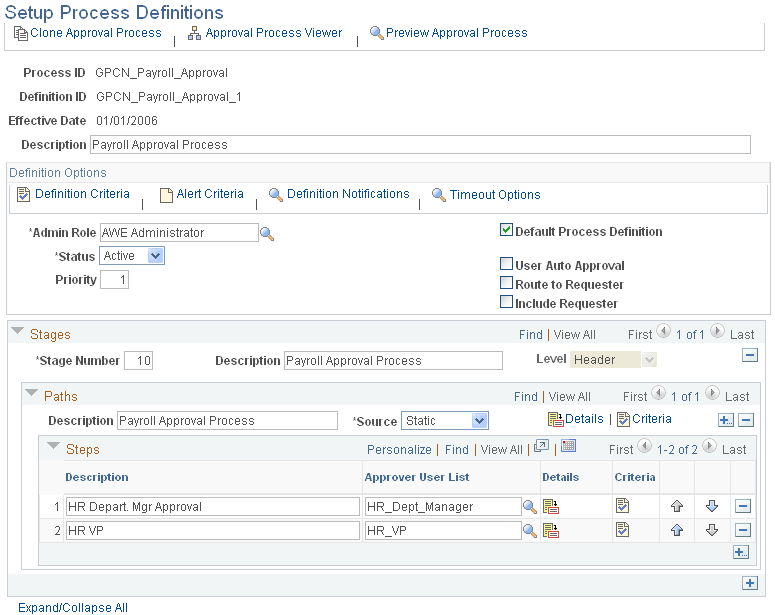
For more information about this page, seeApplication Fundamentals: Defining Dynamic Approvals and Approval Framework: Defining the Setup Process Definitions Component.
User Profiles - Email Addresses Page
System Administrators use the User Profiles - Email Addresses (USER_EMAIL) to enter or confirm the email address for an approver.
Navigation:
And, select the Edit Email Addresses link on the General page.
This example illustrates the fields and controls on the User Profiles - Email Addresses page.
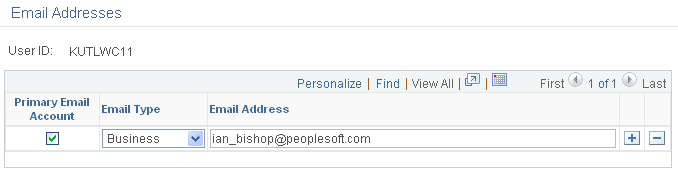
For more information about this page, seeApproval Framework: Triggering Email Collaboration