Admin Information Page
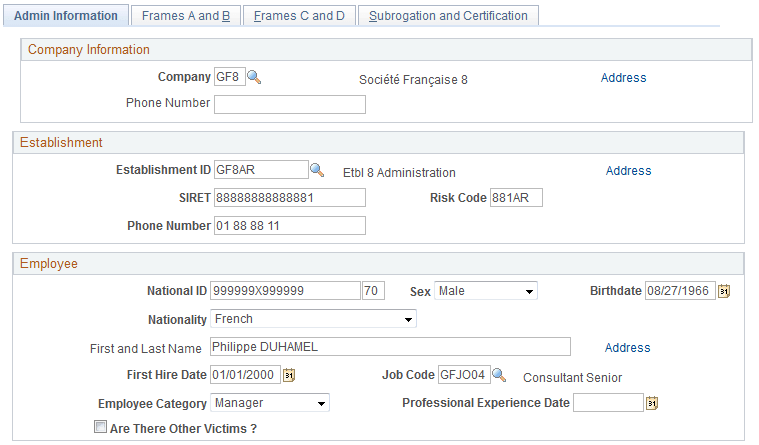
Use the Admin Information page (GPFR_ATMP_1) to generate the data needed to produce certificates for work accidents and occupational illness.
Navigation:
This example illustrates the fields and controls on the Accident/Illness Cert FRA - Admin Information page. You can find definitions for the fields and controls later on this page.
Note:
You must run the Illness/Maternity Certificate Application Engine process (GPFR_ILL_AE ) using the Extract Certificates Data FRA component before accessing the pages in the Accident/Illness Cert FRA component.
Company Information
| Field or Control | Description |
|---|---|
|
Company |
Displays the payee's company on the date of the accident. |
|
Phone Number |
Displays the phone number for the company. |
|
Address |
Click this link to access the Company Address page, which displays the address of the company that you selected. |
Establishment
This group box displays information about the establishment at which the employee works, as entered in HR.
| Field or Control | Description |
|---|---|
|
Establishment ID |
Displays the establishment with which the employee was associated on the original date of the absence. |
|
SIRET |
Displays the SIRET identification number for the establishment. |
|
Risk Code |
Displays the risk code for the establishment. |
|
Phone Number |
Displays the establishment's phone number. |
|
Address |
Click this link to access the Establishment Address page, which displays the address of the establishment that you selected. |
Employee
| Field or Control | Description |
|---|---|
|
National ID |
Displays the payee's national ID followed by the key. |
|
Sex |
Displays the payee's gender: Female, Male , or Unknown. |
|
Birthdate |
Displays the payee's date of birth. |
|
Nationality |
Displays the payee's nationality: EEC Resident, French, or Other. |
|
Address |
Click this link to access the Employee Address page, which displays the employee's address. |
|
First Hire Date |
Displays the date on which the employee was first hired. |
|
Job Code |
Displays the employee's job code. |
|
Employee Category |
Displays a category: Executive, Manager, or Workman. |
|
Professional Experience Date |
Displays the employee's years of seniority in the job. |
|
Are There Other Victims |
For work accidents, select this check box if another person was injured in the accident. |
Related Topics