Frames A and B Page
Use the Frames A and B page (GPFR_ATMP_2) to display the payee's earnings during the reference period.
This page pertains to industrial accidents and occupational illness.
Navigation:
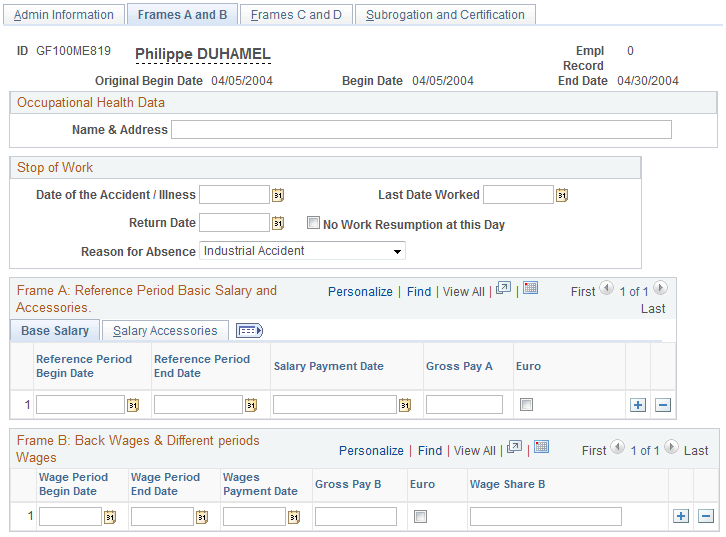
This example illustrates the fields and controls on the Accident/Illness Cert FRA - Frames A and B page: Base Salary tab. You can find definitions for the fields and controls later on this page.
Common Page Information
| Field or Control | Description |
|---|---|
|
Date of the Accident/Illness |
Displays the date of the accident or the first medical observation (for an occupational illness). This is the same date entered in the Original Begin Date field on the Absence Event Entry page. |
|
Last Date Worked |
Enter the last date that the payee worked. Please note that you must enter the date yourself, it does not display by default. |
|
Return Date |
Enter the date on which the payee returned to work, if applicable. |
|
No Work Resumption at this Day |
If the payee has not yet returned from the absence, select this check box. |
|
Reason for Absence |
Displays the reason for the absence as recorded on the Absence Event Entry page: Industrial Accident or Occupational Illness. |
Frame A: Reference Period Basic Salary and Accessories
Frame A displays the payee's monthly gross earnings for each month.
Base Salary Tab
The base salary represents the paid and unpaid earnings during the reference period, including any wages that were upheld during this period.
| Field or Control | Description |
|---|---|
|
Reference Period Begin Date |
Displays the begin date of the earliest segment in the selected period. |
|
Reference Period End Date |
Displays the end date of the latest segment in the selected period. |
|
Salary Payment Date |
Displays the date on which the payee was paid. |
|
Gross Pay A |
Displays the employee's gross pay. |
|
Euro |
This check box is selected automatically if the salary is paid in euros. |
Salary Accessories Tab
Access the Salary Accessories tab.
This example illustrates the fields and controls on the Accident/Illness Cert FRA - Frames A and B page: Salary Accessories tab. You can find definitions for the fields and controls later on this page.

| Field or Control | Description |
|---|---|
|
Reference Period Begin Date |
Displays the begin date of the earliest segment in the selected period. |
|
Reference Period End Date |
Displays the end date of the latest segment in the selected period. |
|
Advantages in Kind and Tips |
Displays the benefits in kind (avantages en nature) and tips (pourboires) not included in the base gross salary. |
|
Allowances |
Displays any allowances, premiums, or gratuities not included in the base gross salary. |
|
Wage Share A |
Displays the wage share of the contributions that correspond to the gross amount declared in columns 4, 5, and 6 of the certificate. |
|
Business Expenses |
Displays the amount of previously paid business expenses that are subject to contributions (that is, that are not part of the payee's standard gross pay). |
|
Percentage of Deduction |
Displays a supplemental deduction percentage if the payee's job qualifies for an additional deduction (journalists, for example). |
Frame B: Back Wages & Different Periods Wages
Frame B displays any back wages or wages that were paid to the payee at different intervals than the basic pay. For example, it might show a quarterly allowance (earned during the period from January 1 to March 31) that was paid in the March payroll.
| Field or Control | Description |
|---|---|
|
Wage Period Begin Date |
Displays the begin date of the period to which the amount in the Gross Pay B field applies. |
|
Wage Period End Date |
Displays the end date of the period to which the amount in the Gross Pay B field applies. |
|
Wages Payment Date |
Displays the date on which the payee was paid the processed gross. |
|
Gross Pay B |
Displays the gross amount of the employee's earnings. |
|
Euro |
This check box is selected automatically if the salary is paid in euros. |
|
Wage Share B |
Displays the wage share of the contributions that correspond to the gross amount declared in column 12 of the certificate. |