Extracting DUCS Data Using Application Framework
After you complete the DUCS setup pages, you can extract DUCS information from the payroll tables.
Pages Used to Extract DUCS Data
| Page Name | Definition Name | Usage |
|---|---|---|
|
GPFR_AF_EXTR_DEFN |
Define an Extraction ID. |
|
|
GPFR_AF_EXTR_PRM |
Enter a sending reference and the frequency code for the extraction data. |
|
|
GPFR_AF_EXTR_RUN |
Run the DUCS extraction process. |
Define Extraction Data Page
Use the Define Extraction Data page (GPFR_AF_EXTR_DEFN) to .
Navigation:
This example illustrates the fields and controls on the Define Extraction Data page. You can find definitions for the fields and controls later on this page.
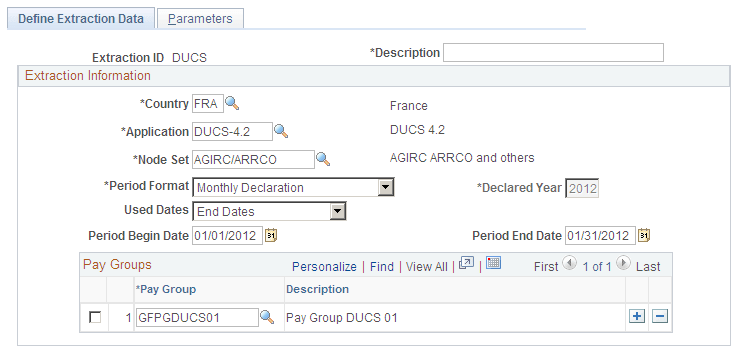
| Field or Control | Description |
|---|---|
|
Period Format |
Values are Month, Other, Quarter, Year. |
|
Declared Year |
Specify a value in this field only when the Period Format is Year. |
|
Used Dates |
These are the processed payroll results whose Payment Dates or Payroll Segment End Dates are within the Declaration Period. |
|
Period Begin Date and Period End Date |
Specify the dates of the declaration period. |
Pay Groups
You must enter at least one paygroup in this region of the page. If you have a single extraction ID for all of your paygroups, you should list them all in this region.
Parameters Page
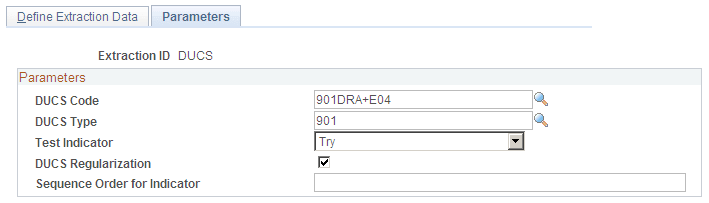
Use the Parameters page (GPFR_AF_EXTR_PRM) to enter a sending reference and the frequency code for the extraction data.
Navigation:
This example illustrates the fields and controls on the Parameters page. You can find definitions for the fields and controls later on this page.
Run Extraction FRA Page
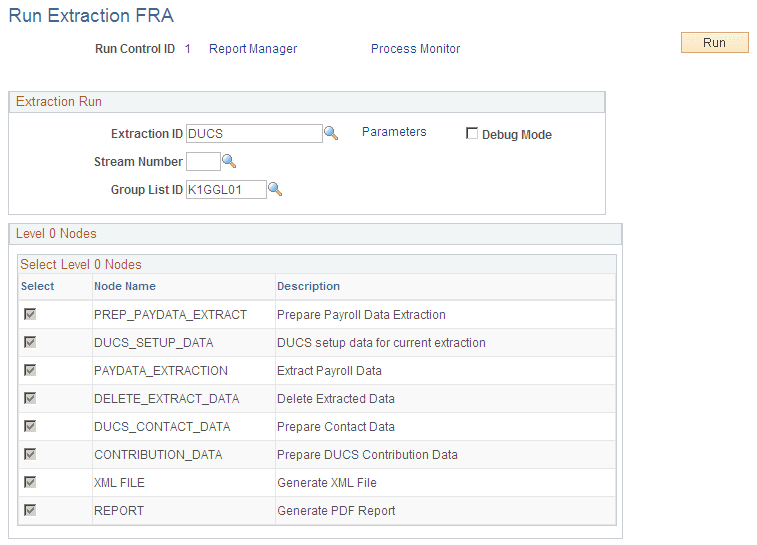
Use the Run Extraction FRA page (GPFR_AF_EXTR_RUN) to run the DUCS extraction process.
Navigation:
This example illustrates the fields and controls on the Run Extraction FRA page (1 of 2). You can find definitions for the fields and controls later on this page.
This example illustrates the fields and controls on the Run Extraction FRA page (2 of 2). You can find definitions for the fields and controls later on this page.
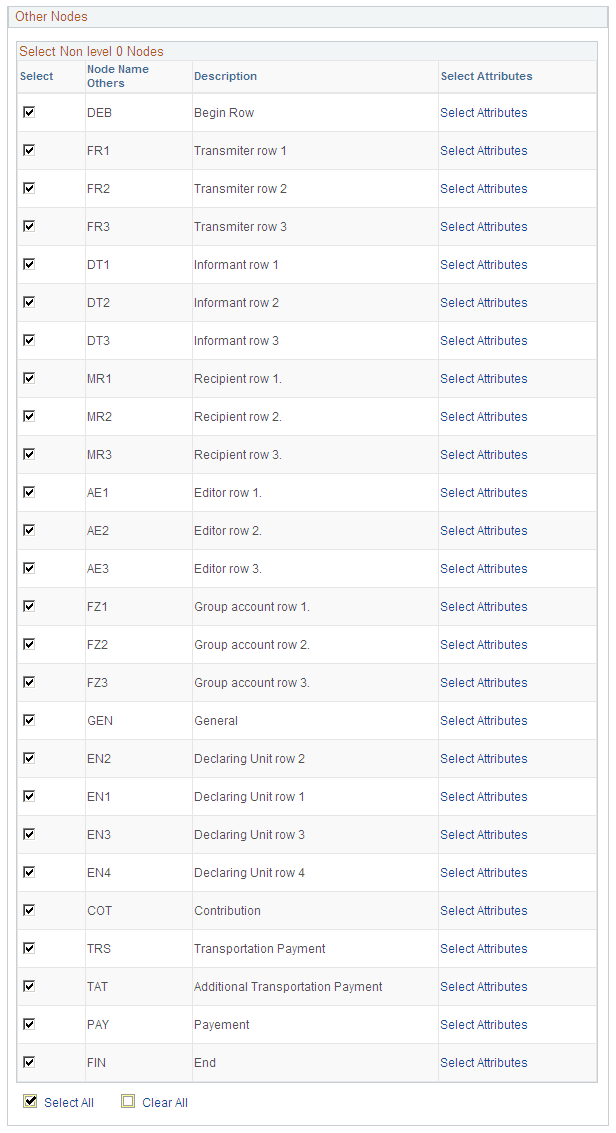
When the process has successfully completed, the GPFR_AF_EXTRACT table is populated based on the Extraction ID definition and the Run Control parameters.
| Field or Control | Description |
|---|---|
|
Extraction ID |
Select an Extraction ID to determine which nodes are displayed. |
|
Debug Mode |
Select to generate a log file with the extraction run. |
|
Group List ID |
Use this option when you generate test files, or corrective files. |