Understanding How To Run the Banking Process for France
After completing the setup steps described above, run the following processes in the core Global Payroll application and then continue processing data in Global Payroll for France:
In the Global Payroll core application:
-
Run and finalize payrolls on the Payroll/Absence Run Control page.
-
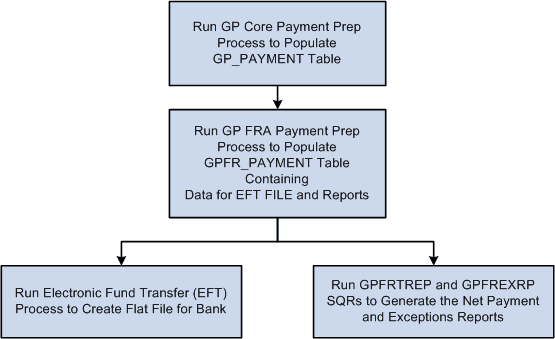
Run the payment preparation (GP_PAYMENT) process on the Run Payment Prep Process (GP_PMT_PREPARE) page.
The payment preparation process is a batch job that takes the results of payroll calculations and populates the payment table (GP_PAYMENT). This table identifies each recipient, the amount owed, the source bank, and the account number.
In Global Payroll for France:
-
Run the payment preparation (GPFR_PAYMENT) process for France on the Payment Preparation (GPFR_BANK_POPULATE) page.
This populates the GPFR_PAYMENT table containing data for the EFT file and the Net Payment and Exceptions reports.
-
Run the FREFT SQR on the Payment File Generation (GPFR_BANK_EFT) page.
The FREFT SQR generates a flat output file (EFT) containing the details of each payment in the payroll run.
-
Run the GP FRTREP SQR and GPFREXRP SQR on the Payments Report (GPFR_BANK_REPORT) page.
This generates the Net Payment and Exceptions reports for all payment modes (transfer, check, and cash).
Note:
These steps aren't necessary if you are processing payments using Single Euro Payment Area (SEPA) formats and standards.
This diagram illustrates the process flow from Global Payroll core to Global Payroll for France:
General Processing Information
The payment preparation (GP_PAYMENT) process in the core Global Payroll application populates the GP_PAYMENT output table. The process sets the GP payment status to P (prepared).
The payment preparation (GPFR_PAYMENT) process for France populates the GPFR_PAYMENT output table.
The GPFR_PAYMENT output table contains the same basic information found in the GP_PAYMENT table, but sorted by source bank.
When you run the French payment preparation (GPFR_PAYMENT) process, the system:
-
Selects payees with a payment status of P (prepared) in the GP_PAYMENT record.
-
Sets the payment status for the selected payees to T (transferred) in GP_PAYMENT.
-
Sets the payment status for the selected payees to P (prepared) in the GPFR_PAYMENT record.
Note:
If you rerun the GP_PAYMENT process, cancel and rerun the GPFR_PAYMENT preparation process. You can delete the selected Calendar Run ID in GPFR_PAYMENT and the GP_PAYMENT status changes back from T (transferred) to P (prepared).