Setting Up Establishment Information
To set up establishment information, use the Establishment Data IND (GPIN_ESTAB_DATA) component.
Pages Used to Set Up Establishment Information
| Page Name | Definition Name | Usage |
|---|---|---|
|
GPIN_ESTAB |
Enter basic establishment identification information as well as Factories Act or Shops and Establishments Act registration information. You add a new establishment by using the Establishment component in PeopleSoft HR. |
|
|
GPIN_ESTAB_ESI |
Enter ESI registration information. |
|
|
GPIN_ESTAB_PF |
Enter provident fund registration information. |
|
|
GPIN_ESTAB_PT |
Enter professional tax registration information. |
|
|
GPIN_ESTAB_IT |
Enter income tax registration information. |
|
|
GPIN_ESTAB_LWF |
Enter LWF registration information. |
Establishment Registration Page
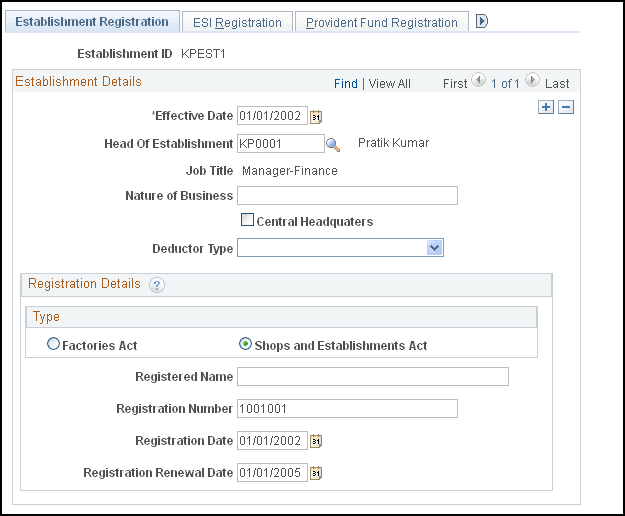
Use the Establishment Registration page (GPIN_ESTAB) to enter basic establishment identification information as well as Factories Act or Shops and Establishments Act registration information.
Navigation:
This example illustrates the fields and controls on the Establishment Registration page. You can find definitions for the fields and controls later on this page.
| Field or Control | Description |
|---|---|
|
Head of Establishment |
Select the employee who is considered the head of the establishment. |
|
Job Title |
The job title appears after you select an employee in the Head of Establishment field. |
|
Nature of Business |
Enter the nature of the business of the establishment. |
Registration Details
| Field or Control | Description |
|---|---|
|
Type |
Select whether the establishment is registered under the Factories Act or the Shops and Establishments Act. |
|
Registration Number |
Enter the establishment's registration number. |
|
Registration Date |
Enter the date on which the establishment was registered. |
|
Registration Renewal Date |
Enter the date on which the establishment's registration must be renewed. |
Note:
If a registration number is at the company level, and is applicable to multiple establishments, you must enter the registration number information for each establishment.
Related Topics
ESI Registration *Page
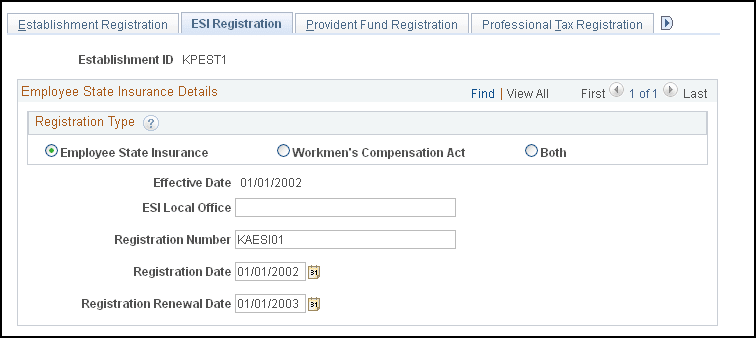
Use the ESI Registration (employee state insurance registration) page (GPIN_ESTAB_ESI) to enter ESI registration information.
Navigation:
This example illustrates the fields and controls on the ESI Registration page. You can find definitions for the fields and controls later on this page.
| Field or Control | Description |
|---|---|
|
Registration Type |
Select if the registration is related to ESI, Workmen's Compensation Act, or both. |
Provident Fund Registration Page
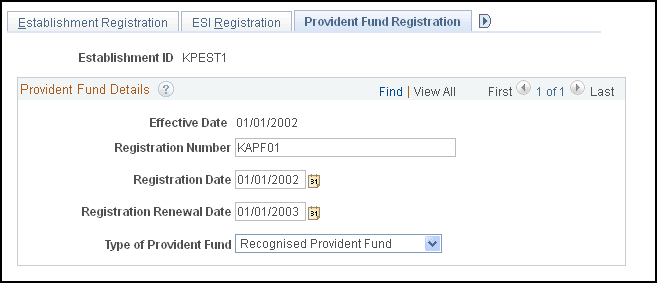
Use the Provident Fund Registration page (GPIN_ESTAB_PF) to enter provident fund registration information.
Navigation:
This example illustrates the fields and controls on the Provident Fund Registration page. You can find definitions for the fields and controls later on this page.
| Field or Control | Description |
|---|---|
|
Type of Provident Fund |
Select Recognised Provident Fund or Statutory Provident Fund as the provident fund type. |
Professional Tax Registration Page
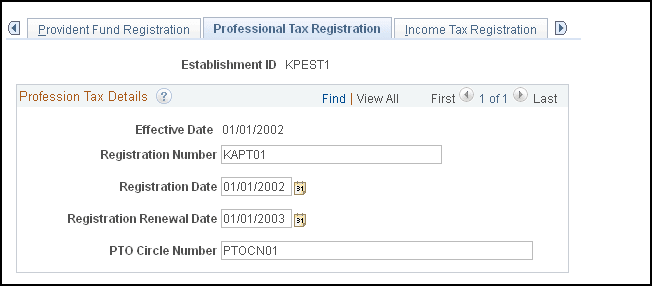
Use the Professional Tax Registration page (GPIN_ESTAB_PT) to enter professional tax registration information.
Navigation:
This example illustrates the fields and controls on the Professional Tax Registration page. You can find definitions for the fields and controls later on this page.
| Field or Control | Description |
|---|---|
|
PTO Circle Number (profession tax officer circle number) |
Enter the PTO circle number. |
Income Tax Registration Page
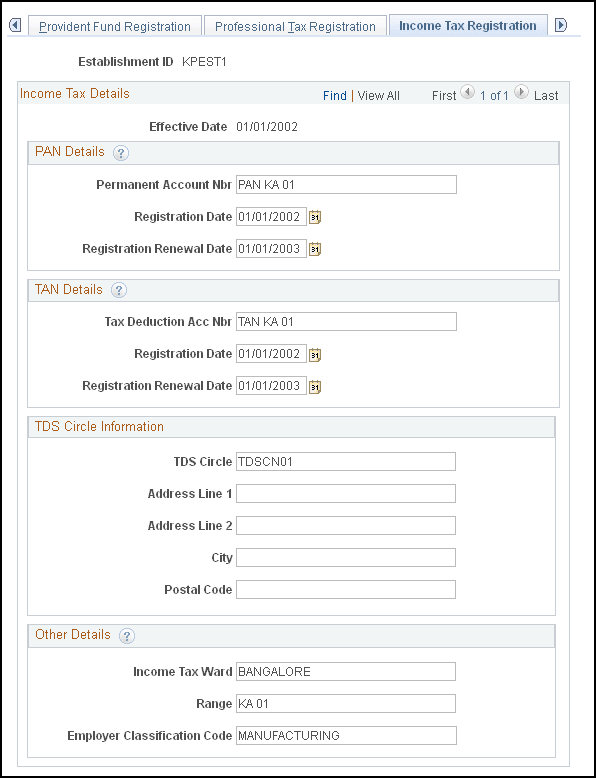
Use the Income Tax Registration page (GPIN_ESTAB_IT) to enter income tax registration information.
Navigation:
This example illustrates the fields and controls on the Income Tax Registration page. You can find definitions for the fields and controls later on this page.
PAN Details
| Field or Control | Description |
|---|---|
|
Permanent Account Nbr (permanent account number) |
Enter the company's permanent account number. |
TAN Details
| Field or Control | Description |
|---|---|
|
Tax Deduction Acc Nbr (tax deduction account number) |
Enter the company's tax deduction account number. |
Other Details
| Field or Control | Description |
|---|---|
|
TDS Circle (tax deduction at source circle) |
Enter the circle number applicable to the establishment. |
|
Income Tax Ward |
Enter the company's income tax ward. |
|
Range |
Enter the range details, if applicable. |
|
Employer Classification Code |
Enter the employer classification code. |
LWF Registration Page
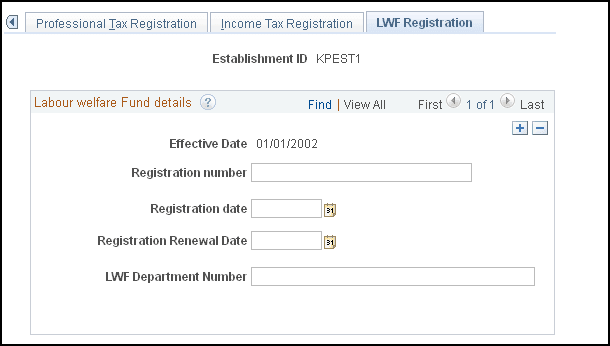
Use the LWF Registration (labour welfare fund registration) page (GPIN_ESTAB_LWF) to enter LWF registration information.
Navigation:
This example illustrates the fields and controls on the LWF Registration page. You can find definitions for the fields and controls later on this page.
Labour welfare Fund details
| Field or Control | Description |
|---|---|
|
Effective Date |
Enter the date from which the registration becomes applicable to the entity. |
|
Registration number |
Enter the LWF registration number of the entity. |
|
Registration date |
Enter the LWF registration date of the entity. |
|
Registration Renewal date |
Enter the renewal date of the LWF registration for the entity. |
|
LWF Department Number |
Enter the LWF department number of the entity. |