Entering Labor Insurance Information
This section provides an overview of setting up labor insurance information and discusses how to enter labor insurance data.
Page Used to Enter Labor Insurance Data
| Page Name | Definition Name | Usage |
|---|---|---|
|
GPJP_LA_PYE_DATA |
Enter labor insurance data for all job records of each employee. |
Understanding Labor Insurance Information Setup
You must enter some data into the system before you calculate labor insurance premiums.
Setting up labor insurance data includes these steps:
-
Define labor insurance establishments on the Labor Ins Estab page.
Select the industry type for each labor insurance establishment.
-
Set up employee labor insurance data on the page.
If an employee has multiple jobs and receives separate payments for each job, enter labor insurance data for each job separately.
Labor insurance data will be deducted for each of the employee's job record.
Maintain Labor Ins Data JPN Page
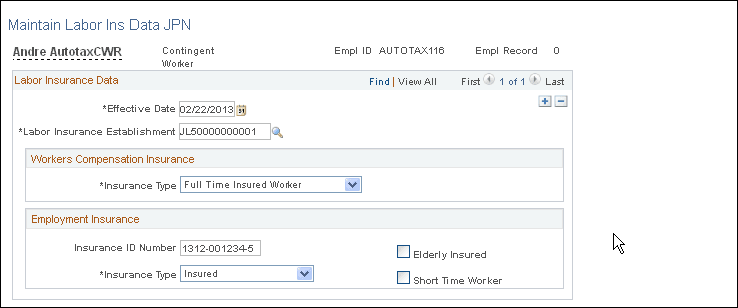
Use the Maintain Labor Ins Data JPN page (GPJP_LA_PYE_DATA) to enter labor insurance data for all job records of each employee.
Navigation:
This example illustrates the fields and controls on the Maintain Labor Ins Data JPN page. You can find definitions for the fields and controls later on this page.
Workers Compensation Insurance
| Field or Control | Description |
|---|---|
|
Insurance Type |
Full Time Insured Worker, Insured Officer, Temporary Insured Worker, and Exclusion. Select Exclusion when a payment, such as a director's remuneration, is not subject to workers compensation insurance. |
Employment Insurance
| Field or Control | Description |
|---|---|
|
Insurance Type |
Insured: Ordinary worker who is eligible for employment insurance. Officer: Officers who work as employees and are eligible for employment insurance. Exclusion:Any other payees who are not eligible for employment insurance, such as payees whose standard hours are less than 20 per week. Note: Employees with insurance type Officer and Insured are subject to the deduction of employment insurance premiums unless their age is 64 or more at the time of payment. The age is determined by the system and is not affected by the value of the Elderly Insured check box. Global Payroll for Japan does not support voluntary elderly insured. |
|
Elderly Insured |
Select if the payee's employment insurance type is Officer or Insured and the payee is categorized as Elderly Insured in the Annual Basic Employment Premium report. Use the Annual Employment Insurance Exempt report to help identify employees to be categorized as elderly insured. |
|
Short Time Worker |
Select if the payee's employment insurance type is Officer or Insured and the payee needs to be categorized as a short time worker. |