Legal Codes CFDI Page
Use the Legal Codes CFDI page (GPMX_LEGAL_CODE) to define the CFDI report parameters and to map elements.
Navigation:
Set Up HCM, Product Related, Global Payroll & Absence Mgmt, Reports, Legal Codes Payslip MEX, Legal Codes CFDI page
This example illustrates the fields and controls on the Legal Codes CFDI page.
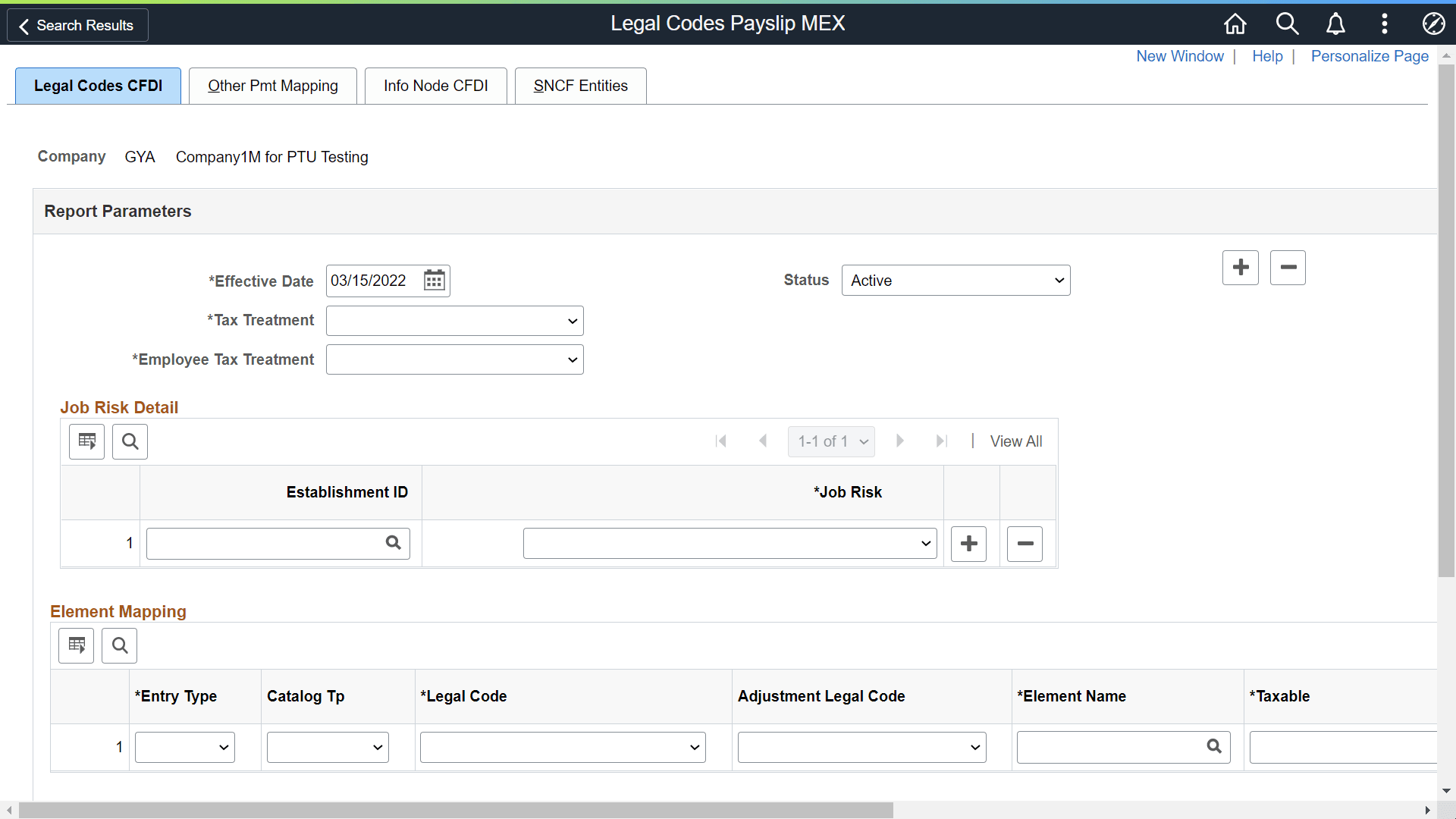
| Field or Control | Description |
|---|---|
|
Company |
The Company for which the Legal Code Payslip setup is defined. |
|
Effective Date |
Date from which the setup is applicable. |
|
Status |
Defines whether or not the setup is valid. The default value for this field is Active. Values are:
|
|
Tax Treatment |
Option provided by SAT to identify the class of Tax regime. |
|
Employee Tax Treatment |
Select a default employee tax treatment for the company. Available option is: Wage & Salaries & Assimilated. |
| Field or Control | Description |
|---|---|
|
Job Risk Detail |
|
|
Establishment ID |
The Establishment Id where the employee's job risk is determined by the establishment that is associated with the employee's location. |
|
Job Risk |
The code to identify the Employer’s classification based on the activities performed by the employees. Valid values are:
Note: ‘Not Applicable’ option is available only if you use/add an effective date > = 08/13/2017. |
| Field or Control | Description |
|---|---|
|
Element Mapping |
|
|
Entry Type |
Select the type of element to include in the report. Values are:
|
|
Catalog Type |
Select the catalog type to which the Legal Code belongs. Values are:
Note: There are discrepancies for some element types between SAT and GP Mexico. For example, ‘Employee Subsidy’ is treated as an earnings for the SAT while in GP Mexico ‘Employee Subsidy’ is reported as a deduction. |
|
Legal Code |
Legal code is the SAT catalog to report earnings and deductions. System displays the options based on the selected Catalog Type, If the catalog type is selected as deduction then the deductions catalog is displayed otherwise it displays the earnings catalog. |
|
Adjustment Legal Code |
Contains the Adjustment codes defined by SAT to be used to report Adjustments. Adjustments are triggered when a negative value is found in payroll results, its value changes to positive and is stored in an element including original element’s name. |
|
Element Name |
Enter the name of the earnings or deductions element to include in the CFDI report. System displays the options based on the selected Entry Type. If the entry type is selected as deduction then the deductions catalog is displayed otherwise it displays the earnings catalog. Note: If the Taxable and Non taxable are empty, the amount of this element will be printed as 100% taxable. The description of this element will be printed in the report. |
|
Taxable |
The element that contains the Taxable Base for the corresponding element. System displays the options based on the selected Entry Type. If the entry type is selected as deduction, then the deductions catalog is displayed otherwise it displays the earnings catalog. Note: The description printed in CFDI file takes the description's Element name. If you just enter an Element in this field (Non taxable are empty), the amount of this element will be printed as 100% taxable. This element could be equal to Element Name. |
|
Non Taxable |
The element that reports the Non-Taxable Base for the corresponding element. System displays the options based on the selected Entry Type. If the entry type is selected as deduction then the deductions catalog is displayed otherwise it displays the earnings catalog. Note: If just enter an Element in this field (Taxable are empty), the amount of this element will be printed as 100% non-taxable. This element could be equal to Element Name. |
|
Add |
This field defines when an element sum or not sum to Total Earnings or Total Deductions depends on the Entry Type, however always must to print in the CFDI report.
Note: By default the check box is selected. |
|
Severence |
Select this field to indicate that the element will be printed on the Complemento node of Severance. Note: The Severance option is used only in special payroll severance process. |
| Field or Control | Description |
|---|---|
|
Overtime Detail |
|
|
Element Name |
Enter the name of Overtime element. If this section is populated then the information must to print in Overtime node on CFDI report. Valid values: All earnings. |
|
Overtime Type |
Defines the overtime type. Valid Values are:
|
| Field or Control | Description |
|---|---|
|
Disability Detail |
|
|
Element Name |
Enter the name of Disability element. If this section is populated then the information must to print in Disability node on CFDI report. Valid values: All deductions |
|
Absence Type |
Identifies the Absence Type. Valid values are:
|
Note:
Selection of correct options in Legal Code Mex page will ensure that the correct value are send to SAT.