Manage Pos Input via Batch MEX Page
Use the Manage Pos Input via Batch MEX page (GPMX_PI_BATCH) to load batch positive input or delete previously loaded batch positive input.
Navigation:
This example illustrates the fields and controls on the Manage Pos Input via Batch MEX page. You can find definitions for the fields and controls later on this page.
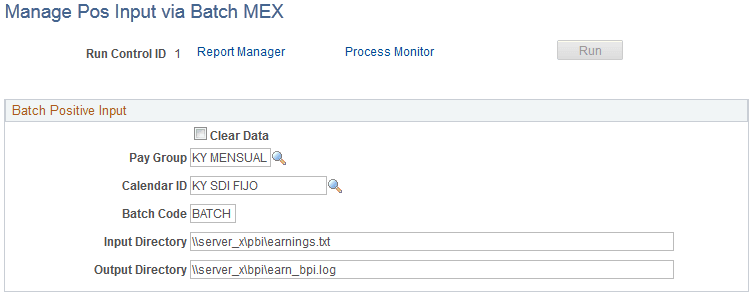
| Field or Control | Description |
|---|---|
|
Clear Data |
If you select this check box, the system will delete previously loaded data. If you deselect this check box, the batch process will load new data into the Positive Input tables for payroll purposes. |
|
Pay Group |
Enter the pay group for which you want to load batch positive input. |
|
Calendar ID |
Enter the calendar ID for the pay group that you identified in the Pay Group field. |
|
Batch Code |
Enter the batch code ID that identifies all of the transactions contained in the flat file. This field enables you to delete information loaded by mistake, because it serves as the identifier of that information. |
|
Input Directory |
Specify the location of the flat file containing the batch positive input (flat file directory). |
|
Output Directory |
If the batch process finds errors, it generates a log file containing the errors. Use this field to specify where the system should place the error log (error log directory). |
Note:
You do not need to specify input and output directories when deleting values because the process determines the data to delete according to the batch code that you specify.
Flat File Layout for Batch Positive Input
When you create flat files for the batch positive input process, reproduce this file definition for earnings and deductions:
| Field | Initial Position | Length | Default Value |
|---|---|---|---|
|
EMPLID |
1 |
11 |
Not applicable. |
|
EMPL_RCD |
12 |
3 |
Not applicable. |
|
PIN_NM |
15 |
18 |
Not applicable. |
|
GP_UNIT |
33 |
20 |
Not applicable. |
|
GP_AMT |
53 |
20 |
Not applicable. |
|
GP_RATE |
73 |
20 |
Not applicable. |
|
GP_PCT |
93 |
11 |
Not applicable. |
|
PC_BASE |
104 |
20 |
Not applicable. |
|
DEPTID |
124 |
10 |
Not applicable. |
|
JOBCODE |
134 |
6 |
Not applicable. |
When you create flat files for the batch positive input process, reproduce this file definition for supporting elements:
| Field | Initial Position | Length | Default Value |
|---|---|---|---|
|
EMPLID |
1 |
11 |
Not applicable. |
|
EMPL_RCD |
13 |
3 |
Not applicable. |
|
PIN_NM |
16 |
18 |
Not applicable. |
|
PIN_NM (SOVR) |
34 |
18 |
Not applicable. |
|
SOVR_VAL_CHAR |
52 |
25 |
Not applicable. |
|
SOVR_VAL_NUM |
77 |
18 |
Not applicable. |
|
SOVR_VAL_DT |
95 |
10 |
Not applicable. |
Here's an example of a flat file for earnings and deductions:
| Field | Example |
|---|---|
|
EMPLID |
KY003 |
|
EMPL_RCD |
0 |
|
PIN_NM |
COMISIONES |
|
GP_UNIT |
12.58 |
|
GP_AMT |
11.36 |
|
GP_RATE |
10 |
|
GP_PCT |
1.3 |
|
GP_BASE |
25.36 |
|
DEPTID |
43000 |
|
JOBCODE |
550000 |
Note:
This flat file definition applies to both earnings and deductions that you load using batch positive input.
Here is an example of a flat file for a supporting element override:
| Field | Example |
|---|---|
|
EMPLID |
KY004 |
|
EMPL_RCD |
0 |
|
PIN_NM |
COMISIONES |
|
PIN_NM (SOVR) |
FD VR METODO ISR |
|
SOVR_VAL_CHAR |
142 |
|
SOVR_VAL_NUM |
(blank) |
|
SOVR_VAL_DT |
(blank) |
Related Topics