IR21 and Appendix 1 Processing Management
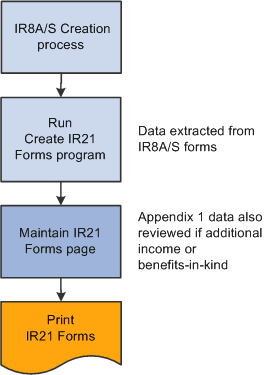
The IR21 form must be completed for all employees who are noncitizens when they terminate their employment with the company. The data that is reported is similar to that which is provided on the IR8A and Appendix 8A forms, and includes amounts for the current and previous year. As with the other IRAS forms, not all of the data can be extracted from the payroll system. Therefore, you should create as much of the data as possible first. You can then enter the other required information by using online pages and print the IR21 report.
The IR21 is a compilation of two years of some IR8A and Appendix 8A data that is compiled into four pages of a single notification report. (IR8A and Appendix 8A are statutory reports that employees complete each tax year). You create IR21 report details by using the Create IR21 Details Page and review and maintain the details online by using the IR21 Details component. After you create an IR21, you can enter prior years of data for all the necessary variables. You can create and maintain IR21 details for a specific employee or pay group.
Two other forms may need to accompany an IR21 under certain circumstances. The first is Appendix 1, which documents received benefit in kind. The system generates this Appendix with the IR21 form, and there is a field on the IR21 that summarizes the value of benefits in kind received by an employee. This field populates when you run the print program for IR21. You can review and maintain Appendix 1 details by using the IR21 Appendix 1 component. The second is IR8S, which documents CPF contributions that the employer and employee make. The system doesn't generate IR8S forms to accompany the IR21, although IR8S forms to accompany IR8A forms are supported as noted previously. You should ensure that an IR8S form is manually completed if it is required to accompany the IR21 form.
The following diagram illustrates the IR21 and Appendix 1 forms management procedure: