IR8A/IR8S and Appendix 8A and 8B Processing Management
To populate all of the available details that are required for the IR8A/IR8S and Appendix 8A and 8B forms, you must follow the correct processing sequence:
-
Run the Create IR8A/IR8S Tax Forms process using the Create IR8A/IR8S Form page to create the IR8A and IR8S data from the available payroll data.
This process calculates and generates amounts for the different entities of the IR8A and IR8S forms and stores them in the IR8A/IR8S form tables.
-
Update additional data by using the IR8A/IR8S Forms component.
You can review, maintain and add information that is not retrieved from the payroll system.
-
Create Appendix 8A pages by using the Appendix 8A Forms SGP page.
You must provide the Appendix 8A with the IR8A form when an employee receives benefits in kind. Manually add details by using the Appendix 8A Details page before entering any benefit in kind details. Although you fill in most of the data on the form manually, some of the benefits can be extracted from the payroll system. To create an Appendix 8A form, you must first create the Appendix 8A record by using the Appendix 8A pages.
Alternatively, you can create the Appendix 8A record by selecting the Create records check box in the Calculate Appendix 8A run control page (refer to next step).
-
Run the Calculate Appendix 8A program.
This calculation program captures and stores specific Appendix 8A data - (representing sections 4a to 4k on the Appendix 8A form) and uses the information that you set up in the IRAS Tax Forms SGP page. This process updates those amounts that it can, by using the payroll balances. You can create Appendix 8A records by selecting the Create records check box. You can then print the data or generate an electronic file.
-
Create Appendix 8B data by using the Appendix 8B Forms SGP page.
You must provide the Appendix 8B form with the IR8A form when the employee has derived gains or profits either directly or indirectly from the exercise, assignment, or release of any share option right or benefit where such right or benefit was obtained by him by reason of any office or employment. You enter all fields here manually—these are not system-populated fields.
-
Print the Appendix 8A forms by using the Print Appendix 8A Forms SGP page.
Printing the Appendix 8A forms populates the value of benefits in kind field on the IR8A/IR8S Forms - IR8A Income page. A field on the IR8A summarizes the value of benefits in kind that an employee receives. The field becomes populated only when you run the Print Appendix 8A process. The value of benefits in kind is calculated by using the rates that are maintained by using the IRAS Benefit Rates SGP page.
-
Print the Appendix 8B forms by using the Print Appendix 8B Forms SGP page.
-
Print the IR8A/IR8S forms. This print program produces the employee's tax year end certificates.
The following diagram illustrates the IR8A/IR8S and Appendix 8A and 8B forms management procedure:
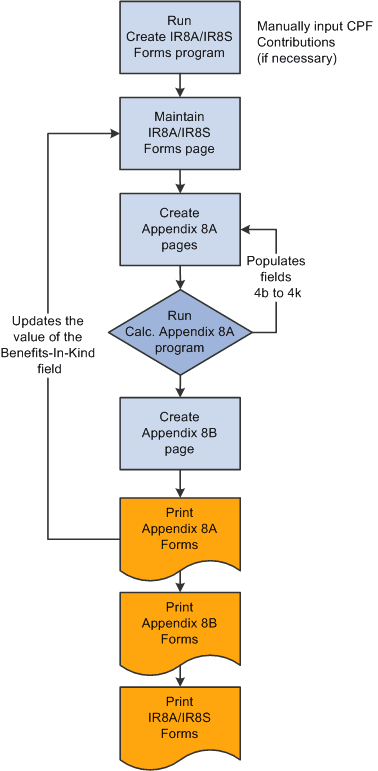
Note:
To flag employees that require an IR8S form, enter variable IRS VR IR8S REQD on the standard Payee Supporting Element Override page. Overrides are allowed at payee level only. The variable isn't actually used in Global Payroll processing, but it is checked by the reporting process.