Define Bank File ESP Page
Use the Define Bank File ESP page (GPES_BANK_FILE_PNL) to define bank files.
Navigation:
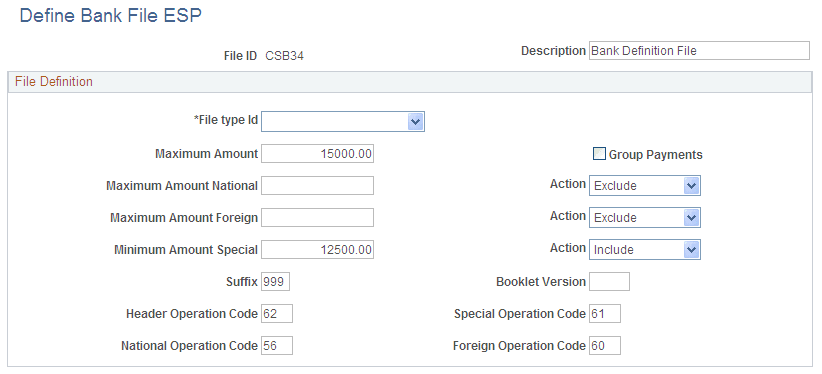
This example illustrates the fields and controls on the Define Bank File ESP page. You can find definitions for the fields and controls later on this page.
| Field or Control | Description |
|---|---|
|
File type Id |
Select the type of banking file to be generated. The possible values are:
|
|
Group Payments |
Select to group all payments for an employee that are associated with the same calendar group. For example, when this check box is selected and segmentation occurs, the system combines payments for the different segments for a payee in a unique line in the file. Note: Regardless of whether you select this check box, the banking process splits lines related to different accounts. |
|
Maximum Amount |
Enter the amount at which the system excludes a transfer from the banking file. Any transfers exceeding this amount also generate a message in the banking process log. |
|
Maximum Amount National |
Enter the amount at which transfers to national bank accounts are excluded or split. If you select Exclude in the corresponding Action field, the system excludes from the banking file any national bank transfers that exceed the value in the Maximum Amount National field. If you select Split in the corresponding Action field, the system splits the amount of national bank transfers that exceed the value in the Maximum Amount National field into separate lines in the banking file that follow the line for the maximum national amount. |
|
Maximum Amount Foreign |
Enter the amount at which transfers to foreign bank accounts are excluded or split. If you select Exclude in the corresponding Action field, the system excludes from the banking file any foreign bank transfers that exceed the value in the Maximum Amount Foreign field. If you select Split in the corresponding Action field, the system splits the amount of foreign bank transfers that exceed the value in the Maximum Amount Foreign field into separate lines in the banking file that follow the line for the maximum foreign amount. |
|
Minimum Amount Special |
Enter the amount above which transfers are included in the special block of the banking file or excluded from the banking file. If you select Include in the corresponding Action field, the system includes transfers that exceed the amount in the Minimum Amount Special field in the special block of the banking file. If you select Exclude in the corresponding Action field, the system excludes from the banking file any transfers that exceed the value in the Minimum Amount Special field. Note: If you select Exclude, in the Minimum Amount Special field, you will probably need to create a second banking file definition to manage large transfers separately from the rest. |
|
Suffix |
Enter the values of positions 14, 15, and 16 in the banking file codes. |
|
Booklet Version |
Enter the version of the notebook following this logic. The format is:
|
|
Header Operation Code |
Enter the values of positions 3 and 4 of the header code. |
|
Special Operation Code |
Enter the values of positions 3 and 4 of the special code. |
|
National Operation Code |
Enter the values of positions 3 and 4 of the national code. |
|
Foreign Operation Code |
Enter the values of positions 3 and 4 of the foreign code. |