Setting Up Statutory Severance Days
This topic discusses how to set up statutory days and periods for severance pay.
Page Used to Set Up Statutory Severance Days
| Page Name | Definition Name | Usage |
|---|---|---|
|
GPES_STA_TERM |
For each termination reason, define the default statutory values for the number of severance days per year and the maximum number of periods for severance pay, as defined by the Social Security General Treasury (Tesorería General de la Seguridad Social [T.G.S.S.]). |
Related Topics
Severance Days Page
Use the Severance Days page (GPES_STA_TERM) to for each termination reason, define the default statutory values for the number of severance days per year and the maximum number of periods for severance pay, as defined by the Social Security General Treasury (Tesorería General de la Seguridad Social [T.
G.S.S.]).
Navigation:
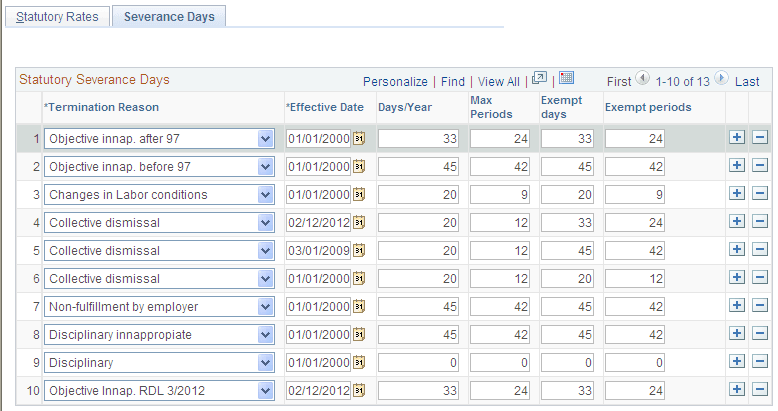
This example illustrates the fields and controls on the Severance Days page. You can find definitions for the fields and controls later on this page.
| Field or Control | Description |
|---|---|
|
Termination Reason |
Select the termination reason for which you want to define statutory values for severance days and periods. The payroll calculation process uses these values to calculate severance pay for indemnification of service. T.G.S.S. defines and supplies the valid termination reasons and statutory values. A delivered translate table stores the valid termination reasons. |
|
Effective Date |
Enter the date on which the statutory severance day and period values become effective for the corresponding termination reason. |
|
Days/Year |
Enter the maximum days per year to pay for indemnification of service when calculating the severance pay for the corresponding termination reason. |
|
Max. Periods(maximum periods) |
Enter the maximum number of periods to pay for the corresponding termination reason. |