Setting Up Absence Reasons
To define absence reasons, use the Absence Reasons GBR component (GPGB_ABS_TYPE). This topic discusses how to define absence reasons.
Page Used to Define Absence Reasons
| Page Name | Definition Name | Usage |
|---|---|---|
|
GPGB_ABS_TYPE |
Define an absence type and enter absence codes that further define the absence. For example, if you have an employee who is absent from work due to sickness, record the type of sickness: flu, stomach bug, and so on. |
Absence Reasons GBR Page
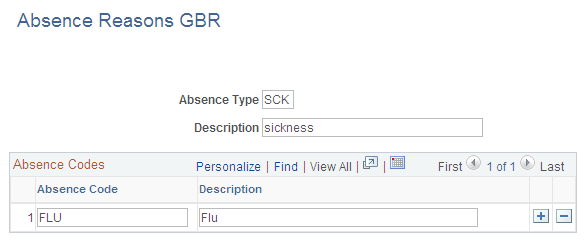
Use the Absence Reasons GBR page (GPGB_ABS_TYPE) to define an absence type and enter absence codes that further define the absence.
For example, if you have an employee who is absent from work due to sickness, record the type of sickness: flu, stomach bug, and so on.
Navigation:
This example illustrates the fields and controls on the Absence Reasons GBR page.
| Field or Control | Description |
|---|---|
|
Absence Type |
Displays the name of the Absence Type that you enter. |
Absence Codes
| Field or Control | Description |
|---|---|
|
Absence Code |
Enter any Absence Code that further defines the Absence Type that you create. |
Note:
Absence reasons are not required for processing statutory absence.