Viewing P45 Information Online
This topic discusses how to view an employee's P45 information.
Page Used to View a P45
| Page Name | Definition Name | Usage |
|---|---|---|
|
GPGB_EE_P45 |
View employees' P45 information. You can use this page to view P45 information for all employees, whether or not they have been issued with a P45. If the employee has received a P45, the system displays the information that was printed on that P45. For employees still working for your organization, the system displays the most current tax and pay information for the tax year. |
Review P45 GBR Page
Use the Review P45 GBR page (GPGB_EE_P45) to view employees' P45 information.
You can use this page to view P45 information for all employees, whether or not they have been issued with a P45. If the employee has received a P45, the system displays the information that was printed on that P45. For employees still working for your organization, the system displays the most current tax and pay information for the tax year.
Navigation:
This example illustrates the fields and controls on the Review P45 GBR page.
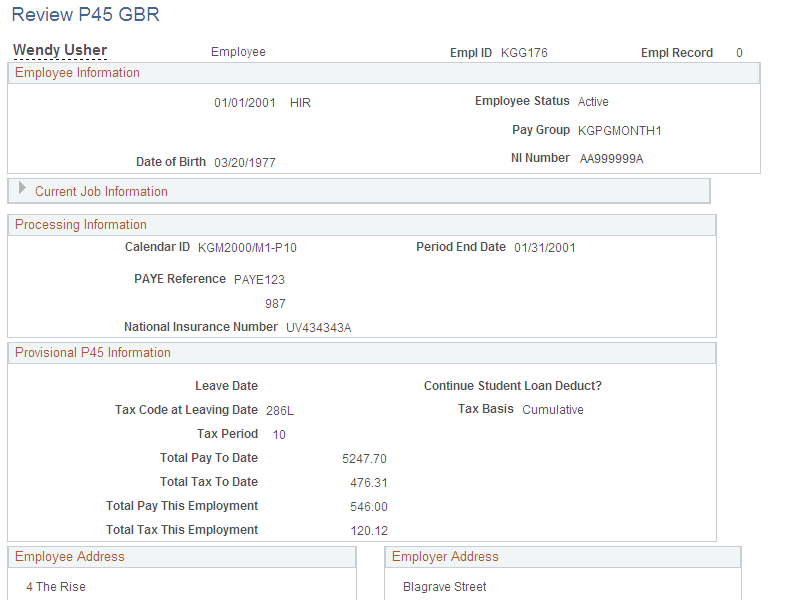
Provisional P45 Information
This group box is displayed if the employee has not been terminated. It lists the most current pay and tax information for the current tax year.
Finalized P45 Information
This group box is displayed if the employee has been issued with a P45. It lists the pay and tax information that was printed on the final P45.