Defining and Assigning Payment IDs
To define payment IDs, use the Payment ID Definition (GP_PYMT_ID_DEFN) component. To assign payment IDs, use the Source Bank Accounts (SRC_BANK) component. To combine payments, use the Combine Payments (GP_PYENT_GBL) component.
Pages Used to Define and Assign Payment IDs
| Page Name | Definition Name | Usage |
|---|---|---|
|
GP_PYMT_ID_DEFN |
Define a payment ID that is unique by bank account number. If you have two different bank accounts, you will have two different payment IDs for each bank account, for example, one for direct deposits and another for checks. |
|
|
GP_PYMT_ID_ASGN |
Associate a payment ID with a payment method. |
|
|
GP_PYENT_COMB |
Assign appropriate rules for combining payments and payslips to a pay entity. |
Understanding Payment IDs
A payment ID is a unique identifier that you can use to determine which payments have been processed.
You define the payment ID on the Payment ID Definition page. Because the same payment ID can be associated with multiple payment methods and can be used by multiple source banks, you need to associate the appropriate payment ID with a specific payment method. You define this as part of the Source Bank account on the Payment ID Assignment page.
When you have defined payment IDs and assigned them to a payment method, you can use this information to run the Payment Number Assignment process.
Payment ID Definition Page
Use the Payment ID Definition page (GP_PYMT_ID_DEFN) to define a payment ID that is unique by bank account number.
Navigation:
This example illustrates the fields and controls on the Payment ID Definition page.
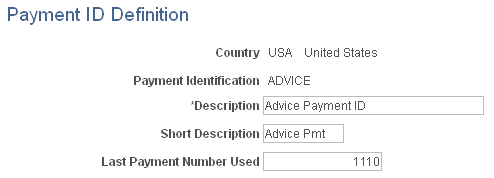
If you have two different bank accounts, you will have two different payment IDs for each bank account, for example, one for direct deposits and another for checks.
| Field or Control | Description |
|---|---|
|
Country |
Select the country that uses the payment ID. |
|
Payment Identification |
Enter a unique definition for the payment ID. |
|
Last Payment Number Used |
Enter the last payment number used for the payment identification. For example, the last number used for advices. Note: The last payment number determines the starting number for checks and advices during the payment process. |
Payment ID Assignment Page
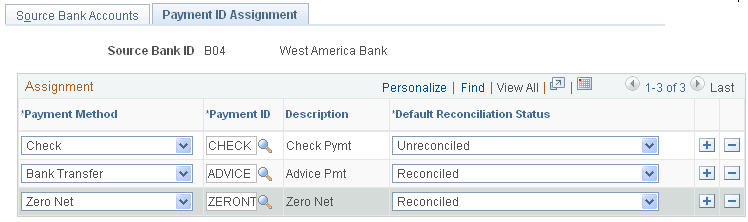
Use the Payment ID Assignment page (GP_PYMT_ID_ASGN) to associate a payment ID with a payment method.
Navigation:
This example illustrates the fields and controls on the Payment ID Assignment page.
| Field or Control | Description |
|---|---|
|
Payment Method |
Select the payment method to use. Values are Bank Transfer, Cash, Check, Postal Order, Wire Transfer, and Zero Net. If the bank associated with the bank account requires prenotes, enter a payment method of Zero Net and a payment ID of ZERONT. Note: You can use the Zero Net payment method whenever a zero dollar payment is generated. Using the Zero Net payment method is not restricted only to the use of prenotes. |
|
Payment ID |
Select the payment ID to associate with the specific payment method for the source bank. |
|
Default Reconciliation Status |
Identify the default reconciliation status. This is used to create rows in the GP_PYMT_BNK_TBL. Typically, if you selected a payment method of Check, you will select Unreconciled here. If you selected a payment method of Bank Transfer, you will select Reconciled here. Note: This field is used by the Global Payroll core bank reconciliation process. If you use another method to reconcile your payments, the value entered here is irrelevant. |
Note:
The first page in this component, the Source Bank Accounts page, is discussed in the PeopleSoft HCM Application Fundamentals product documentation.
Related Topics
Combine Payments Page
Use the Combine Payments page (GP_PYENT_COMB) to assign appropriate rules for combining payments and payslips to a pay entity.
Navigation:
This example illustrates the fields and controls on the Combine Payments page.
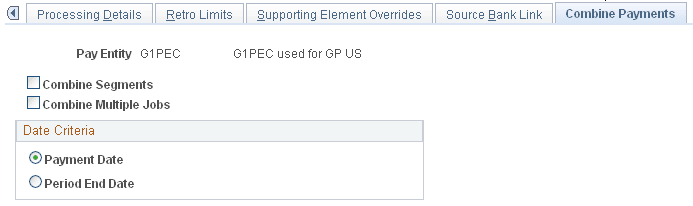
In PeopleSoft Global Payroll, an employee may have multiple segments generated for a given calendar group as a result of segmentation or multiple jobs. Each of these segments may produce a separate payment based on the employee's net pay elections. If you want an employee to receive a single payslip, use the Combine Payments page to control how payslips and payments are combined.
| Field or Control | Description |
|---|---|
|
Combine Segments |
Select if segments should be combined for banking and payslips. If you don't select this check box, all other options will be deselected and unavailable for entry. |
|
Combine Multiple Jobs |
Select to combine multiple jobs into a single payment. |
Date Criteria
Use this group box to specify criteria for combining payments. You must select one of the two options.
| Field or Control | Description |
|---|---|
|
Payment Date |
Select to combine segments with the same payment date. |
| Field or Control | Description |
|---|---|
|
Period End Date |
Select to combine segments with the same period end date. |