Maintaining Garnishment Rules
To maintain garnishment rules, use the Garnishment Rules USA (GPUS_GRN_RUL) component.
Pages Used to Maintain Garnishment Rules
| Page Name | Definition Name | Usage |
|---|---|---|
|
GPUS_GRN_RUL |
Enter descriptive information for a garnishment rule. |
|
|
GPUS_GRN_RULECAL |
Enter exemption calculations for the rule ID. |
Garnishment Rule Page
Use the Garnishment Rule page (GPUS_GRN_RUL) to enter descriptive information for a garnishment rule.
Navigation:
This example illustrates the fields and controls on the Garnishment Rule page.
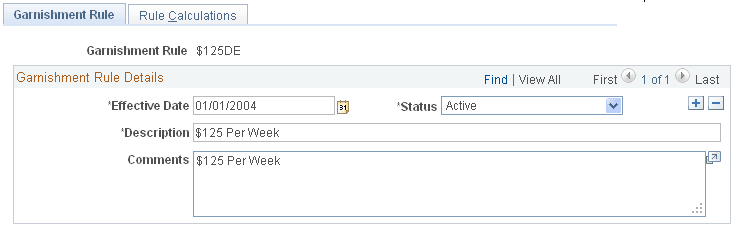
Enter the description and comments for this garnishment rule.
Note:
PeopleSoft Global Payroll for United States delivers many garnishment rules. These rules are delivered and maintained by Oracle.
Rule Calculations Page
Use the Rule Calculations page (GPUS_GRN_RULECAL) to enter exemption calculations for the rule ID.
Navigation:
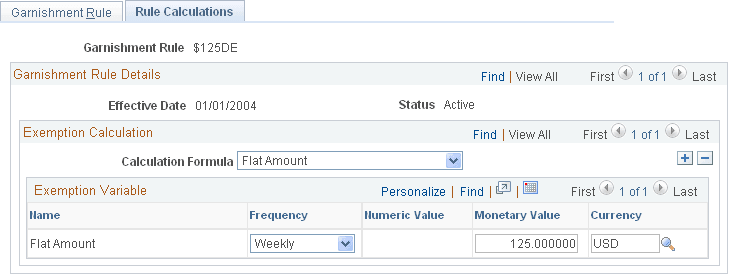
This example illustrates the fields and controls on the Rule Calculations page.
| Field or Control | Description |
|---|---|
|
Calculation Formula |
Select the calculation formula to use to calculate the exemption amount. Valid values are DE Amt*Pct+Amt1*Pct+Amt2*Pct, DE Percent, CS &CG Deductions, DE Percentage + Amount, DE or Amount Percent, Disposable Earnings Percentage, Flat Amount, Flat Amount Percentage, General Calculation, Greater of %DE or Amount, Greater of %Gross or Amount, Gross Percentage, Gross Percentage + Amount, Minimum Hourly Wage, and SWT Gross Percentage. |
Exemption Variable
Depending on the Calculation Formula, the appropriate exemption variables appear in the Exemption Variable group box. For example, if the calculation formula is DE Percentage + Amount, the exemption variables Flat Amount and Disposable Earnings Percent appear in the group box. You must then define the values of these variables.
| Field or Control | Description |
|---|---|
|
Frequency |
Select the frequency that applies to the exemption variable. Valid values are Biweekly, Monthly, Semi-Monthly, and Weekly. Note: The frequency that you select causes annualization or deannualization to occur so that the calculated value is in line with the pay period frequency. |
|
Name |
The appropriate variable names automatically appear in this column when the calculation formula is selected. |
|
Numeric Value, Monetary Value,, and Currency Code |
Enter a numeric or monetary value and a corresponding currency code for each applicable value. |